



If ChatGPT shows “Error in message stream,” save your prompt, check OpenAI’s status page, then retry or start a fresh chat. The message describes a failed response stream; it does not, by itself, identify whether the cause is your connection, browser, account or OpenAI’s service.
OpenAI’s troubleshooting guide does not list that exact wording. It does document related network and response-generation errors. The checks below use those documented steps to narrow the problem, including what to do when a project change will not save. Settings and limits were checked on October 30, 2026.
Check status.openai.com Before Changing Any Settings
Check OpenAI’s live status page for ChatGPT conversation, login or upload incidents that match your task. Read the incident details, including any affected region or plan. A green page means no relevant incident has been posted; it cannot rule out a new or account-specific problem.
If a matching incident is active, follow its updates and avoid changing unrelated settings. If no incident is listed, continue with the checks below. Test one change at a time so you can tell which one mattered.
If you rely on ChatGPT for client work, use the page’s Subscribe to updates option. You’ll hear about incidents without refreshing a tab.
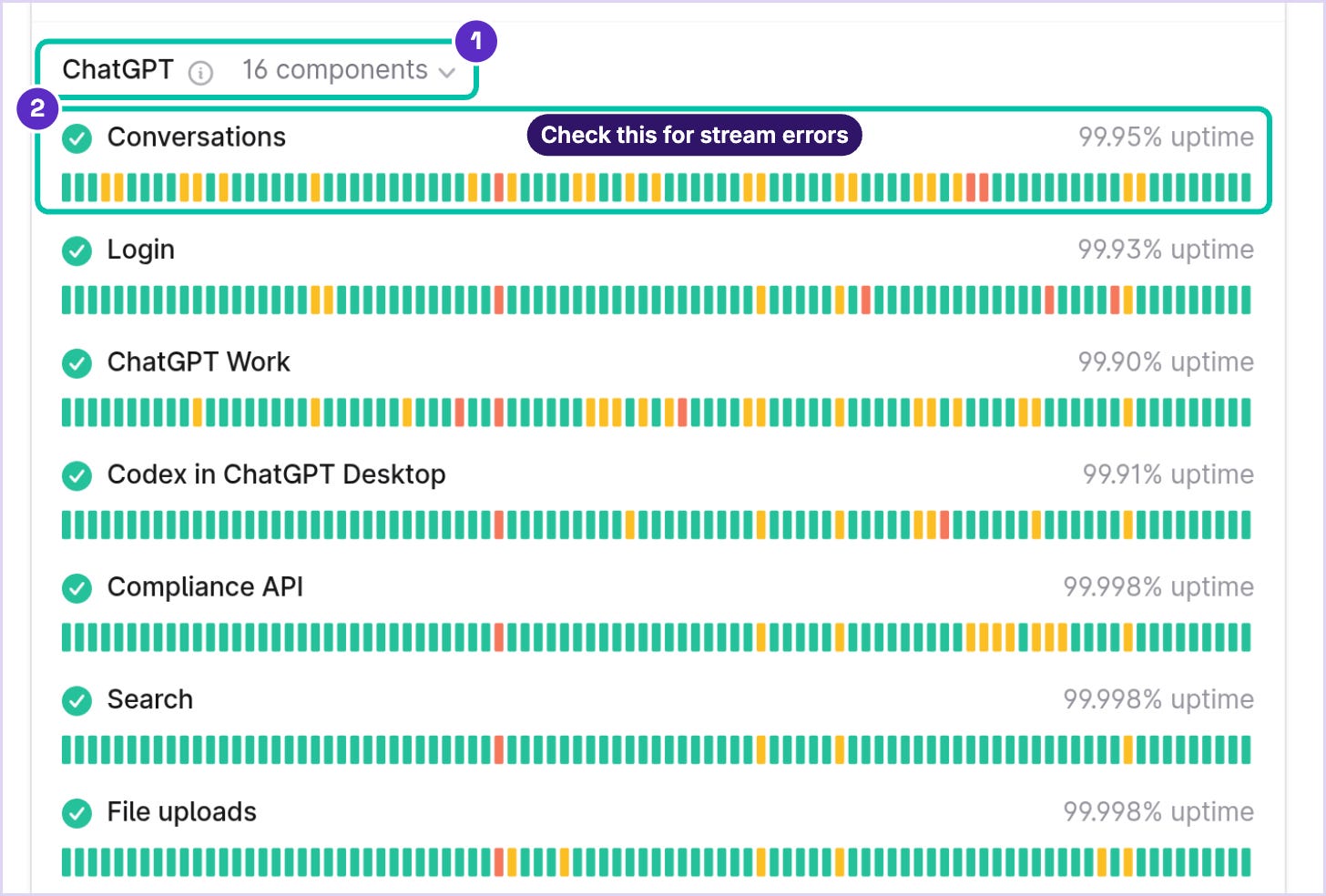
How to Fix “Error in Message Stream” in ChatGPT
A streamed answer arrives incrementally. An interruption can stop it before completion, but the error text alone does not identify the underlying connection or protocol. OpenAI’s network guidance includes WebSocket requirements that an IT team can check.
Work through these in order and stop when it clears:
Check service status. If a matching incident is active, follow its updates.
Save and retry. Copy unsent text. Use Regenerate if offered, or resend in a fresh chat.
Refresh or restart. On the web, use Cmd/Ctrl + Shift + R. In the app, fully close and reopen it.
Try a private window or another browser. Check whether extensions are allowed in private mode; some can still run.
Compare networks. On a personal device, try a trusted alternate connection. On a managed device, ask IT before changing required VPN, proxy or security controls.
Isolate optional tools. If permitted, test one extension or VPN setting at a time, then restore it. A successful test narrows the cause but does not prove it.
Clear site data last. Save work and confirm you can sign in again before clearing ChatGPT site data.
If the stream error keeps hitting one long conversation, length may be the trigger. OpenAI’s error guide suggests starting a new chat when a conversation has grown long and ChatGPT turns slow or unresponsive. You don’t have to lose the thread. If the old chat still responds, ask for a handoff summary and paste it into a fresh one:
Summarize this conversation so I can continue it in a new chat. Include the goal, the decisions we've made, the latest version of any draft or code, and any open questions. Keep it under 300 words.ChatGPT “Something Went Wrong”: What It Means
OpenAI describes “Something went wrong.” as a general error. It can come from a temporary problem on OpenAI’s servers or from your own setup. That’s why the message tells you so little. The fixes overlap with the stream list: refresh or start a new chat, check the status page, clear your cache and cookies, and try a private window. After that, compare browser extensions and networks using the permission-aware steps above.
A second browser or device can narrow the problem. If one works and another does not, compare their extensions, app versions and networks. Changing device and network together does not tell you which was responsible. If the error persists across both, collect the details for support.
Fixing “Error Creating or Updating Project” in ChatGPT
OpenAI’s error guide also does not document “Error creating or updating project” by name. First check whether the change actually saved. Then use the published project rules to look for a relevant limit or permission issue:
Files: 5 per project on Free, 25 on Go and Plus, and 40 on Pro, Business, Enterprise and Edu; up to 10 in one upload batch.
Chats: chats created with a GPT cannot be moved into a project. A temporary chat must be saved as a regular chat before it can be added.
Memory: private project memory can now be changed in Project settings. Shared projects remain project-only. Changes may take a few hours.
Permissions: workspace settings can restrict who creates or manages projects.
For an upload failure, count the project’s files and retry a smaller batch. For a missing Move to project action, check chat eligibility. For a memory change, open ••• → Project settings → Memory and save the available option. ChatGPT Work is unavailable inside project-only-memory projects.
If a permitted change still fails, refresh and compare the web and app. Check service status again, then send support the exact message and action that failed. On a work account, ask the workspace owner to check project permissions.
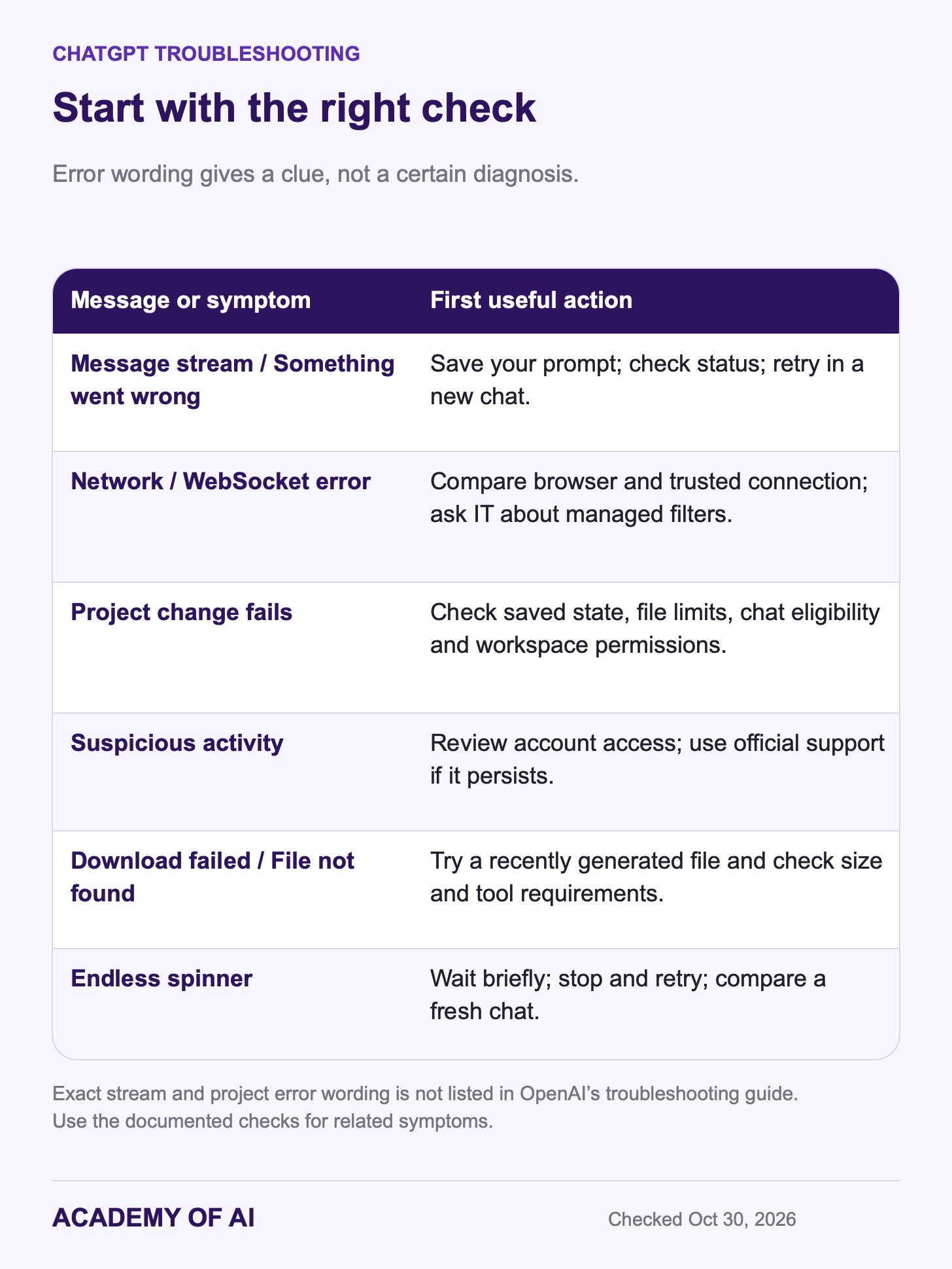
Network, Download and Suspicious Activity Warnings Explained
Other documented messages provide clues, but they are not definitive diagnoses. Start with the matching action below, then use the earlier comparison tests if it persists.
“A network error occurred.” and “An error occurred while connecting to the websocket.” suggest a connection problem. Compare another browser or trusted network; ask IT before changing managed security controls.
“There was an error generating a response.” may be a one-time failure, so click Regenerate first.
“There was a problem preparing your chat.” can point to an extension or URL blocker interfering with the page. Disable script blockers or use a private window.
“We detect suspicious activity.” or “Unusual Activity Detected” appears when traffic looks automated, and a VPN or proxy can trigger it. If you share your login, change your password. If you don’t use bots and it keeps happening, contact support.
“Download failed” or “File Not Found” can mean a generated file has expired. Those don’t last long, so download files soon after ChatGPT creates them. In a custom GPT, Code Interpreter must be switched on, and the download must be below the documented 512 MB limit.
A reply stuck on “Thinking...” or a spinning wheel: wait 30 to 60 seconds, click Stop, then Regenerate.
Hitting a usage limit is different from an error. The ChatGPT Free tier FAQ says ChatGPT shows when your access resets, and tools like image creation and file uploads can have their own caps. If limits interrupt real work every week, our guide to whether ChatGPT Plus is worth it weighs the upgrade.
On a work laptop, the network may be the whole story. OpenAI’s network article lists the domains and WebSocket settings an IT team needs to allow, and it names corporate filters like Zscaler and Cisco Umbrella as common culprits. Send your IT team that link rather than trying to work around their firewall.
When to Contact OpenAI Support and What to Send
Use the chat bubble on OpenAI’s Help Center when the issue persists across browsers, devices and networks. Include the exact error, time and time zone, model, app or browser version, and steps to reproduce. Add the conversation URL or ID privately if relevant. OpenAI’s support guide explains what to collect.
Support may request a HAR file, which records browser network traffic. Use the browser’s Export HAR (sanitized) option where available, then review the file for sensitive content. Sanitization is not a guarantee that all private data is gone. Share it only through the official support process. Do not include passwords or one-time codes.
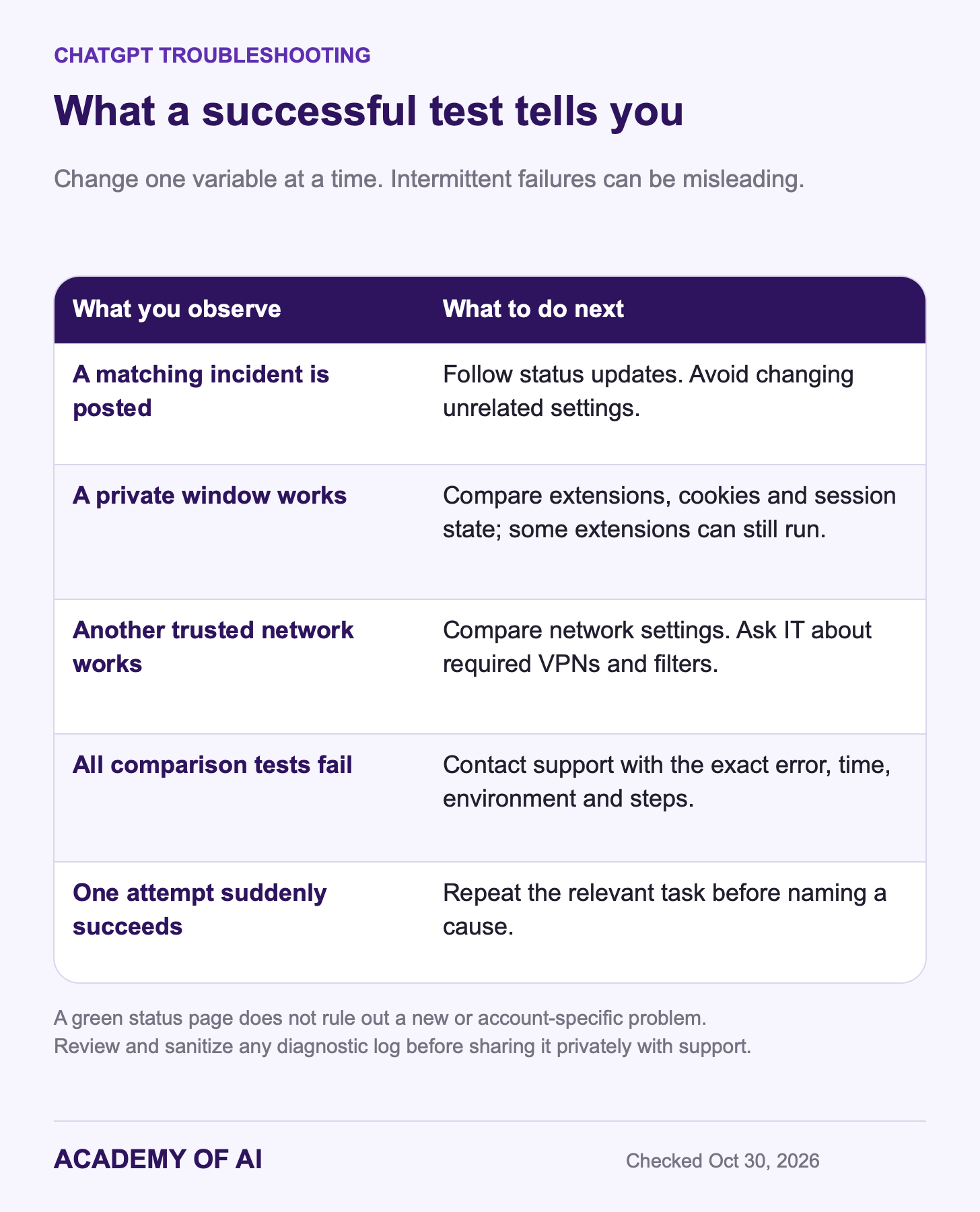
If a private window or alternate connection works, use that result to narrow your next test. Change one variable at a time and restore normal settings afterward. Intermittent service problems can also disappear during testing, so a single success is a clue. For the settings worth reviewing once it works, see our ChatGPT setup guide.
ChatGPT Error Message Questions, Answered
Is ChatGPT Down Right Now?
Check OpenAI’s status page and the relevant incident details. If nothing is listed, try a private window and another trusted connection. An unreported or account-specific issue is still possible.
Why Does ChatGPT Keep Saying “Something Went Wrong”?
Repeated failures can come from the service, your browser, network or account. Compare one variable at a time. If the problem persists, contact support with the exact message and time; provide a reviewed, sanitized HAR if requested.
Do ChatGPT Desktop App Errors Need Different Fixes?
Mostly the same steps apply. OpenAI’s guide to the new ChatGPT desktop app says the new Mac and Windows app can install alongside the previous one, now called ChatGPT Classic, which still gets bug fixes. If one app errors, test the same chat in the other app or on chatgpt.com to see whether the problem follows you.
Does Clearing Cookies Delete My ChatGPT History?
Clearing browser cookies does not delete chats saved to your signed-in account, but it signs you out and can discard unsent local text. Save your prompt and confirm your sign-in method first. Temporary or unsaved sessions are different from saved account history.
Why Can’t I Create a Project in ChatGPT?
Projects are available on Free and paid plans, but workspace permissions and feature availability still matter. Check those controls, the file cap for your plan and the 10-file upload-batch limit. Capture the exact error if the change still will not save.
Keep reading on Academy of AI