



ChatGPT Plus is worth testing if Free regularly blocks a useful task or paid reasoning saves enough review time to justify $20 a month. If quick questions and short email edits already work well on Free, stay there. The decision should come from your own tasks, not the length of a feature list.
Free and Go include unlimited everyday text chats, subject to safeguards. Paid plans add reasoning options and higher tool allowances. The important distinction is ordinary chat versus uploads, research, image generation and agent work, which have separate limits. This guide uses OpenAI’s current plan and model documentation, checked October 30, 2026.
So the classic reason to upgrade (running out of messages) now mostly applies to tools like deep research and file uploads. The checklist further down sorts you by how you work, because that predicts the value better than any feature list. Landing in the “stay on Free” group is a fine outcome. You keep $240 a year.
ChatGPT Plus Features After the GPT-6 Update
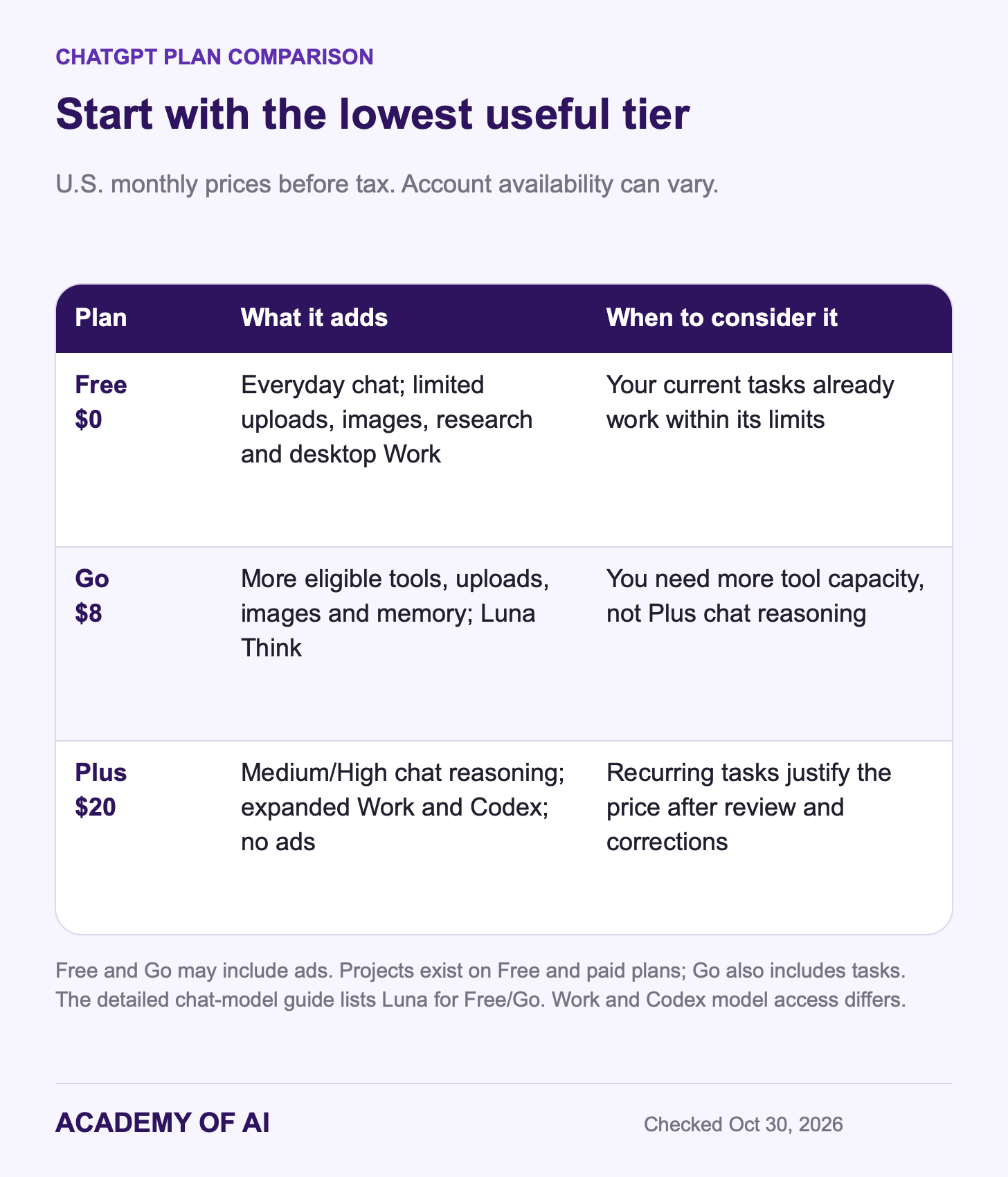
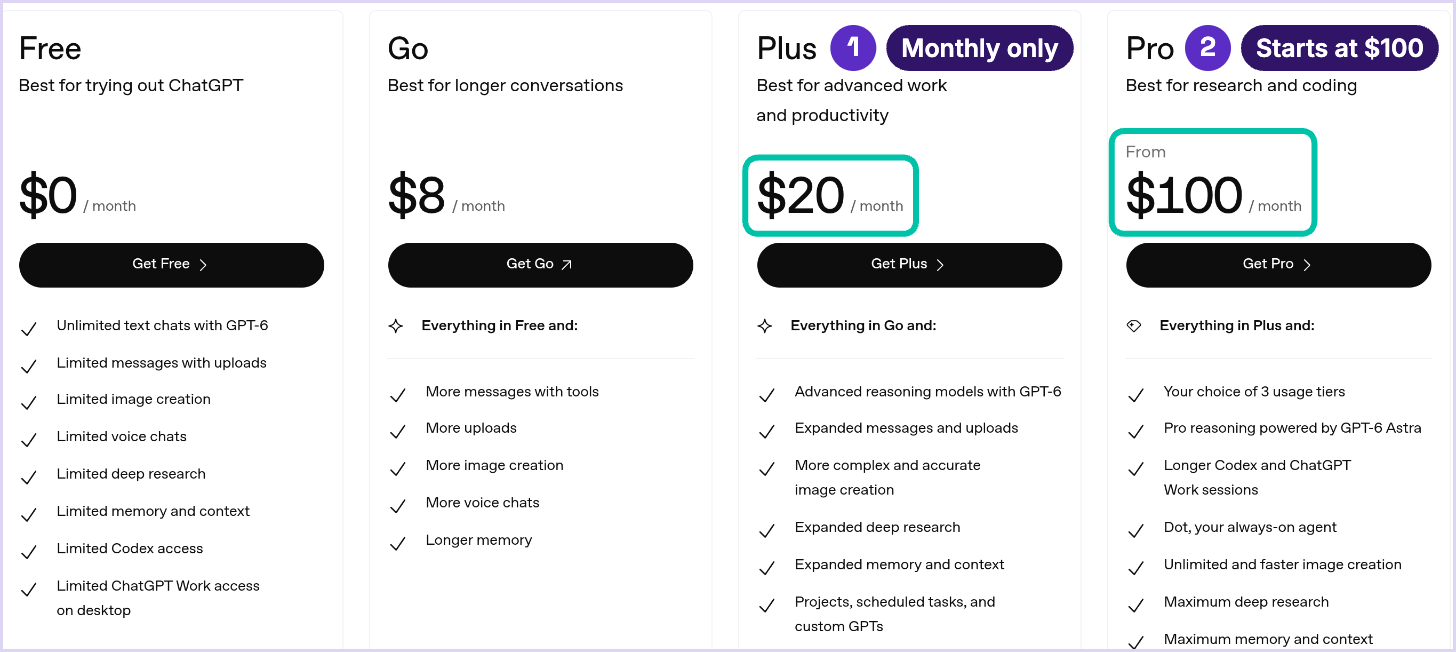
Plus costs $20 a month in the U.S. before applicable taxes. Go is $8, and Pro has $100, $200 and $500 tiers. Model names vary across Chat, Work and Codex. OpenAI’s detailed model guide currently identifies GPT-5.6 Luna for Free and Go chat, while GPT-6 Sol is rolling out to eligible paid chat accounts. Check your model picker for the options actually available.
Here’s what the $20 adds over Free, based on OpenAI’s own documentation:
More chat reasoning: Plus includes Medium and High effort. Extra High and Pro effort are not included in Plus chat. Model access differs by surface; Plus can still access Astra in Work and Codex.
Expanded Work: OpenAI’s pricing page lists expanded access on desktop, web and mobile, compared with limited desktop access on Free and Go.
More Codex: included usage can support coding and automation tasks, with capacity depending on the model and workload.
Higher tool limits: more room for uploads, images and deep research. Check the limits shown in your account.
No ads: Plus is ad-free; eligible Free and Go accounts may see ads in selected regions.
Optional credits: eligible Plus users can buy more Work and Codex usage. These purchases add to the subscription cost.
Projects are not exclusive to Plus: OpenAI documents project sharing on Free and paid plans. Go also includes tasks and custom GPTs, subject to current availability. Do not upgrade for a feature you already have.
Monthly Billing, Local Prices and Credit Add-Ons
At $20 a month, Plus costs $240 over 12 months before tax or added credits. OpenAI does not offer annual billing or multi-month prepayment for Plus. Business has different billing: Standard seats cost $25 monthly or $20 per user per month billed annually, with at least two paid seats. That is an organization plan, not a personal Plus discount.
Outside the U.S., the number moves. OpenAI bills in roughly 70 local currencies and sets localized prices, per its multi-currency billing article, and subscriptions bought inside the iPhone or Android app are billed by Apple or Google in your currency. Go pricing is localized in some markets too, so the gap between Go and Plus where you live may not be the U.S. $12. The checkout screen is the only price to trust.
Then there are add-ons. Plus comes with a fixed allowance of Work and Codex usage, and past that you can buy ChatGPT credits. OpenAI added auto top-up for Plus and Pro credits in March 2026, which refills your balance from the card on file when it dips below a level you choose. Handy in a deadline week. It’s also how a $20 plan turns into a bigger bill without anyone noticing, so check the usage dashboard before you switch it on.
Is ChatGPT Plus Worth It for Your Work Pattern?
Open your ChatGPT history and scroll back two weeks. Ignore what you meant to use it for and look at what you did. Most people fall into one or two of the patterns below, and each has its own answer.
You Ask Quick Questions and Polish Short Messages
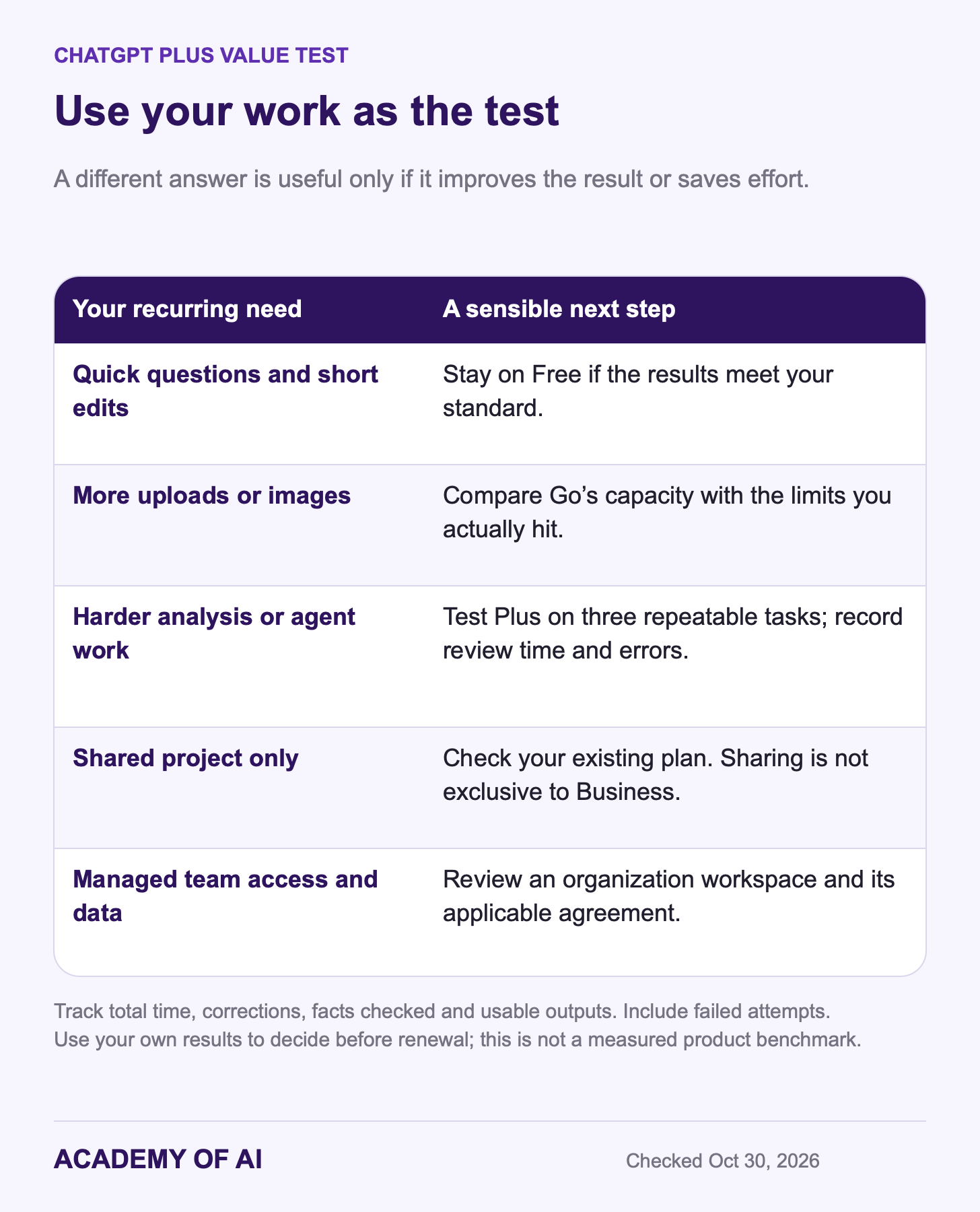
Start with Free for rewording emails, explaining terms, brainstorming subject lines and summarizing short articles. If the results meet your standard after a quick review, a paid plan may add little. Our guide to getting AI to write emails in your voice can help improve that workflow before you spend money.
You Work With Long Reports, PDFs or Spreadsheets
Test Plus if you regularly compare proposals, examine long reports or troubleshoot a spreadsheet. Higher upload allowances and more reasoning options may help, but they do not guarantee a correct result. Measure the time spent checking the answer as well as generating it. Our spreadsheet prompt guide gives you concrete tasks to try.
You Research Before You Decide
Deep research can search multiple sources and produce a cited report. Free has limited access; Plus provides more. Check the allowance shown in your account. If vendor comparisons or market scans recur in your job, test whether it finds relevant primary sources and whether the citations support its claims.
You Want to Hand Off Multi-Step Tasks
Work can help research a topic, analyze files and create deliverables across supported tools. Plus offers expanded access on desktop, web and mobile. That is useful when Free’s limited desktop access interrupts a recurring task. Review the result and consequential actions. Work and Codex share usage allowances, so check your usage dashboard before assuming a paid plan can handle an all-day workload.
You Build Small Tools or Automations
Plus may fit a few focused coding sessions each week, such as automating a report or building a small internal tool. OpenAI’s usage estimates are ranges, not a guaranteed number of projects. If you repeatedly reach the limit, compare credits or another tier using actual usage. Our vibe coding guide explains how to test a small tool before relying on it.
You Share Work or Handle Client Data
Sharing a project alone does not require Business. Consider an organization workspace when you need managed access, centralized billing and business data protections. Business Standard starts at two paid seats. Before uploading client or regulated data, check your organization’s rules and the applicable agreement; a paid plan is not blanket permission to upload it.
Here is an illustrative calculation, not a measured result: saving 30 minutes a week would recover about 26 hours in a year. A $240 subscription breaks even on that time at about $9.23 per hour, before tax and extra credits. Count prompting, verification and corrections in the time spent. Time saved has value only if you can use it productively.
Stay on Free or Go If This Sounds Like You
You don’t owe OpenAI a subscription for using its product a lot. Stay where you are if most of these are true:
Most chats run a few back-and-forths and don’t involve uploaded files.
You open ChatGPT a few times a week, not every working day.
Ads don’t bother you. Free and Go now show them in markets including the U.S., Canada, Australia, New Zealand and the UK, according to OpenAI’s release notes.
You already pay for another assistant that handles your heavy work. Compare before stacking a second subscription.
You’re a verified U.S. K-12 teacher or school staffer. ChatGPT for Teachers is free through June 2028.
You might qualify for a free year of Plus as a U.S. servicemember or veteran within 12 months of separation or retirement. Our guide to official ChatGPT Plus trials and promos lists who qualifies today.
Go is a lower-cost option when you need more uploads, image creation or data analysis than Free offers. Its Think option uses Luna; it does not include Plus’s Sol reasoning levels. Go may include ads, so it is not the right upgrade if removing ads is your main goal.

Usage Caps, Accuracy and Privacy Limits on Plus
Plus has usage limits. OpenAI’s current estimates list about 15–160 local messages per five-hour period with GPT-6.1 Sol and 5–45 with GPT-6 Astra. These describe local Work/Codex usage, not ordinary chat quotas. Cloud tasks may consume more, weekly limits may apply, and task size affects the result. Use your dashboard’s current allowance and reset time.
In Chat, Plus does not include Extra High or Pro effort. That is separate from Astra access in Work and Codex. No paid tier removes the need to check important totals, quotations and source links. Extra reasoning is something to evaluate, not an accuracy guarantee.
Privacy works the same way on Plus as on Free. Plus is a personal plan, and OpenAI’s help center says content from its individual services may be used to train models unless you opt out in your data controls. Business plans don’t train on business data by default. If you paste client contracts, patient details or salary data into ChatGPT, that difference matters more than any model upgrade. Our explainer on ChatGPT’s privacy policy and terms walks through the settings.
Features, models and allowances change. Treat the current checkout and account controls as the purchase details, and keep a short record of why you upgraded. Monthly billing gives you a chance to reassess when your work or the plan changes.
When Free Is Enough
The strongest case for staying on Free is simple: your current tasks already work. Unlimited everyday chats reduce one reason to upgrade, while separate tool limits remain. Save a few examples of satisfactory Free results before comparing a paid plan.
The case for Plus grows when you can identify a recurring limit or a meaningful difference on a difficult task. Try the same input, record the model and settings, and review both results against the same standard. Different answers are not automatically better answers.
The other version of this argument is “pay for a different assistant instead.” Fair. Anthropic, Google and xAI all sell paid consumer plans, and the right pick depends on your work more than the logo. If Google’s tools are already part of your workday, our explainer on what the Google AI Pro subscription includes is the fairest comparison point. Just don’t pay for three of them out of fear of missing a feature.
Run a One-Month Plus Test With Your Own Tasks
The fastest way to settle whether ChatGPT Plus is worth it for your job is a month of real tasks. Because Plus bills monthly, that test costs $20 in the U.S., and canceling right after you subscribe stops the renewal without cutting your month short. Our guide to paying for ChatGPT Plus for one month covers those billing steps and how to avoid a surprise charge.
Before upgrading, choose three real tasks and remove material you are not authorized to upload. Run each on Free and save the input and output. Then try the same inputs on Plus, using the available High reasoning option for the harder tasks. Record the model, setting and date so you know what you compared.
I'm deciding whether a paid AI plan is worth it for my job. Here is a real task from my week: [describe the task and attach the file].

Do the task. Then list any assumptions you made, anything in the file you couldn't read, and any facts I should double-check before using this.
For each task, record total time, corrections needed, facts or calculations checked, and whether the output was usable. Include failed attempts. A small set of your own tasks will not establish a universal benchmark, but it can tell you whether the subscription helps your work.
Finding the setting: open the model menu and look for the Thinking slider. On eligible Plus chat accounts, Medium and High are included; Extra High and Pro are not. Labels can differ during a rollout. Use the options shown in your account rather than a Pro-account screenshot.
A few days before renewal, review the tally. Keep Plus if the improvement is useful, repeated and worth the total cost to you. Otherwise confirm cancellation at least 24 hours before the next billing date. If you used a promotion, check its separate cancellation terms.
ChatGPT Plus Subscription Questions, Answered
What Is ChatGPT Plus?
ChatGPT Plus is a $20-per-month personal subscription in the U.S., before applicable taxes. It expands model and tool access beyond Free, including paid chat reasoning and more Work/Codex capacity. Availability varies by account, platform and rollout. API usage is billed separately.
Is There a ChatGPT Plus Annual Subscription?
No. OpenAI’s help center says Go, Plus and Pro bill monthly only, and you can’t prepay several months. Annual billing exists only on the workplace plans: Business, which needs at least two users, and Enterprise.
How Much Is ChatGPT Plus Outside the United States?
It depends on your country and where you buy. OpenAI sets localized prices in about 70 currencies, and Apple or Google set the in-app price in your currency, so the web checkout and the app can show different numbers. Check both before you subscribe.
What Happens If I Downgrade From Plus to Go?
OpenAI’s Go help page says your Plus plan stays active until the end of the current billing cycle, then your account moves to Go at the Go rate. There’s no refund for the difference, so you lose nothing by switching early: you keep Plus until the renewal date either way.
Keep reading on Academy of AI