



Vibe coding means building software by telling an AI what you want, trying the result and asking for changes, without necessarily reading or understanding the code. Andrej Karpathy introduced the term in a February 2025 post on X. A calculator, checklist or simple prototype is a useful place to start.
Collins named it Word of the Year for 2025. The practical question is what you can build with it. This guide compares six browser tools, gives you a five-step calculator exercise and explains what to check before anyone depends on the result.
What Is Vibe Coding? Karpathy’s Definition in Plain English
Karpathy described accepting AI changes without reading the code and feeding errors back into the tool. He called it a way to “fully give in to the vibes.” Merriam-Webster’s explanation keeps that loose meaning: the person directing the AI may not understand how its code works.
Developer Simon Willison distinguishes vibe coding from other AI-assisted programming. If you read the code, test it thoroughly and can explain it, you are doing software development with AI assistance. The distinction matters because a page that looks right can still calculate the wrong number or expose data.
How a Written Request Becomes Working Code
In the browser tools below, the usual loop is simple: describe the tool, inspect a generated preview, try it and ask for a specific correction. A language model writes or changes the code behind that preview. Some tasks also need a build or deployment step before you can try the result.
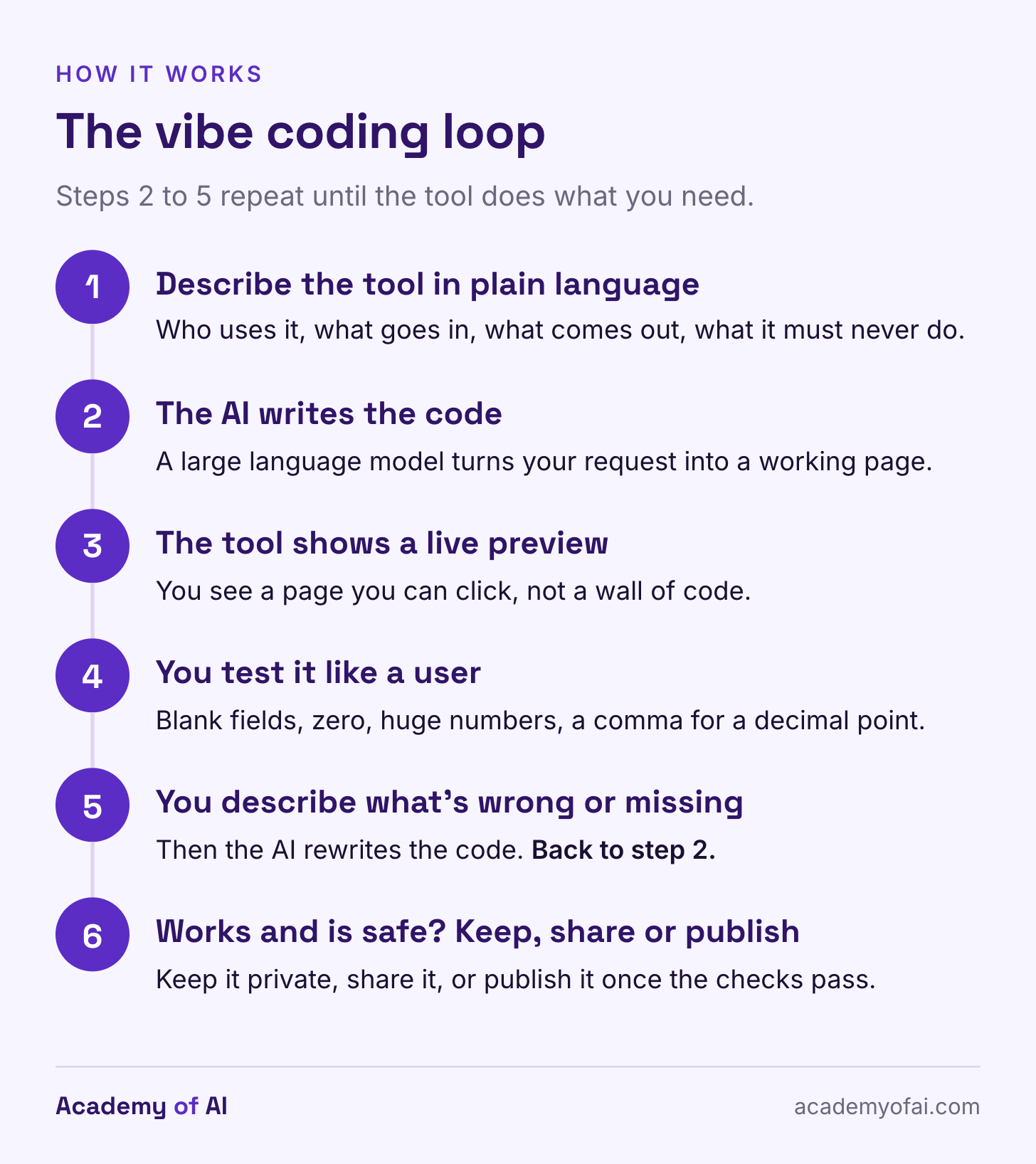
The front end is what you see and click. The back end handles work on a server, such as storing records or checking a login. Deploying makes the app available somewhere other than its development preview. Credits and tokens measure usage, but they are not interchangeable units across different builders.
For a first attempt, choose a tool with a result you can check yourself. A calculator can be built without accounts, a database or external services, but you have to request and verify those limits. Being a one-page app does not automatically mean it stores nothing or is safe.
Lovable, Bolt, Replit and Other Beginner App Builders Compared
These six tools let you begin in a browser without installing a coding environment, and each has a free starting option. The use cases below are editorial suggestions, not results from a head-to-head test. US prices and limits were checked October 30, 2026; tax, extra usage and hosting can add to the bill.
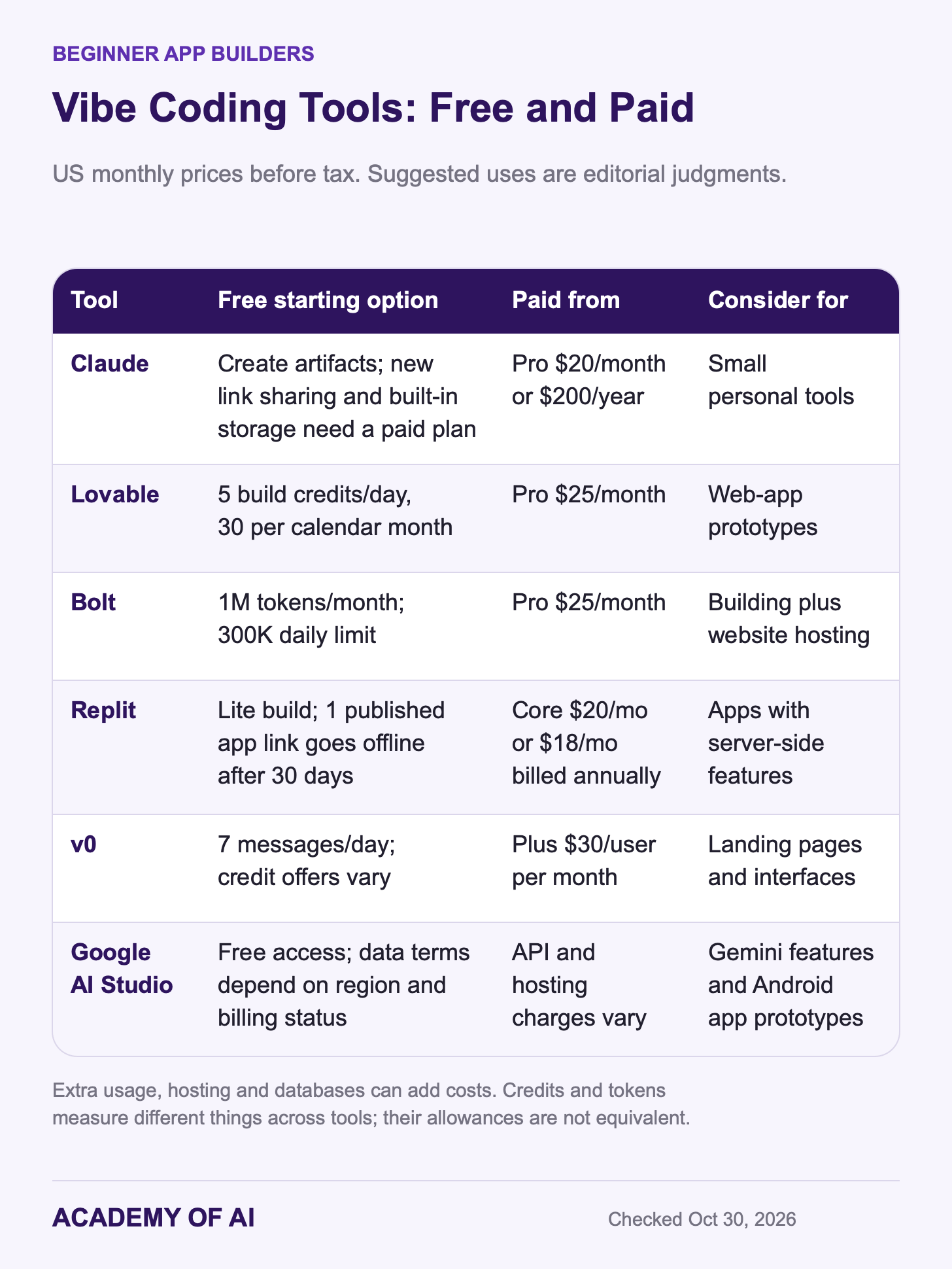
Claude: a straightforward starting point if you already use its chat. Free accounts can create artifacts, including small interactive tools. Built-in storage, app connections and sharing new artifacts require a paid plan. Pro costs $20 monthly or $200 annually. Use the free exercise below as a personal tool.
Lovable: useful for a web-app prototype with a database or sign-in flow. Its Free plan grants five build credits daily, capped at 30 per calendar month. Pro starts at $25 monthly with custom domains and badge removal. Building, running the app and powering its AI features can consume credits differently.
Bolt: combines a browser builder with website hosting. Free includes one million tokens monthly, with a 300,000 daily limit. Free websites carry Bolt branding; Pro starts at $25 monthly and adds custom domains. Consider it when you want the build and hosting in one place.
Replit: combines building, databases, storage and publishing in one workspace. Starter includes Lite build and one free published app whose link goes offline after 30 days. Core is $20 monthly or $18 per month billed annually. It is an option for projects that need server-side features, with usage costs to monitor.
v0 by Vercel: a useful starting point for a landing page, dashboard or interface. Free allows seven messages daily; Plus is $30 per person monthly. It also supports back-end integrations, so choosing it for design does not remove the need to test the logic. Free credit offers can vary by account.
Google AI Studio: Build mode creates web apps and native Android apps. AI Studio has free access; deployed apps and Gemini API use may add charges. Its data terms depend on region and billing status: unpaid-service content may be used to improve Google’s products, with exceptions including the EEA, Switzerland and UK. Use sample data while learning and check the terms that apply to your account.
Build a Freelance Quote Calculator With Claude in Five Steps
The exercise below asks Claude to create a personal quote calculator as an interactive artifact. It is a prompt-and-test walkthrough, not a claim that every generated version has been verified. Start a new chat on a Free account. If artifact creation is unavailable, check Settings → Capabilities; Anthropic’s current instructions call the required setting Cloud code execution and file creation, or Create and edit files in the updated layout.
Step 1: Describe the Tool Like a Client Brief
Specify the inputs and the calculation. These are made-up pricing rules for the exercise; substitute your own once you understand the result. They also match the calculator in our Claude Code web guide.
Create an interactive artifact: a one-page freelance quote calculator for my phone or laptop. Keep the HTML, CSS and JavaScript self-contained.

Inputs: estimated hours, hourly rate, revision rounds, rush job (yes/no), currency label (USD, EUR, GBP, CAD, AUD or INR).

Use these rules:
- Base fee = hours x hourly rate.
- Two revision rounds are included. Each additional round adds two hours at the same hourly rate.
- Rush adds 25% to the base fee plus any extra revision charge.
- Total = subtotal plus rush charge.
- Currency changes the label only; do not convert amounts.

Show the total first, then base fee, extra revisions and rush fee. Add a plain-text quote and a Copy button, with selectable text as a fallback.

Reject blank or negative hours/rates and non-whole revision counts. Allow zero. Accept 42.5 or 42,5 as decimals without thousands separators. Display money to two decimal places.

Use no external libraries, fonts, analytics or network calls. Do not store inputs. Use clear labels, readable text, keyboard-accessible controls and large tap targets.

Check: 10 hours, rate 100, 3 revisions, rush yes must give base 1000, extra revisions 200, rush 300 and total 1500.
Step 2: Test It Like a Skeptical User
First check a result you calculated yourself: 10 hours × 100 = 1,000. The third revision adds 200. A 25% rush fee on 1,200 adds 300, so the total is 1,500. With rush off, it should be 1,200.
Then try blank fields, negative values, zero, 10,000 hours, a fractional revision count and 42,5. Changing the currency label should not change the amount. Copy the quote and compare every number with the screen. Record any mismatch.
Step 3: Report Bugs One Batch at a Time
Describe what you entered, what happened and what you expected. These are hypothetical bug reports, not results from a test run; replace them with the problems you actually find:
Two problems:
1. When I type 42,5 in the hours field, the total shows 0. Accept both 42.5 and 42,5 as decimals.
2. If the hourly rate is blank, the total shows "NaN". Show a friendly message instead: "Add your hourly rate to see a total."

Fix only these two things. Don't change the layout or the wording anywhere else.
Step 4: Add One Feature, Then Retest
New features are where old bugs come back. Add one, then rerun your Step 2 tests.
Add a deposit dropdown with 0%, 25% and 50%, defaulting to 25%. Deposit = total x selected percentage; balance = total minus deposit. Include both in the breakdown and copied quote. Do not change the existing pricing rules or layout.

For a total of 1500, 25% means a deposit of 375 and a balance of 1125. At 0%, the balance is 1500; at 50%, deposit and balance are both 750.
Step 5: Get a Review Before Clients See It
Before I use this with clients, review the tool in plain English and list, most serious first:
- Any input that could still produce a wrong or confusing number
- Anything a client might misread in the quote text
- Whether the page stores, sends or loads anything from outside the page
Don't change the code yet. Give me the list only.
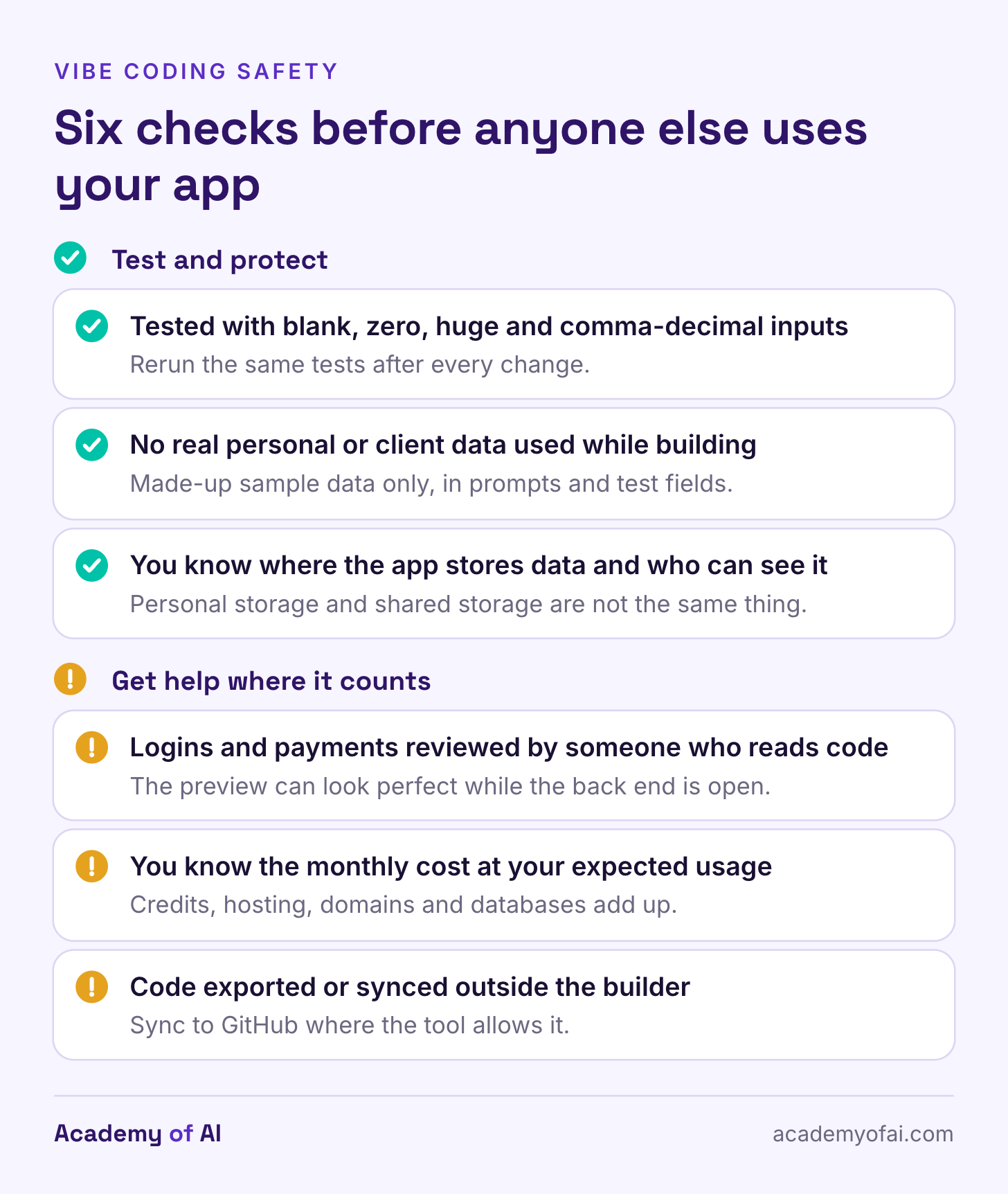
Use that review to find questions, then check the answers. Recalculate three example jobs yourself, including the deposit. If you cannot assess whether the code stores or transmits information, get someone who can before using sensitive data. A second AI response is not independent verification.
New artifacts start private. Free accounts can create them, but link sharing for newly created artifacts requires a paid plan; older legacy artifacts follow different rules. Built-in persistent storage also needs a paid plan. Neither private sharing nor a request to “store nothing” proves the generated app follows your intended data rules.
Is Vibe Coding Safe? Security, Privacy, Cost and Upkeep
Security: a polished screen does not prove that the code behind it is secure. In Veracode’s fall 2026 evaluation, 18 models were tested across four languages and four vulnerability categories. The average security pass rate was 62%. That is a result on a defined test set, not an estimate that 38% of all AI-built apps are vulnerable.
For an app with accounts, payments or other people’s records, have a qualified developer check permissions, data access and sensitive operations. Treat a successful demo as the start of review.
Bugs: a fix can break something that worked before. Keep requests small and rerun the same checks after each change. For this calculator, keep the 1,500-total example, the rush-off example and the deposit checks as a short regression checklist.
Privacy: consider both what you send to the builder and what the finished app collects. Use fictional names and sample amounts during practice. Training settings and storage access are separate issues. Our Claude privacy guide explains the consumer account settings; check whether an app’s stored data is personal or shared before anyone enters real information.
Costs: revisions consume usage, and running the finished app can cost money too. Lovable’s pricing examples list 0.50 credits for a button-color change and 1.20 for adding sign-up and login. Those are examples, not fixed quotes for your project. Check the actual meter, any automatic top-ups, and separate hosting, database or API charges.
Upkeep: a free prototype is not a promise of permanent hosting. Replit’s free published link, for example, expires after 30 days. Keep an export or repository copy where the tool supports it, record how the app is deployed and decide who will handle updates. Check export limits before committing a large project to a builder.
When to Move a Project Into Claude Code
The point to add a repository, change review and stronger testing is when the project becomes something you rely on. Some browser builders already support those workflows. Moving to Claude Code can give you a different way to work on the files, but changing tools does not make unreviewed code safe.
Claude Code on the web works with a GitHub repository, makes changes on a separate branch and shows a diff for review. Browser cloud sessions require Pro, Max, Ultra or an eligible Team or Enterprise account. Our Claude Code pricing guide compares the costs. The web walkthrough uses the same calculator rules, with tests before merging.
For a first project, keep the consequences of a mistake small and the expected result easy to check. Before people enter their information or rely on your app for business, arrange the technical review you cannot do yourself.
Questions Beginners Ask Before Building Their First AI App
Do You Need to Know How to Code to Vibe Code?
No. You need to describe precisely what you want and test carefully, which is closer to writing a good brief than to programming. Learning how web pages store data helps you spot problems sooner.
Is Vibe Coding Free?
All six tools above offer a free starting option, subject to their limits and availability. Finishing a small exercise may cost nothing; extra generation, sharing, hosting or app usage can require payment. Decide what you need to build and run before choosing a subscription.
Can You Make Money With Vibe Coding?
Freelancers can build small tools for clients or sell simple templates, but nothing guarantees income, and client work raises the security and upkeep questions above. Our list of AI income stream ideas with Claude prompts is a practical place to test whether an idea has buyers before you build it.
What Is Vibe Coding in Simple Terms?
You describe a tool, the AI generates code, and you test and refine the result. Traditional no-code tools often emphasize visual components; modern products can mix both approaches. Whether you can inspect or export the code depends on the tool and plan.
Keep reading on Academy of AI