



Claude Code on the web lets you build and edit a project from your browser, with no coding software to install. Connect GitHub at claude.ai/code, choose a repository and describe the change. Claude works in a cloud session and pushes a separate branch for you to review. Pro, Max, Ultra and Team include access; Enterprise access depends on your account and organization settings.
Anthropic now calls the feature cloud sessions. Claude Code on the web is the browser way to use them. This guide follows the official documentation checked October 30, 2026, using the default Anthropic-hosted setup.
You will need a GitHub account and an eligible Claude plan. The walkthrough takes you from a new repository to a small calculator you can test before merging. You do not have to understand every line of code to begin, but you do need a way to check the result.
Claude Code Web Access and Pricing
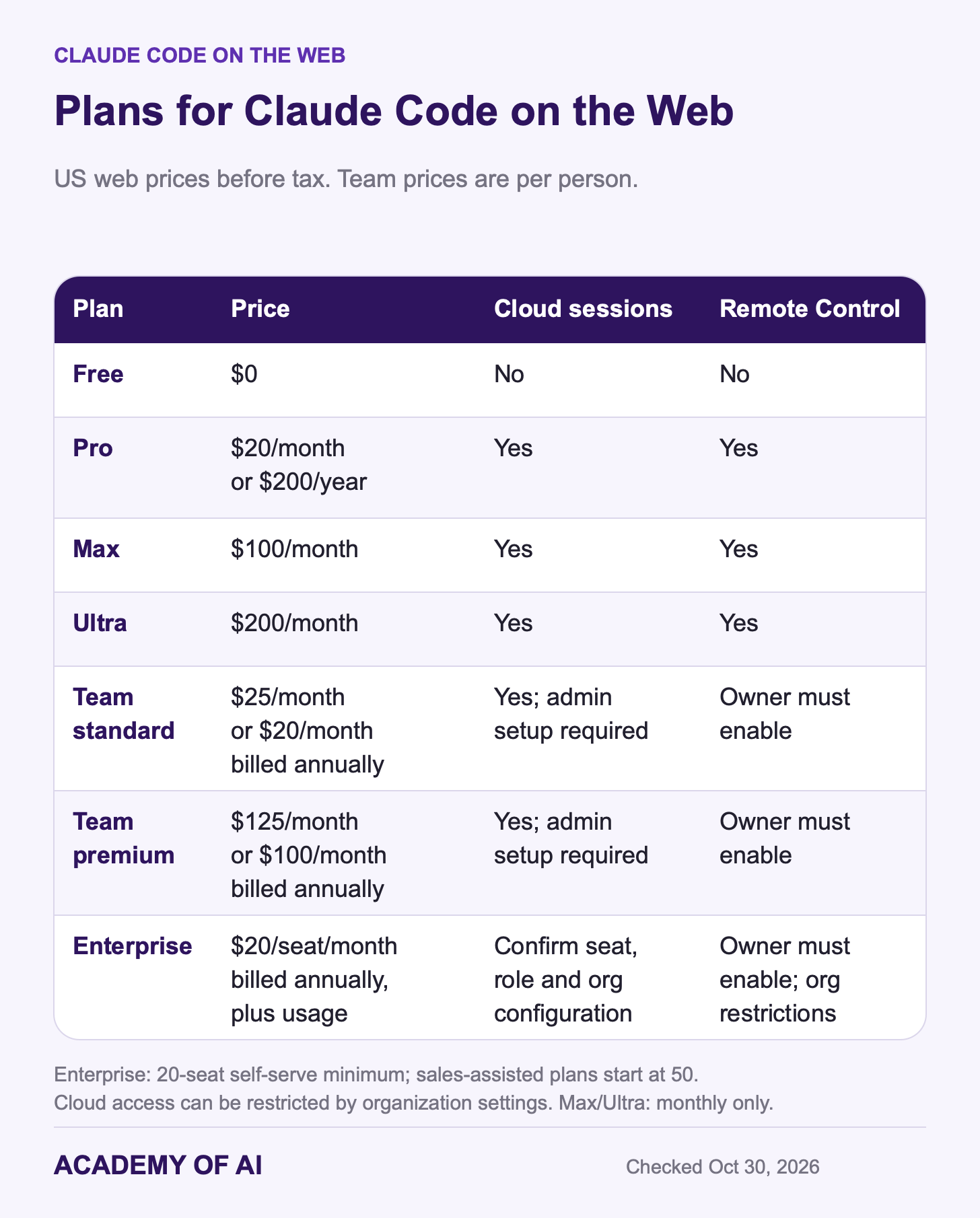
Claude Free does not include Claude Code. Both standard and premium Team seats do. On Enterprise, ask an Owner to confirm your seat, role and cloud-session permissions. Older seat arrangements and organization configurations can affect access. US web prices before tax, checked October 30, 2026:
Pro: $20 monthly or $200 annually (advertised as $17 a month).
Max: $100 monthly.
Ultra: $200 monthly; this replaces the former Max 20x tier.
Team standard: $25 per person monthly or $20 per person per month billed annually.
Team premium: $125 per person monthly or $100 per person per month billed annually.
Enterprise: $20 per seat per month billed annually, plus usage at API rates. The self-serve minimum is 20 seats; sales-assisted plans start at 50.
Outside the US, Anthropic’s Pro plan article says prices vary by region and are charged in local currency where supported.
There is no separate cloud-VM fee. Subscription sessions share your plan’s usage allowance with Claude chat and other Claude Code work; Enterprise usage-based billing still applies. Several sessions running at once can consume that allowance quickly. Our Claude Code pricing guide compares the costs, and our Claude Max guide explains when more capacity is worth considering.
On Team and Enterprise, an Owner must first turn on the GitHub connector in Organization settings > Connectors. Until then, members see “GitHub access is required for Claude Code cloud sessions” instead of a sign-in button.
Claude Code Desktop App, Phone or Browser: Which to Use
The main choice is where the work runs: in the cloud or on your computer. Your browser and phone are ways to reach it.
Browser: at claude.ai/code, Claude clones the GitHub repository into an isolated cloud machine. The task can keep running when you close the tab or your laptop. This guide uses Anthropic-hosted sessions; some organizations run their own cloud environments.
Desktop: the Claude app for Mac, Windows and Linux (beta) can use a cloud session or work locally on a folder. Local mode does not require GitHub. The app includes Claude Code, offers permission controls and can preview an app in its Browser pane.
Phone: the Claude app for iOS and Android has a Code tab. It lets you start and steer sessions; the phone is not where the code executes.
Remote Control: reach a local session from your phone or another browser. Your computer must stay on with the session running. The files remain on that computer, but this is not an offline privacy mode: conversation and code context still go to the model, and Anthropic stores the connected session transcript.
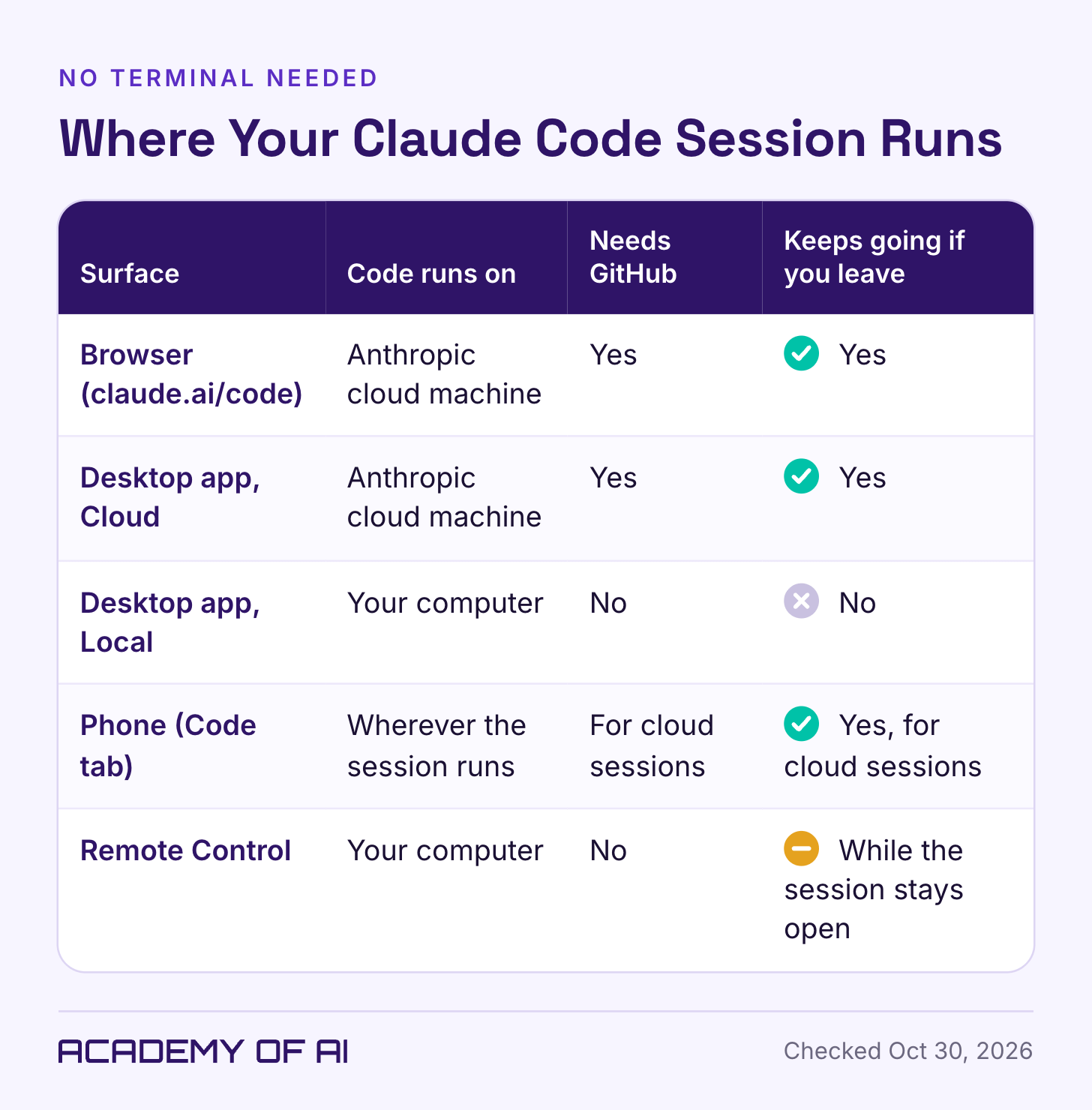
Start in the browser if you want zero installs and you’re fine keeping the project on GitHub. Pick the desktop app’s Local mode if your files live on your computer and you’re not ready for GitHub.
Before You Start: A GitHub Account and One Repository
GitHub stores code and its change history. Three terms will help: a repository (repo) holds the project, a branch holds a separate line of changes, and a pull request (PR) asks to merge those changes into another branch after review. The browser setup below requires GitHub.
Cloud sessions work with existing repositories, so a new project starts as a GitHub repository holding at least a README file, which gives Claude something to clone. If you don’t have a GitHub account yet, create a free one first. Then, following GitHub’s own steps:
Open the create menu in the upper-right corner of any GitHub page and choose New repository.
Type a name in the Repository name field, such as
quote-calculator.Choose private visibility for anything tied to clients or your business.
Add a README file in the initial files options.
Click Create repository.
Private repositories need one extra step, covered in Step 3 below.
Connect GitHub and Start Your First Session at claude.ai/code
These steps follow Anthropic’s cloud quickstart. Set up the connection on a computer first; the same sessions can then be reached from your phone.
Step 1: Sign In With Your Claude Account
Open claude.ai/code and sign in with your Claude account. If access is missing, check that you selected the right account or organization. Team and Enterprise users may need an Owner to confirm their seat and permissions.
Step 2: Connect GitHub
Follow the connection prompt to GitHub. Read the authorization request and check that it shows the account you intend to use before approving it. GitHub then returns you to Claude.
Step 3: Install the Claude GitHub App on Private Repos
With GitHub connected, a session can clone any public repository. For a private one, install the Claude GitHub App on the account that owns it (on a GitHub organization, an organization owner may need to approve it). If GitHub asks which repositories to include, pick only the ones you’ll use with Claude; you can add more later. Onboarding may prompt you to do this now, and Skip puts it off.
Step 4: Leave the Default Environment on Trusted Network Access
An environment is the saved setup for your cloud session. Pro, Max and Ultra create Default automatically. Team and Enterprise may show Create your first cloud environment; keep the defaults and select Create & finish. An Owner’s Quick setup setting can skip that form.
Trusted network access allows common package registries and other listed domains through the session’s network. GitHub and some connected services use separate routes. Keep the default for this exercise. If a later task needs another domain, review a narrow Custom allowance rather than opening access to every site.
Step 5: Pick Your Repository and Branch
Click the repository selector below the message box and choose your repo. The branch control next to it starts on the default branch; leave it there for a first project.
Step 6: Choose Plan Mode for Your First Task
Choose Plan. Claude can inspect the project and run exploratory commands, but waits for approval before changing your source files. Accept edits allows changes without stopping for each one. Auto uses a classifier to assess actions and appears when your model and organization allow it. Cloud sessions do not offer Manual or Bypass permissions. The permission-mode documentation explains the differences.
Step 7: Describe the Task and Press Enter
Name the file or feature, include the relevant error if there is one, and describe the result you expect. Starting a new task creates a separate session and branch. Follow-up messages in that session continue the same piece of work.
Example Prompt: A One-Page Quote Calculator for Freelancers
This is the same small project used in our vibe-coding guide, with its files stored in GitHub. These are illustrative pricing rules for the exercise, not a recommended freelance rate structure. Paste the prompt with Plan selected:
I'm not a developer. This repository contains only a README.

Build a freelance quote calculator in one index.html file, with its CSS and JavaScript included.

Inputs: estimated hours, hourly rate, revision rounds, rush job (yes/no), currency label.

Use these exact rules:
- Base fee = hours x hourly rate.
- Two revision rounds are included. Each additional round adds two hours at the same hourly rate.
- Rush adds 25% to the base fee plus any extra revision charge.
- Total = subtotal plus rush charge.
- Deposit = 25% of total. Balance = total minus deposit.
- Currency changes the label only; it does not convert amounts.

Show the total first, then the breakdown, deposit and balance. Add a Copy quote button and a selectable plain-text fallback if copying fails.

Reject blank or negative hours/rates and non-whole revision counts. Allow zero. Accept 42.5 or 42,5 as decimals without thousands separators. Display money to two decimal places.

Use no external libraries, fonts, analytics or network calls. Do not store inputs. Add a short README explaining how to open the file and test it.

Check: 10 hours, rate 100, 3 revisions, rush yes gives base 1000, extra revisions 200, rush 300, total 1500, deposit 375 and balance 1125.

Before editing, show your plan in plain English.
Read the plan before you approve it. If something’s off, say so in plain words and ask for a revised plan. When it looks right, tell Claude to go ahead, for example:
The plan looks good. Go ahead. When you're done, list every file you changed and explain each change in one or two plain sentences.The prompt asks for a local, self-contained file. That is a requirement to verify, not a guarantee that the generated code obeys it. Results can differ between runs.
Review, Test and Then Merge the Pull Request
A useful-looking preview is only the first check. For this exercise, review the changed files and test the calculator before merging anything into main.
Read Claude’s summary. Open Changes, or click the added/removed line counts on the Changes card, to inspect the diff.
For an unclear line, hover over it, select + and write a comment. Send a follow-up message to deliver the queued comments to Claude.
Ask about unexpected files, external connections or logic you cannot explain. For important business software, get a developer to review what you cannot assess.
Create a pull request from the Changes card. A PR proposes a merge; it does not merge the work. Check its title, description and target branch.
Test the proposed branch as described below. If you request fixes, download and test the changed version again.
When the checks pass, use GitHub’s merge controls. A draft PR must be marked ready, and required reviews or repository rules may block merging.
This follow-up can help you understand the change. Treat the answer as an explanation to check, not proof the code is correct:
Explain this change to me like I've never read code. For each file: what it does now, what could break, and how I can check it works without reading the code.Test the Branch Before Merging
On GitHub, open the repository and select Claude’s proposed branch, not main. Use Code → Download ZIP, following GitHub’s download instructions. Extract it and open index.html in your browser.
Check the arithmetic: 10 hours × 100 is 1,000. A third revision adds 200; the 25% rush fee on 1,200 adds 300. Total: 1,500. Deposit: 375. Balance: 1,125.
Change one input: with rush off, the same quote should total 1,200, with a 300 deposit and 900 balance.
Try awkward inputs: blank fields, negatives, zero, a decimal comma, a very large value and a fractional revision count. Check that validation and formatting make sense.
Check the output: the copied quote must match the displayed numbers. Changing the currency label must not change the amounts.
Check usability: try a narrow window and keyboard navigation. Confirm the app does not quietly add a dependency or storage feature you did not request.
Only merge the version you checked. After merging, confirm that index.html on main is the version you intended.
Check Sharing and Automation Settings
Secrets: this exercise needs none. Environment-variable values can be read by people or sessions using that environment. For a later API connection, review network secrets and their supported request types; they are not a universal replacement for every credential.
Session sharing: on Pro, Max and Ultra, Public visibility can expose the session to any signed-in Claude user. A private GitHub repository does not automatically make a shared Claude session private.
Auto-fix: this optional feature can push fixes and respond to GitHub review activity. Its comments appear under your username, labeled as Claude Code. Check your repository’s automation rules before turning it on.
Move a Session Between Your Laptop and Your Phone
Your cloud sessions are available from the Claude mobile app as well as the browser and desktop app. Open Code, choose the same session and continue the conversation. You do not need to recreate it on each device.
In the desktop app, use the environment selector below the prompt: Local works on a folder on your computer; Cloud uses a cloud environment. To move an eligible local session, select Open in → Cloud and read the handoff dialog. It explains what happens to the files and the original session; the conversation carries over as a summary.
On your phone, use Code to check progress, answer a question or request a specific change. A small screen is useful for steering; use a larger screen when the diff needs close inspection.
For a session running on your own computer, Remote Control connects your phone or browser to that session. In the desktop app’s local session, enter /remote-control, then open it from the Code list on your other device. Keep the computer awake and the session open.
What Anthropic Stores From Your Cloud Sessions
In the Anthropic-hosted setup, your repository is cloned into an isolated cloud machine and the session transcript is stored so you can return to it. GitHub credentials are held outside that machine and attached to GitHub requests through a proxy. This does not make every file in the repository appropriate to upload.
Claude Code’s data-use policy distinguishes consumer and commercial accounts. On Pro, Max and Ultra, opting into model improvement permits training on Code sessions, with five-year retention; with that setting off, the standard Code retention is 30 days. Team and Enterprise do not train on your code and prompts by default and generally use 30-day retention, subject to documented exceptions. Saved history, feedback and other data can have different rules.
For a practice project, use made-up data. For client or company work, check what your organization permits before connecting a repository. Our Claude privacy guide explains the account terms and training setting.
Fixes for Missing Repos, Expired Sessions and Usage Drain
Your private repository is missing. Check that the Claude GitHub App is installed on the account that owns it and that this specific repository is included. Ask the owner for approval if needed; do not grant access to every repository just to fix one missing project.
The page only shows a GitHub login button. Cloud sessions can’t start without a connected GitHub account. If you’d rather skip GitHub for now, use a Local session in the desktop app.
An old session needs to restart. An idle cloud machine can pause and later be reclaimed. A reclaimed environment is rebuilt when you return; running processes need to restart, and uncommitted work may be lost. Ask Claude to commit and push work you want to keep before leaving it for a long period.
Your usage disappears faster than expected. Suspect parallel sessions first, since each one draws on the same limits. Give each session one well-defined task, and see our guide to stretching your Claude usage limits.
Claude cannot see a local change. In this browser workflow, the session starts from the GitHub repository. Changes that exist only on your laptop are not automatically included. Push the intended changes to the selected branch or provide the relevant context explicitly.
Start with one private repository, one small task and Plan mode. For the calculator above, success means the numbers match your manual checks and the copied quote matches the screen. Claude explaining its code is useful; your own checks decide whether it is ready.
Claude Code App and Remote Control Questions, Answered
Is There a Claude Code App for Desktop and Phone?
Claude Code is available inside the regular Claude apps: desktop on Mac, Windows and Linux (beta), and the Code tab on iOS and Android. Use the official mobile-app links; there is no separate Claude Code mobile app.
Is Claude Code on the Web Free?
No. Pro, at $20 monthly in the US before tax, is the least expensive individual subscription with browser cloud sessions. Max, Ultra and eligible Team and Enterprise accounts also support them. To experiment with a small tool before subscribing, our vibe-coding guide starts with Claude Artifacts on the Free plan.
What Is Claude Code Remote?
People use the phrase for two different things. Remote Control reaches a session on your own computer, which must keep running. Cloud sessions run away from your computer and can continue when you close it. Team and Enterprise Remote Control access also requires an Owner to enable it.
Can I Use Claude Code on the Web Without GitHub?
The browser onboarding in this guide requires GitHub. For a folder on your own computer, use the desktop app’s Local mode instead. The CLI has additional ways to send a local repository to the cloud, but those are separate from the no-install browser workflow.
Keep reading on Academy of AI