


Stop Burning Through Claude Limits
How to use Claude smarter so you waste fewer messages, fewer tokens, and way less creative momentum.
There is nothing more annoying than hitting your Claude limit right when the work finally starts getting good. You are in the flow. Claude understands the assignment. The draft is sharper. The spreadsheet is almost there. The strategy is finally making sense. Then suddenly, the party is over.
Rude.
The first thing to know is this: Claude usage is not just about how many messages you send. Anthropic says usage depends on several factors, including message length, file attachment size, conversation length, tool usage, model choice, effort level, and artifact creation. That means one messy, file-heavy, tool-heavy chat can burn through your limit faster than several clean, focused conversations. (Claude Help Center)
So this is not really an article about “hacking” Claude. I do not want you thinking like a little AI coupon goblin. This is about building a cleaner workflow so Claude lasts longer, works better, and stops eating your usage before lunch.
You may still hit your limits on big workdays. That happens. But most people are not hitting limits because they are doing too much smart work. They are hitting limits because they are dragging too much junk into the room.
Let’s fix that.
What Actually Burns Through Claude Usage?
Claude is powerful because it can hold a lot of context, read files, use tools, create artifacts, reason deeply, and work across long conversations. That is the good news. The bad news is that all of those features have a cost.
Think of every Claude chat like a room. Every message, file, tool, and previous answer is something Claude may need to carry around. The more you bring into the room, the heavier the conversation gets. That does not mean you should avoid context. Context is what makes Claude useful. It means you should bring the right context.
Anthropic separates usage limits from length limits. Usage limits control how much you can use Claude over time, while length limits control how long or complex a single conversation can become. If you hit a usage limit, you may need to wait, upgrade, or use credits. If you hit a length limit, starting a new conversation or using Projects can help. (Claude Help Center)
That distinction matters. Sometimes your problem is not that you need a bigger plan. Sometimes your chat is just bloated. Other times, your setup is burning usage because you keep re-uploading the same files, sending tiny corrections, using Research for simple tasks, or asking Claude to build before you know what you want.
Claude is not punishing you for being ambitious. It is charging your limit for everything you make it process.
1. Shrink Your Files Before You Upload Them
This is the easiest win. Stop uploading giant PDFs, full slide decks, uncropped screenshots, and messy documents when Claude only needs a few sections.
File attachment size affects Claude usage. That means a huge PDF with 80 irrelevant pages is not harmless. Neither is a screenshot that includes your entire desktop when Claude only needs one chart. Smaller, cleaner files help Claude focus and help you waste less usage. (Claude Help Center)
Before uploading anything, ask yourself what Claude actually needs. Does it need the whole PDF, or just pages 3 through 7? Does it need the whole bank statement, or a cleaned list of categories and totals? Does it need a screenshot, or could you copy the text into a plain file?
My rule is simple: do not upload the whole haunted document if Claude only needs three paragraphs.
For recurring work, I would use plain text or markdown files whenever possible. They are clean, light, and easy for Claude to read. A file called brand-voice.md is usually more useful than a 47-page brand deck full of images Claude does not need for the task.
Use this prompt before uploading a giant source file:
I have source material for this task, but I do not want to upload more than necessary.

The task is: [describe task]

Tell me exactly what parts of the source material you need. Tell me what I can remove, summarize, crop, or paste as plain text before I upload anything.
This turns Claude into your context bouncer. Very chic. Very necessary.
2. Plan First, Build Last
Most people waste Claude usage by asking for the final asset too early. They start with “make me a spreadsheet,” “write the full article,” “create the presentation,” or “build the launch plan.” Then Claude creates something close, but not quite right. Then they spend ten messages fixing what could have been clarified upfront.
That is expensive.
The better move is to use Claude cheaply at the planning stage before asking it to generate the heavy output. First, define the goal. Then define the audience. Then define what “done” looks like. Then ask for the structure. Then approve the structure. Only after that should Claude build the file, artifact, spreadsheet, deck, or final draft.
Anthropic’s usage guidance recommends planning conversations before starting, combining related questions, and providing background upfront to reduce back-and-forth. That is exactly the workflow here. (Claude Help Center)
Think cheap. Build expensive.
Do not ask Claude to cook the whole meal before you know what you are eating.
Use this prompt:
Before creating anything, help me plan the task.

My goal is: [goal]
The final output should be: [output]
The audience is: [audience]
Success looks like: [success criteria]

Ask me any missing questions first. Then give me the simplest plan before you build.
This one prompt can save you a ridiculous amount of cleanup.
3. Make Claude Ask You Questions First
One of the fastest ways to waste usage is making Claude guess. Guessing creates generic output. Generic output creates corrections. Corrections create longer chats. Longer chats burn more usage.
So stop letting Claude guess.
Before any important task, tell Claude to interview you first. I use this all the time because it forces the tool to gather the missing context before it starts producing. It also makes you think more clearly about what you actually want.
Anthropic recommends clear, detailed instructions and relevant context because vague questions often require more clarification. So give Claude permission to clarify before it creates. (Claude Help Center)
Use this:
Before you start, ask me the 7 questions you need answered to do this well.

After I answer, summarize the plan and wait for my approval before creating the final output.
This feels slower for about two minutes. Then it saves the entire project.
Most people want AI to skip thinking. You want AI to extract your thinking. That is the difference between a messy chat and a useful one.
4. Edit the Old Prompt Instead of Sending Another Correction
Every “wait, actually…” makes the conversation heavier.
We have all done it. You send a prompt. Claude gives you something wrong. Then you send another message correcting it. Then another. Then another. Suddenly, your simple task has become a 19-message therapy session about a spreadsheet.
When possible, edit the original prompt instead. Fix the instruction at the source, regenerate, and avoid stacking correction after correction. Anthropic’s own guidance recommends reviewing and editing your prompt before sending to reduce follow-up messages. (Claude Help Center)
This is especially useful when your original prompt was missing something important. Maybe you forgot the audience. Maybe the tone was wrong. Maybe you asked for a full draft when you needed an outline. Fix that upstream.
Bad workflow:
Write this article.
No, make it more human.
No, not that human.
Actually, use paragraph format.
Wait, add SEO.
No, less repetitive.
Better workflow:
Write an SEO-optimized article for Academy of AI.

Use paragraph format. Avoid short, single-sentence paragraphs. Write in Levi Chambers voice: direct, warm, practical, human, and a little playful. Avoid generic AI phrasing, corporate language, and repetition.

Before drafting, give me the outline first.
Clean prompts save usage. They also save your sanity.
5. Start Fresh When the Chat Gets Too Heavy
Long chats can be useful, but they can also get expensive and weird. Claude remembers earlier context in a conversation, which is helpful until the conversation becomes a junk drawer.
If a chat has gone on for a while, start fresh. This is not quitting. This is cleaning the room.
Anthropic notes that current conversation length affects usage, and its length-limit guidance says that starting a new conversation can help when a chat becomes too long or complex. (Claude Help Center) (Claude Help Center)
My favorite move is the handoff summary. Before leaving a long chat, ask Claude to summarize only what matters. Then paste that summary into a fresh chat and keep moving without dragging every old detour behind you.
Use this:
Summarize this conversation so I can continue in a fresh chat.

Include:
1. The goal
2. Key decisions
3. Important context
4. Current draft or plan
5. Next steps
6. Anything Claude must not forget

Keep it concise and remove anything irrelevant.
Then start a new chat and paste:
Here is the handoff summary from my previous chat.

Use this as context and continue from here:
[paste summary]
Shorter chats are cleaner chats. Cleaner chats are cheaper chats.
6. Choose the Right Model and Effort Level
Not every task needs the most powerful model and highest effort setting. You do not need a bulldozer to plant a flower.
Claude lets users change the model, effort level, and thinking settings in supported plans. Anthropic says higher effort can produce more thorough responses, but it takes longer and uses more tokens, which means you can reach usage limits faster. It also says low and medium effort work well for routine tasks and stretch usage further. (Claude Help Center)
Use the lighter setup for quick rewrites, captions, simple summaries, formatting, brainstorming, and low-stakes tasks. Use stronger models or higher effort for hard strategy, coding, complex analysis, serious research, financial modeling, technical planning, and anything you cannot afford to get wrong.
This is not about being cheap. It is about matching the tool to the task.
Use this prompt before starting:
Before we begin, tell me what level of reasoning this task actually needs.

Should I use a faster model, stronger model, lower effort, higher effort, extended thinking, web search, Research, or no tools at all?

Explain the simplest setup that will get a good result without wasting usage.
Claude cannot change your settings for you in every context, but it can help you think through the right setup.
7. Use Projects for Anything You Reuse
If you upload the same file more than once, you probably need a Project.
Claude Projects are one of the best ways to stop wasting usage because they let you keep recurring context in one place. Anthropic says project content is cached, and when you reference uploaded project documents again, only new or uncached portions count against your limits. That means repeated use of the same project files can be more efficient than re-uploading them in every chat. (Claude Help Center)
This is huge for creators, founders, freelancers, educators, and anyone doing repeat work. Your brand voice, audience notes, product details, customer objections, SEO rules, article examples, offer docs, and templates should not be reintroduced every time. Put them in a Project once.
Use Projects for:
brand-voice.md
about-me.md
audience.md
offers.md
content-pillars.md
examples-i-love.md
examples-i-hate.md
customer-objections.md
seo-checklist.md
recurring-prompts.md
Upload once. Use forever.
That is the move.
8. Keep Project Files Clean
Projects help, but they are not an excuse to dump 400 files into Claude and call it context. That is not strategy. That is digital hoarding with a subscription.
Anthropic says Projects can use retrieval augmented generation, or RAG, to store and access significantly more knowledge. RAG retrieves relevant information from uploaded documents instead of loading everything at once, and Anthropic says it can expand project capacity by up to 10x when needed. (Claude Help Center)
That is powerful. It still needs clean inputs.
Use clear filenames. Group related content together. Remove old files you no longer use. Keep project instructions concise. Claude’s docs also recommend descriptive filenames and organized related content to help retrieval work better. (Claude Help Center)
Bad filenames:
final.pdf
notes2.md
stuff.md
new-version-REAL-final.docx
Good filenames:
academy-of-ai-voice-guide.md
substack-audience-notes.md
claude-limit-article-outline.md
seo-checklist-for-ai-articles.md
examples-i-love-ai-newsletters.md
Treat your project like a clean studio, not a garage where old files go to die.
9. Turn Off Tools You Do Not Need
Claude tools are amazing. They can also be expensive.
Web search, Research, connectors, extended thinking, and other tools are not decoration. They do extra work. Anthropic says tool usage affects limits, and its length-limit guidance specifically recommends disabling non-critical tools and connectors when they are not needed because tools and connectors are token-intensive. (Claude Help Center) (Claude Help Center)
Do not use web search for basic writing. Do not use Research when you just need a rewrite. Do not leave connectors on when you already pasted the relevant context. Do not use extended thinking for a caption. Please do not ask the AI to bring a forklift to move a napkin.
Research is especially useful, but it can use limits faster because Claude may retrieve multiple sources and produce comprehensive responses. Use it when the task deserves that depth. Do not use it because you are too lazy to decide what you need. (Claude Help Center)
Use this tool-control prompt:
Before starting, tell me which tools or settings this task actually needs.

If web search, Research, connectors, extended thinking, or artifact creation are not necessary, say so.

Use the simplest setup that can still produce a strong answer.
Only pay for what you are using right now. That is good AI hygiene.
10. Batch Your Work Instead of Dripping Tiny Requests
Tiny requests feel harmless. They are not always harmless.
If you send Claude three tiny related questions, that may be less efficient than one clean message with all three. Anthropic recommends batching similar requests in one message when possible. It also recommends providing all relevant data in a single, well-structured message for research and analysis. (Claude Help Center)
This does not mean you should send a monster prompt full of chaos. It means you should group related work.
Instead of this:
Give me 10 titles.
Now give me subtitles.
Now give me SEO descriptions.
Now give me tags.
Now give me social captions.
Try this:
For this article topic, give me:
1. 10 Substack titles
2. 10 subtitles
3. 3 SEO titles
4. 3 SEO descriptions
5. 10 tags
6. 5 Facebook captions

Keep everything in Academy of AI voice.
One clean message beats six scattered ones.
This also works for editing. Send the whole text in one message instead of pasting it section by section, unless the document is too large. Anthropic specifically recommends sending entire texts for editing in one message rather than breaking them up. (Claude Help Center)
11. Watch Your Usage Before You Hit the Wall
Do not wait until Claude cuts you off to learn how much usage you burned. Check your usage settings.
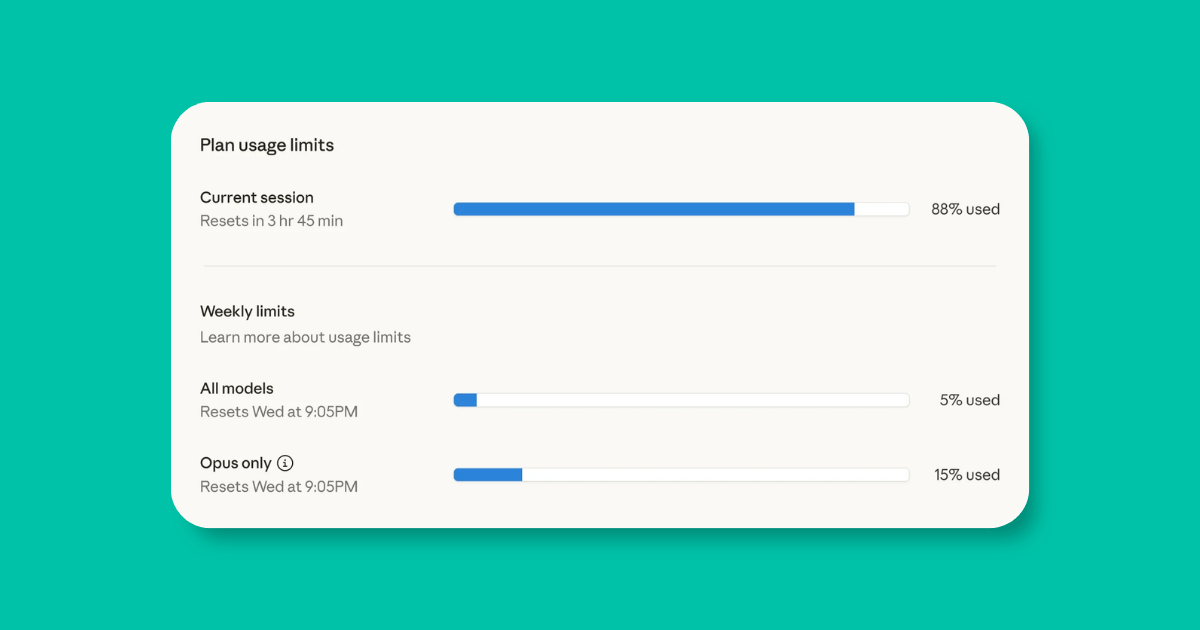
Anthropic says Pro, Max, Team, and seat-based Enterprise users can go to Settings > Usage to view progress bars for current five-hour session usage and weekly limits. That gives you a better sense of when to do heavy work and when to save the big tasks for later. (Claude Help Center)
This is especially useful if you use Claude for serious work. You can plan your day around heavier sessions. Do deep research, long file work, or high-effort strategy when you have room. Save simple rewrites and light prompts for lower-energy moments.
This is not glamorous. Neither is running out of Claude halfway through a launch plan.
Plan your AI time like it matters.
Because it does.
12. Build a Claude Limit Workflow
Here is the Academy of AI version. Screenshot this. Save it. Use it before your next serious Claude session.
1. Strip files down to what matters.
2. Start with the goal and success criteria.
3. Ask Claude to ask questions first.
4. Approve the plan before generating.
5. Use the right model, effort level, and tools.
6. Move recurring context into Projects.
7. Batch related requests into one clean message.
8. Summarize and restart when the chat gets heavy.
That is the whole workflow.
It is not complicated. It just requires a little discipline before you start asking Claude to do big things. Most AI waste happens before the first good prompt. It happens when the user has not decided what they want, what files matter, what tools are needed, or what success looks like.
Claude works better when you lead.
Copy-and-Paste Prompts to Save Claude Usage
Use these before big tasks. They are simple, but they can save you a lot of back-and-forth.
The Planning Prompt
Before creating anything, help me plan the task.

My goal is: [goal]
The final output should be: [output]
The audience is: [audience]
Success looks like: [success criteria]

Ask me any missing questions first. Then give me the simplest plan before you build.
The File-Shrinking Prompt
I have source material for this task, but I want to avoid uploading unnecessary files.

The task is: [task]

Tell me what information you actually need, what I can remove, what I should crop, what I should summarize, and what should be pasted as plain text.
The Fresh-Chat Handoff Prompt
Create a clean handoff summary so I can continue this work in a new Claude chat.

Include:
1. Goal
2. Audience
3. Important context
4. Decisions made
5. Current draft or plan
6. Next steps
7. Anything Claude must avoid
The Tool-Control Prompt
Before starting, tell me which tools or settings this task actually needs.

If web search, Research, connectors, extended thinking, high effort, or artifact creation are not necessary, tell me.

Use the simplest setup that can still produce a strong result.
The Project Setup Prompt
I do this task repeatedly and want to stop re-uploading context.

Help me turn it into a Claude Project.

Tell me:
1. What files to create
2. What instructions to add
3. What examples to upload
4. What recurring prompts to save
5. What workflow to follow each time
The Usage Audit Prompt
Review this Claude conversation and tell me where I wasted usage.

Look for:
1. Repeated context
2. Unnecessary tools
3. Vague prompts
4. Oversized files
5. Long-chat issues
6. Correction loops
7. Anything that should move into a Project

Then give me a cleaner workflow for next time.
That last prompt is a little humbling. Good. Humbling saves tokens.
Common Mistakes That Burn Claude Usage
The biggest mistake is uploading every file “just in case.” That sounds responsible, but it usually creates noise. Claude does not need your whole archive to help with one section of one project.
The second mistake is asking for the finished asset before planning. That creates beautiful wrong work. Beautiful wrong work is still wrong. It just wastes more time because now you have to edit something that should never have been built.
The third mistake is correction stacking. Every time you send “no, I meant…” you add more weight to the chat. Fix the original prompt when possible. Start clean when needed.
The fourth mistake is using the strongest model, highest effort, extended thinking, Research, web search, connectors, and artifacts for a tiny task. That is not advanced. That is expensive chaos in a cute outfit.
The fifth mistake is refusing to use Projects. If Claude needs your brand voice, audience, product details, examples, or source docs more than once, that context belongs in a Project. Repeating yourself to AI is unpaid admin work.
What This Means for You
Claude limits are annoying, but they are also useful feedback. They show you whether your AI workflow is clean or chaotic.
If you keep hitting the wall too fast, you may not need more Claude. You may need smaller files, clearer prompts, shorter chats, better Projects, fewer tools, and a stronger habit of planning before generating.
Claude should feel like leverage, not a slot machine. You should not be throwing prompts into the void and hoping one comes back useful. Give it cleaner inputs. Give it stronger context. Give it less junk to carry.
That is how you get more useful work from the same tool.
Not by begging Claude to last longer.
By using it like someone who knows what the hell they are doing.
Your First Assignment
Open your last long Claude chat and paste this:
Review this conversation and tell me where I wasted usage.

Identify repeated context, unnecessary tools, unclear prompts, oversized files, long-chat issues, correction loops, and anything I should move into a Project.

Then give me a cleaner workflow for next time.
Run that today. Do not wait until your next usage limit meltdown.
The goal is not to use Claude less. The goal is to use Claude better.
And better is where the freedom is.
Keep reading on Academy of AI
Subscribe to Academy of AI
Academy of AI helps everyday people learn the tools already changing work, money, creativity, and freedom. No panic, no jargon, and no gatekeeping. Just practical AI education for people who want to use AI with clarity, confidence, and power.
Subscribe to Academy of AI if you want to stop dabbling with AI and start building real leverage.