



Google AI Pro is Google’s paid Gemini plan, and in the US it costs $19.99 a month. A Google AI Pro subscription adds Gemini 4 Argon, four times the free usage limits, a 1 million token context window, Gemini inside Gmail and Docs, 1,000 Flow credits and 5 TB of storage. It’s the plan Google used to sell as Google One AI Premium, home of Gemini Advanced.
Those figures come from Google’s own plans page, checked on October 30, 2026. Most of them changed this year. Storage went from 2 TB to 5 TB in April, YouTube Premium Lite joined the bundle in May, NotebookLM got a new name in July, and Gemini 4 Argon reached Pro subscribers in mid-October. That’s why plenty of pages about this plan still describe a version you can’t buy anymore. This guide sticks to the current version: what Pro adds over free Gemini, what it costs in four currencies, where the fine print bites and whether it’s worth paying for your kind of work.
The short verdict: Pro is worth considering when its higher limits, storage and eligible extras replace costs or solve a recurring problem. Already paying for storage improves the comparison only if Pro replaces that bill. Start with your account type and actual workload.
What Is Google AI Pro? What It Adds to Gemini
A Google AI Pro subscription is one of four personal tiers sold through Google One, the subscription service that already handled Google’s extra storage. The ladder runs Free, AI Plus, AI Pro and AI Ultra. Buy Pro on a personal Google account and it switches on extras in the Gemini app, Gmail, Docs, Google Search, Chrome, the Flow video studio and Gemini Notebook. It also raises the storage shared across Gmail, Drive and Photos.
Start with what you get for nothing. The free tier isn’t a toy. According to Google’s plans page, free accounts get the Flash-Lite model plus image generation and editing, Deep Research (Gemini’s multi-step web research reports), Gemini Live voice chat, Canvas, Gems and Gemini Notebook, with 15 GB of storage. So the $19.99 pays for stronger models and higher ceilings, with a pile of non-AI perks thrown in.
The main Pro additions, per the same page and Google’s AI Pro benefits help article, looks like this:
Gemini 4 Argon plus Google’s Pro and Flash models in the Gemini app, instead of Flash-Lite
Four times the free plan’s usage limits, and a 1 million token context window instead of 32k
Video generation in the Gemini app, and 1,000 credits in Google Flow
Gemini in Gmail, Docs, Vids and other Google apps
Gemini Notebook with five times more Audio Overviews and bigger notebooks
Higher access to Gemini 4 Argon, Nano Banana and agent features in Google Search
Entry-level limits in Google Antigravity, Google’s agent coding tool, plus higher limits in Jules and Colab
Auto browse in Gemini in Chrome (US and India only)
Google Home Premium Standard, Google Health Premium and YouTube Premium Lite, in supported countries
5 TB of storage across Gmail, Drive and Photos
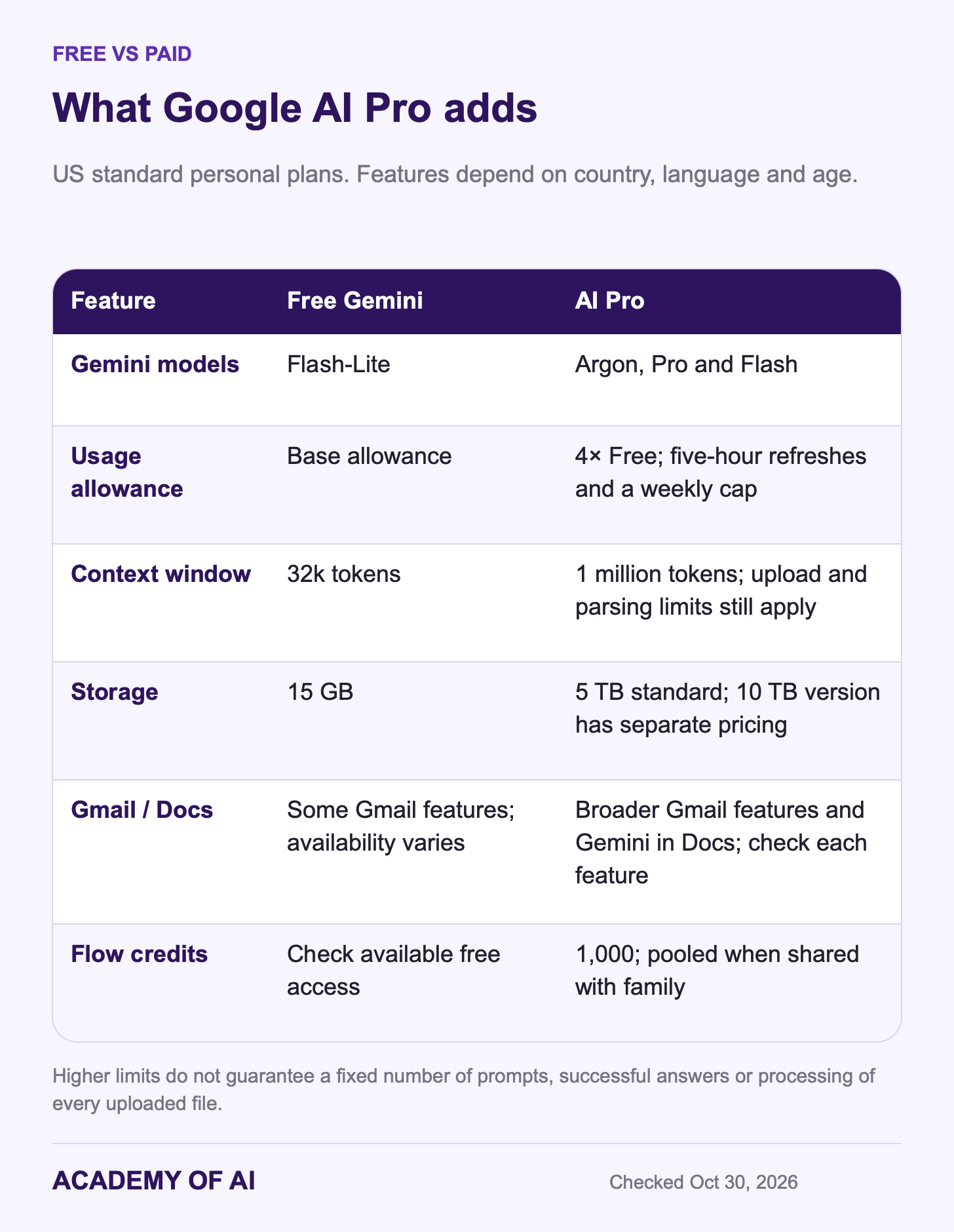
Start the value comparison with the models, limits and storage. Then count only extras available to your account that you would actually use. A long benefits list is not evidence that the subscription will save you time.
Gemini Advanced and Google One AI Premium: The Name History
If you searched for Gemini Advanced, this is the plan you were looking for. It goes by a newer name now.
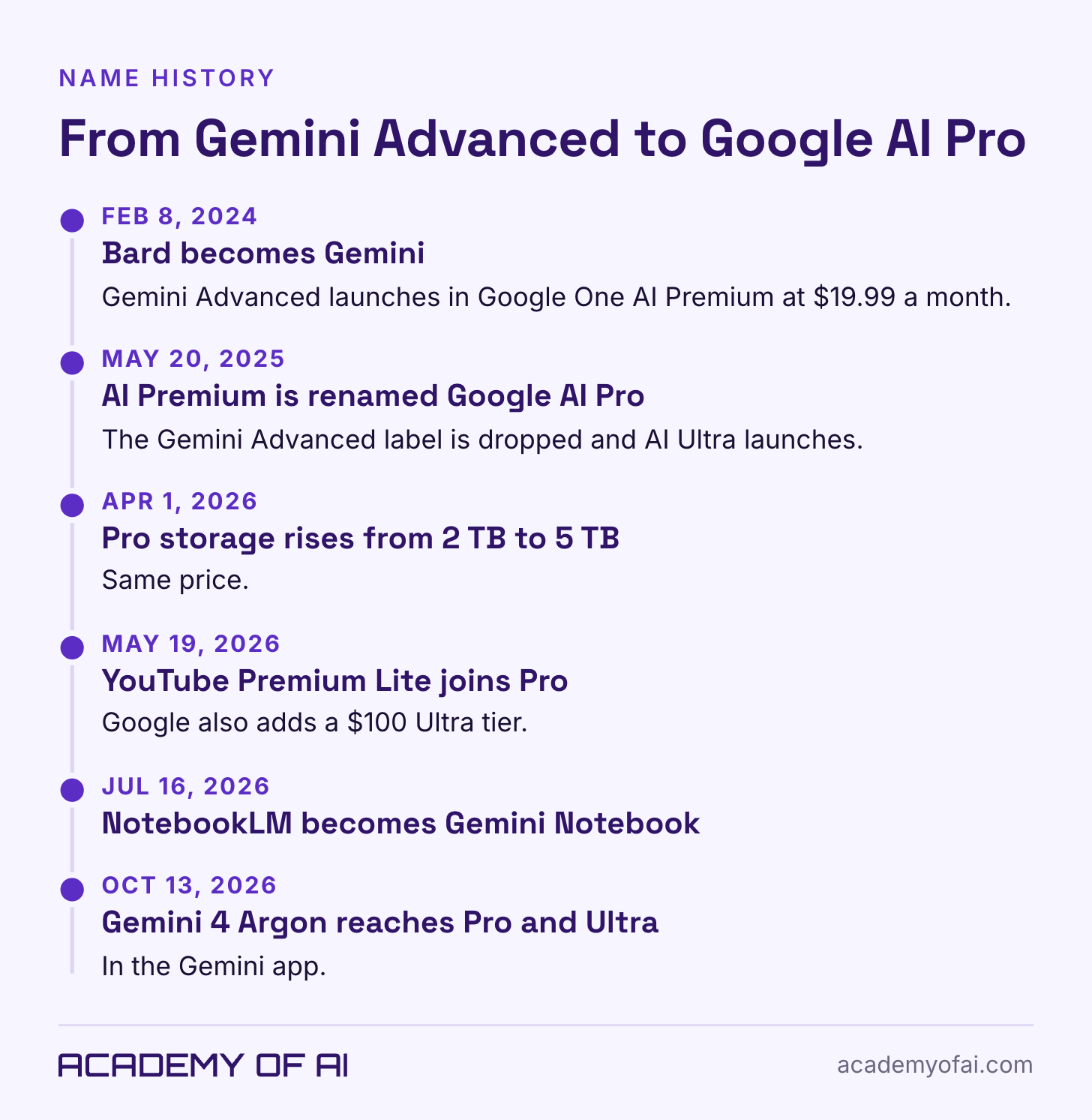
On February 8, 2024, Google renamed Bard to Gemini and launched the paid Gemini Advanced experience inside Google One AI Premium at $19.99 a month. On May 20, 2025, Google renamed AI Premium to Google AI Pro and introduced AI Ultra at $249.99. These are historical names and prices, not today’s Ultra price.
The name has held since. The contents haven’t. Google announced on April 1, 2026 that AI Pro storage would rise from 2 TB to 5 TB at no extra cost, as 9to5Google covered. At I/O 2026 on May 19, Google’s subscriptions post added YouTube Premium Lite to Pro, introduced a $100 AI Ultra tier and cut the top Ultra tier from $250 to $200. NotebookLM became Gemini Notebook on July 16, and Gemini 4 Argon arrived for Pro and Ultra subscribers on October 13.
The old name hasn’t fully left the building. Trial fine print on Google’s UK plans page and German plans page still said “Google One AI Premium” on October 30, 2026. And because billing runs through Google One, plenty of people search for a “Google One AI Pro subscription.” Same plan, same checkout.
Gemini 4 Argon, Weekly Caps and a 1M Context Window
The headline model is Gemini 4 Argon. Google introduced it on September 30 as its frontier model for coding, enterprise knowledge work and cyber defense, first for paying API customers and AI Ultra. Two weeks later, Google said Pro and Ultra subscribers can now use it in the Gemini app. Pro also gets Google’s Pro and Flash models. Free users get Flash-Lite.
Keep the Gemini app separate from AI Mode in Google Search. The plan-page country footnote for Argon, Nano Banana Pro and Deep Search concerns AI Mode; it does not establish the Gemini app’s country list. Confirm the feature and account eligibility you care about before buying.
Limits work differently than they did a year ago. At I/O 2026, Google moved from daily prompt counts to what it calls compute-based usage limits, where heavier prompts, heavier features and longer chats burn more of your allowance. Per Google’s Gemini limits help page, your limit refreshes every five hours until you hit a weekly cap. Pro gets four times the free allowance. AI Plus gets two times, and Ultra gets five or 20 times Pro, depending on the tier.
There is no universal number of prompts you can send: heavier tasks use more allowance. Google’s limits guide says subscribers who reach the cap can continue with Flash-Lite and inspect usage under Settings → Usage limits on the Gemini website. Antigravity has its own access and usage rules; Google’s benefits page distinguishes paying Pro members from trial eligibility. Do not treat a Gemini app allowance as an Antigravity quota.
The context window is how much information the model can consider at once, measured in tokens: small pieces of text or other content. Google lists 32k for Free, 128k for AI Plus and 1 million for Pro and Ultra. That larger window can help when comparing a contract, a statement of work and meeting notes, but page count alone cannot tell you whether they fit. Upload limits, file parsing and the actual amount of content still matter.
A bigger window doesn’t make a careful reader. Long-document answers still need spot checks against the source, especially numbers, dates and anything you’ll quote to a client.
Gmail and Docs Features: Help Me Write, AI Inbox, Proofread
For a lot of office workers, this section decides it. Pro puts Gemini inside Gmail, Docs, Vids and other Google apps. The exact features depend on your country and language, though, and free accounts already get some of them.
Google’s Gmail availability table is more specific than its introductory wording: it lists conversation summaries globally for personal accounts in eight languages, while free Help me write and suggested replies are US-limited. Paid Help me write and summaries are listed globally in English, French, German, Italian, Japanese, Korean, Portuguese and Spanish. Paid search overviews, Proofread, Gmail Live and suggested replies have their own English-language and device requirements. AI Inbox is English-only in the US. Check the row for the exact feature rather than assuming every Gmail tool follows one country rule.
Two features you might expect aren’t on a personal plan: Help me schedule, and Summarize and draft emails. Google lists those for eligible Workspace business plans. The plans page also notes that Gemini in Gmail and Docs is for users 18 and over, in select languages.
Test repetitive writing such as client updates and vendor follow-ups. For example: “Draft a brief follow-up asking whether the revised schedule works. Do not add a deadline or imply agreement.” Compare the time to draft and review it against writing it yourself. Our guide to getting AI to write emails in your own voice explains how to supply suitable examples. Check names, dates, tone and invented commitments before sending.
Notebook Limits, Flow Credits and Video Generation
Gemini Notebook is what NotebookLM became in July. “NotebookLM is now Gemini Notebook,” Google’s announcement says, calling it the same standalone product for asking questions across your own documents, with notebooks you can open and create inside the Gemini app too. It still turns sources into Audio Overviews (podcast-style summaries), and the higher limits come with Google’s paid AI plans.
Google’s Notebook plans table lists 500 notebooks with up to 300 sources each on Pro, versus 100 notebooks and 50 sources on Free. Pro also has five times the free Audio Overview allowance. Those limits help with research across a larger source collection; they do not guarantee that every generated summary is accurate. Open the cited source before quoting a claim.
Google Flow is the creative studio for AI video and scenes. Pro includes 1,000 Flow credits and access to Gemini Omni Flash, against 200 credits on AI Plus, per the plans page. Run out, and Pro and Ultra members can buy more AI credits for Flow and Antigravity (except in Japan), per Google One’s help center. On a family plan, Google pools Flow limits across the whole group, so one enthusiastic relative can drain everyone’s credits.
Google’s current Gemini video guide describes Gemini Omni for creating and editing videos on eligible paid personal plans and qualifying Workspace accounts, for users 18 and over. Some video-editing options have narrower regional access. Google also announced Omni 1.1 Flash in Flow in August 2026. The old Veo trial wording still visible in a subscriptions FAQ should not be treated as the complete current feature list. Check the model, available controls and credit cost in the product you intend to use. For still images, see our AI image generator comparison.
Upload only material you have the right and permission to use. Get consent for people’s likenesses, avoid deceptive impersonation and review the product’s current rules. A generated clip is not a guarantee that you have every right needed to publish or use it commercially.
5 TB Storage, YouTube Premium Lite and the Non-AI Perks
The 5 TB is shared across Gmail, Drive and Photos, and you can split it with up to five family members. Google’s benefits help page says Pro comes with 5 TB or 10 TB depending on which version of the plan you buy. So a bigger option exists if 5 TB won’t hold your video archive.
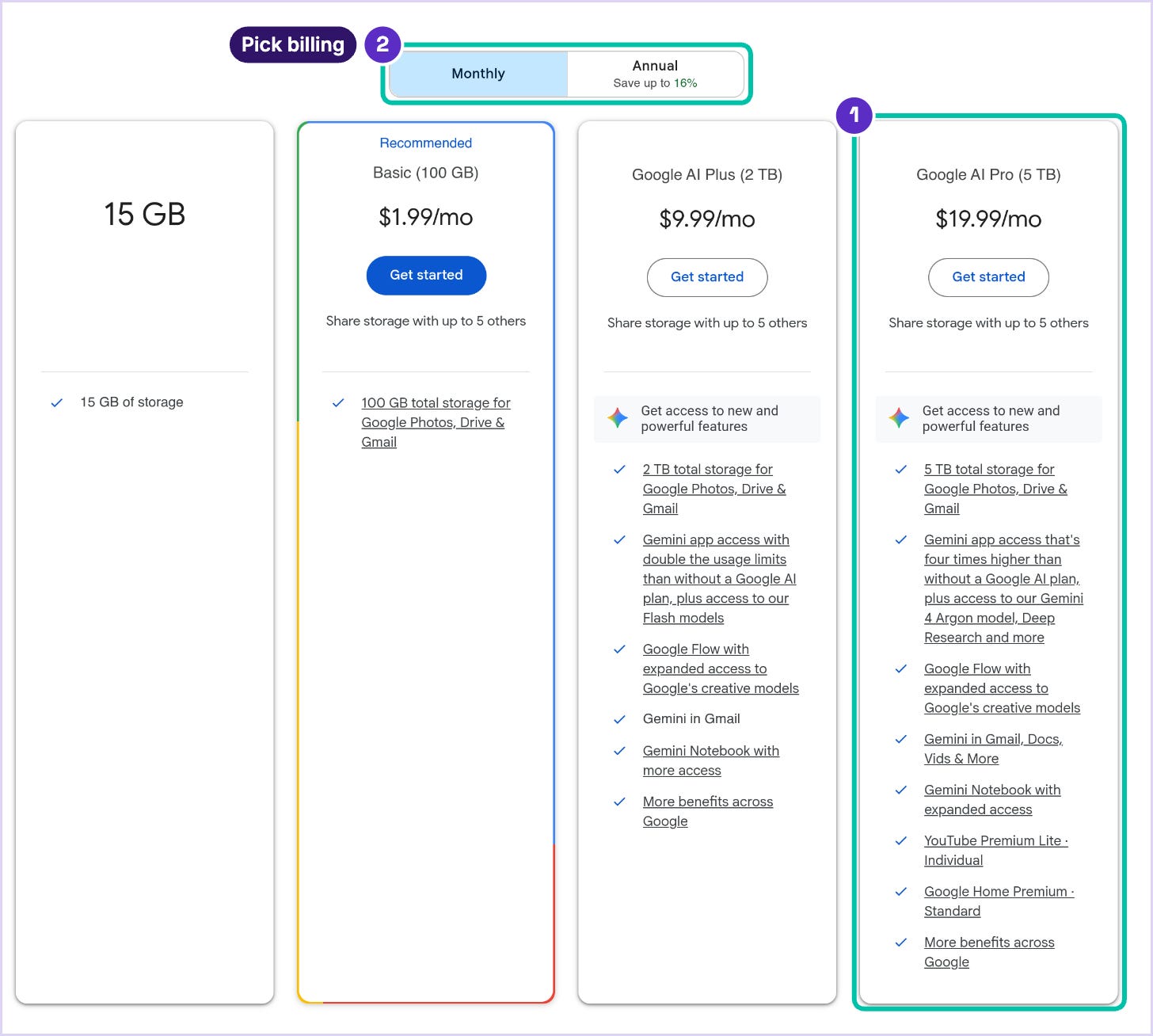
Compare the incremental cost. Google One’s comparison table lists AI Plus variants with 400 GB or 2 TB. The US plans screenshot below shows the 2 TB option at $9.99 a month alongside Pro at $19.99. If you replace that $9.99 bill, the difference is $10 a month for the larger standard storage allowance and Pro’s AI benefits. Confirm your own renewal price and billing channel first.
Google added YouTube Premium Lite at I/O 2026 and valued it at $8.99 a month in the US. Its benefits guide lists fewer ads, background play and downloads on most non-music videos in eligible countries. It is not the full YouTube Premium or YouTube Music plan: ads can remain on music, Shorts and browsing surfaces. Lite is for the plan manager and does not activate during a free trial. If you already pay for YouTube, check whether this replaces anything before counting it as a saving.
The rest of the bundle depends on your country. Google’s benefits help page lists these for Pro:
Google Home Premium Standard: 30 days of event video history in eligible countries. This benefit is for the plan manager.
Google Health Premium: eligible fitness and recovery features requiring supported devices and accounts. It is for adults and is not intended for medical purposes.
Google Developer Program: premium benefits including $10 monthly Google Cloud credits for the plan manager.
Coding tools: higher access in Jules, Gemini Code Assist and Antigravity, with product-specific limits.
Colab: 200 compute units for the plan manager on eligible paid memberships; trials are excluded.
Gemini in Chrome auto browse: US and India, age 18 or older, Chrome 144 or later.
If none of those match your life, leave them out of the math. Bundle value only counts for the perks you’d otherwise pay for.
Google AI Pro Price in Dollars, Pounds, Euros and Rupees
Prices as of October 30, 2026, from Google’s regional plan pages. A Google AI Pro subscription costs $19.99 a month in the US, £18.99 in the UK, €21.99 in Ireland and Germany, and ₹1,950 in India. Local prices aren’t a straight conversion of the dollar figure. Check your own country’s plan page rather than doing the math from $19.99.
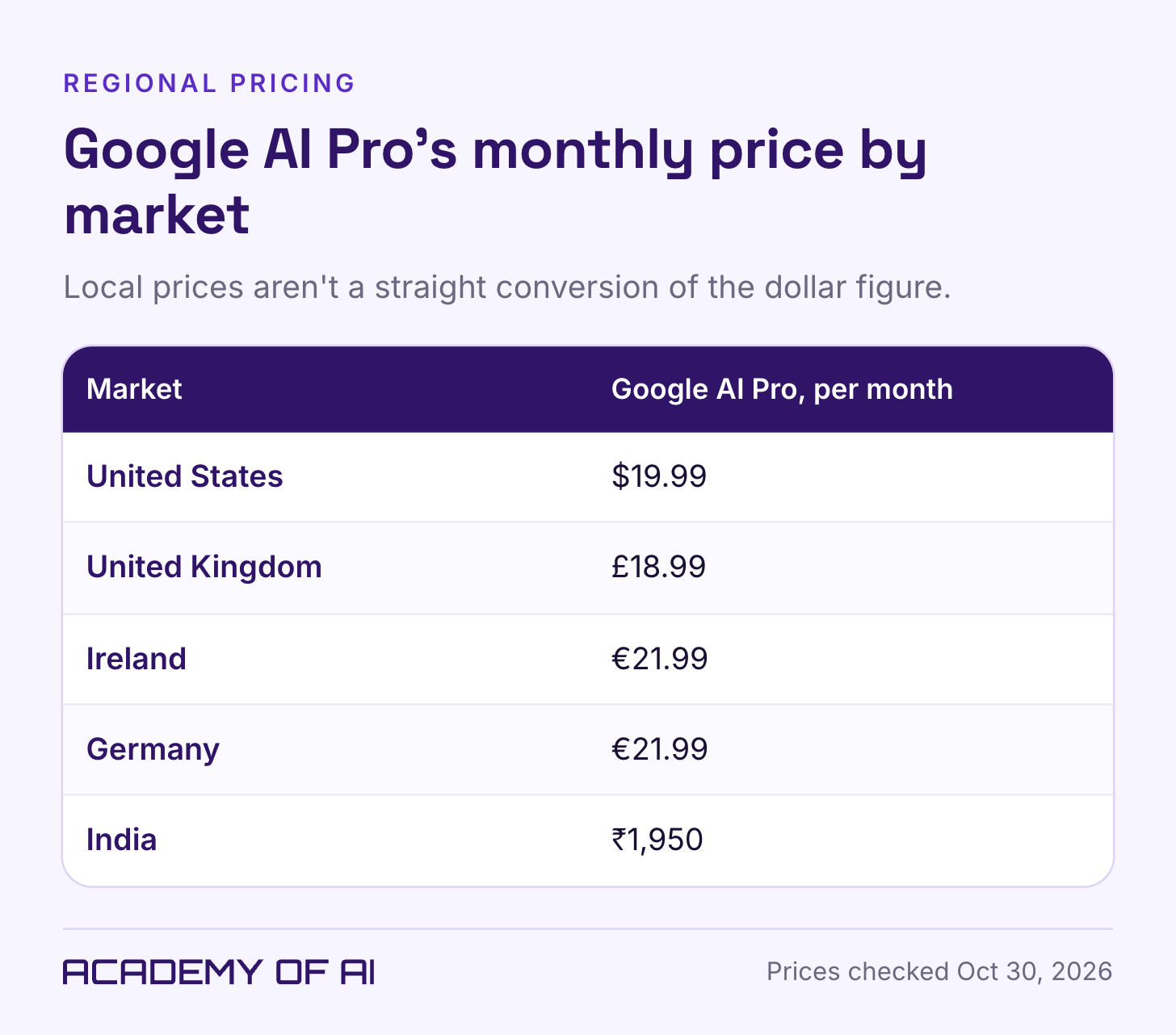
Google confirms monthly and annual billing and 5 TB or 10 TB versions of Pro. Review the price for the exact version in your own checkout, including renewal date and any tax. Do not assume the $19.99 standard monthly price also applies to the 10 TB version, or that an account-specific offer is available to everyone.
You can cancel, but refund eligibility depends on the purchase channel and applicable law. Google’s cancellation guidance explains the normal billing-period rule. Plan availability is broader than the availability of individual features, so check the country and language requirements for each benefit you expect to use.
For the OpenAI side, see our breakdown of whether ChatGPT Plus is worth it. Compare both on the same tasks. Google’s storage and integration with your eligible Gmail account may matter more to you than a model comparison alone.
AI Plus vs Pro vs Ultra: Which Google Plan Fits
AI Plus starts at $4.99 a month in the US with 400 GB, according to Google’s plans page. It includes Flash, twice the free usage allowance, a 128k context window, 200 Flow credits and selected Google-app features. A 2 TB version also exists. Check Plus first if its actual limits and eligible features cover your needs; the “Includes Gemini 4 Argon” label on the current page belongs to Pro, not the cheaper Plus card.
AI Ultra comes in two tiers now. The $99.99 tier gives five times Pro’s limits with 20 TB, and the $199.99 tier gives 20 times Pro’s limits with 30 TB, per the plans page and Google One’s comparison table. Ultra adds the full YouTube Premium plan, Home Premium Advanced, 10,000 or 25,000 Flow credits, much higher Antigravity limits, and Project Genie on the top tier.
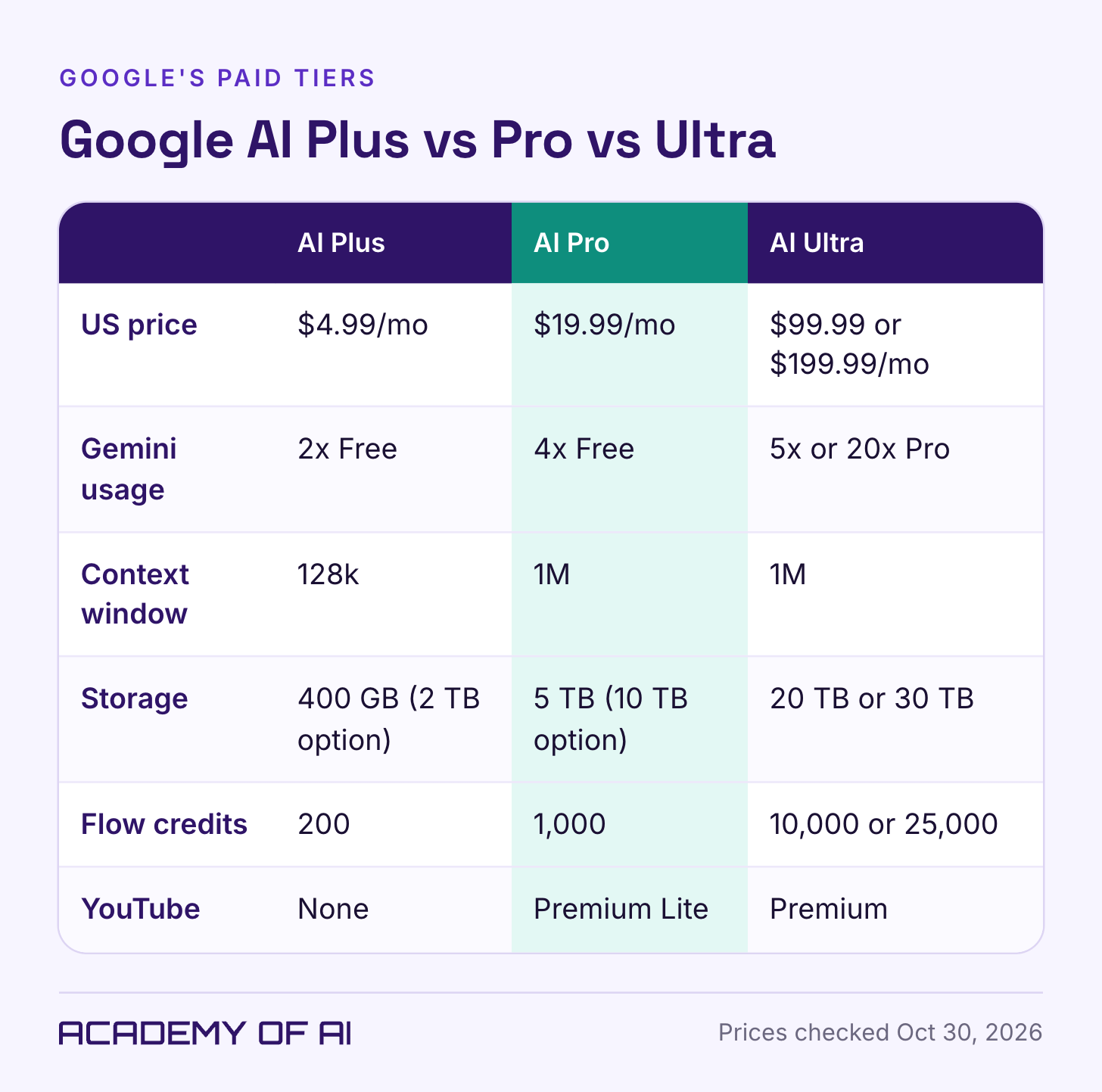
Consider Pro when its additional capacity solves a problem you can identify. For Ultra, record which product limit interrupts work, how often it resets and what that interruption costs. Gemini app usage, Antigravity access and Flow credits are different allowances. A weekly cap cannot reset several times in the same week, and regularly opening the app is not by itself a reason to spend $100 or more.
Free Trials, Student Offers and Carrier Bundles Live Now
Trial length and eligibility depend on the offer shown to your account. Read the renewal price before accepting. Trials do not necessarily include every paid benefit: YouTube Premium Lite and Colab compute units are excluded, and paying-member Antigravity access has separate eligibility. Do not choose a trial solely for a feature until its offer terms confirm access.
As checked October 30, eligible US college students age 18 and over can claim one year of AI Pro by December 31, 2026. Eligible UK university students instead get one year of AI Plus with the same deadline. The pages list renewal prices of $19.99 and £4.49 a month respectively. Verification, a personal Google account and a payment method are required. Read the offer exclusions: existing family-group membership and certain billing arrangements can make an account ineligible. Do not assume a school-issued account qualifies.
Google’s Pixel offer terms list six months of Pro with eligible Pixel 11 Pro, Pro XL and Pro Fold devices, redeemable through October 31, 2027. The eligible Pixel 10 Pro offer has an October 31, 2026 redemption deadline, still in the future on this article’s check date; duration varies by market, including Japan. In the US, Verizon lists a $10 monthly Pro perk for eligible mobile and home plans. Check the exact device, country and existing-subscription restrictions.
Google’s signup rules exclude direct upgrades for some third-party-billed memberships and Pixel Pass arrangements. Student and device offers can renew at a paid rate; record the renewal and cancellation terms when claiming. Partner billing can behave differently: Verizon says cancellation of its perk ends access immediately with prorated billing. Do not assume every route keeps benefits until month-end.
Signing Up or Switching From Another Google One Plan
On a computer, Google’s signup instructions are:
Open the Google One plans page and sign in with the personal Google account you want Pro on. Not a work or school account.
Choose Google AI Pro, then pick monthly or annual billing.
Review the price and the payment date Google shows you, agree to the terms, add a payment method and subscribe.
If you’re already on a Google One plan, such as 2 TB of storage, don’t stack a second subscription. Go to Manage membership in Google One, then Change membership plan, and switch there. On Android, the help page lists a separate path through the Play Store. And if your current Google One plan came through a phone carrier or Pixel Pass, sort that out first, because Google blocks direct sign-up in that case.
Workspace Accounts, Family Sharing and Country Limits
Pro only works on a personal Google account. Google’s sign-up page says so directly, and work or school accounts can’t join a Google One family group either. If your company email runs on Google Workspace, buying Pro on your personal Gmail won’t add anything to your work inbox.
For a work account, start with your Workspace edition. Business Starter lists Gemini in Gmail and access to the Gemini app; Standard adds features in more apps, including Docs and Meet, and expanded Notebook access. The administrator’s configuration and organization terms matter too. Buying Pro on a separate personal account does not add features or protections to the company account.
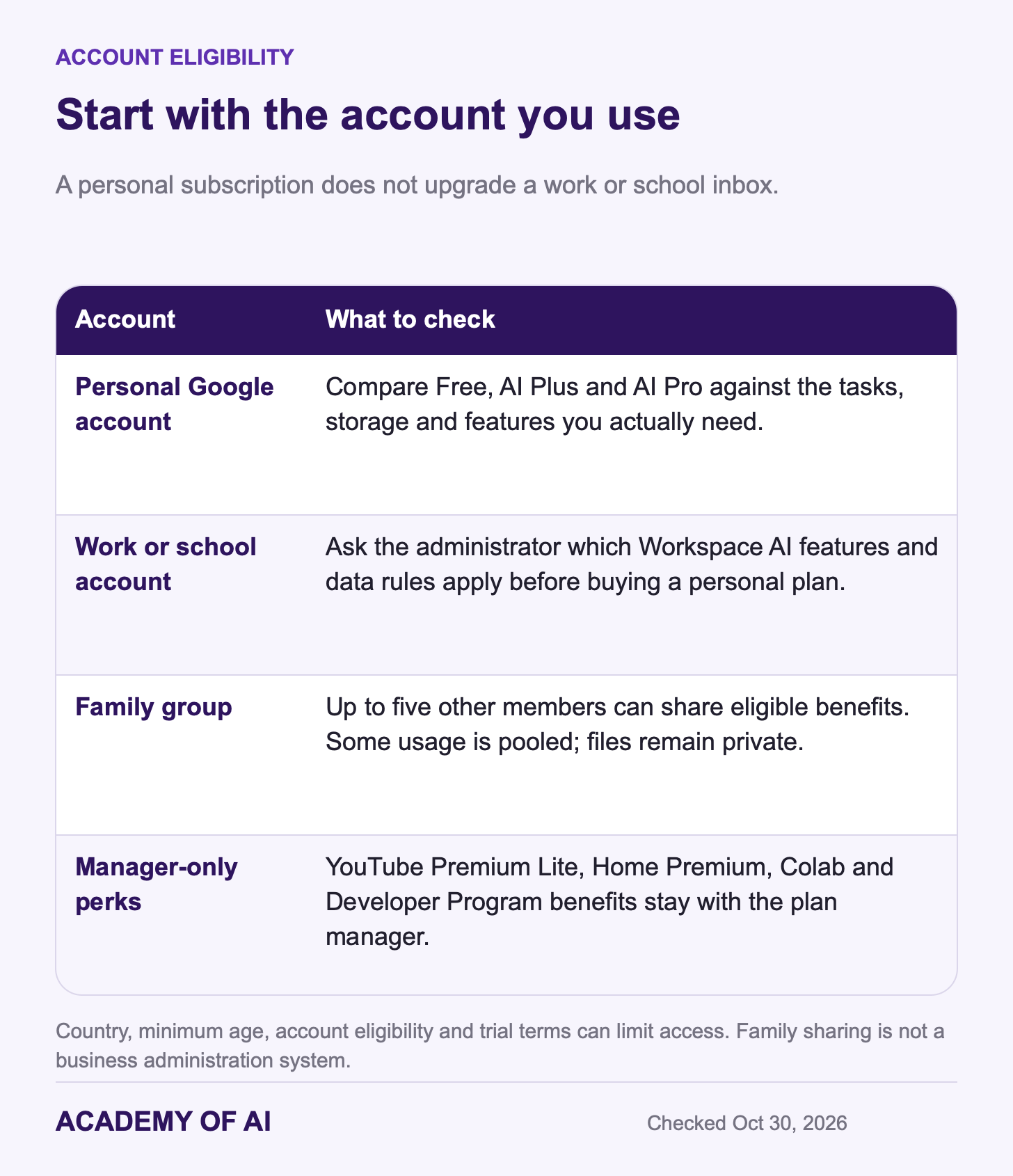
Google One’s family help page lets one Google AI Pro subscription cover up to five family members besides you. The plan manager has to be 18 or older, and everyone has to live in the same country. Members share the storage and AI benefits like the Gemini app, Antigravity and Gemini Notebook, but some limits, including Flow and Antigravity, are pooled across the whole group. Files stay private. Family members see each other’s names and how much shared storage each person uses, not each other’s documents. YouTube Premium Lite, Home Premium, Colab and Developer Program benefits stay with the plan manager.
Then there’s the list of features that depend on where you live. Per Google’s Gmail and benefits help pages, AI Inbox is US and English only. Tasks in Gemini is US only, English only and 18 and over. Chrome auto browse works only in the US and India. Google lists the Daily Brief morning digest as a US-only launch for paid plans in its I/O 2026 post. Discount unavailable extras and verify the local plan before deciding; a subscription does not override a feature’s country, age or language restrictions.
What Happens to Your Files and Inbox If You Cancel
Google’s standard cancellation rule keeps benefits through the billing period, but partner offers can differ. When paid benefits end, your storage falls to the allowance of any remaining plan or offer, normally 15 GB without one. Free Gemini features do not disappear just because Pro ends.
If you exceed the remaining quota, Drive uploads and syncing, Photos backups and Gmail sending and receiving can stop; incoming mail can bounce. Google’s storage policy says content may be removed after two years over quota, with at least three months’ notice and a chance to act. That is not a promise that every account and every file is protected from all other deletion rules for two years. Family members also lose access to shared paid storage when the plan ends.
To cancel, Google’s AI Pro help page points you to Manage subscription in Gemini, then Cancel membership. On gemini.google.com, Manage subscription sits in the Settings menu (the gear). The Google One app has the same option under Settings. Subscribed through Apple’s App Store? Cancel there instead. Before you do any of it, check your storage total and clear or download enough to fit the quota that will remain after cancellation.
Review Data Permissions Before Uploading Client Files
A personal Pro subscription does not turn Gemini into an organization-managed service. The Gemini Apps Privacy Hub says kept activity can be used to improve services and train models, and some content can receive human review. These are Gemini Apps rules; do not assume every product in the bundle handles data identically.
With Keep activity off, future chats are not used to train Google’s AI models unless you submit feedback. Google can retain them for 72 hours to provide and protect the service, with safety review still possible. Previously reviewed material can remain disconnected from your account for up to three years. Turning activity off does not retroactively erase all prior copies.
For client, employee or other confidential information, follow the owner’s permission and your organization’s approved tools and agreement. Removing names or switching account types alone does not establish permission. Gemini Notebook has separate data rules, including a feedback exception for personal accounts and different Workspace protections. Review the specific product before uploading. For another assistant’s approach, see our guide to Claude’s terms and privacy policy.
Is Google AI Pro Worth It? Checklist by Reader Type
Office workers should first check the account they use. If your employer provides Gemini through Workspace, compare that existing access with the specific personal tasks you would pay for. A personal Pro subscription can still serve side projects or family storage, but it will not upgrade the work inbox.
Freelancers and creators can test the larger storage allowance, Flow credits and 300-source notebooks against a real project. Record useful results, retries, review time and credits consumed. Needing more than 2 TB or making video every week is a reason to compare plans, not proof that this bundle is the best fit.
Small-business owners using personal Gmail should also consider administration, file ownership and data rules. A family-sharing feature is not a substitute for a business workspace. Compare the relevant Workspace edition before buying personal Pro for company use.
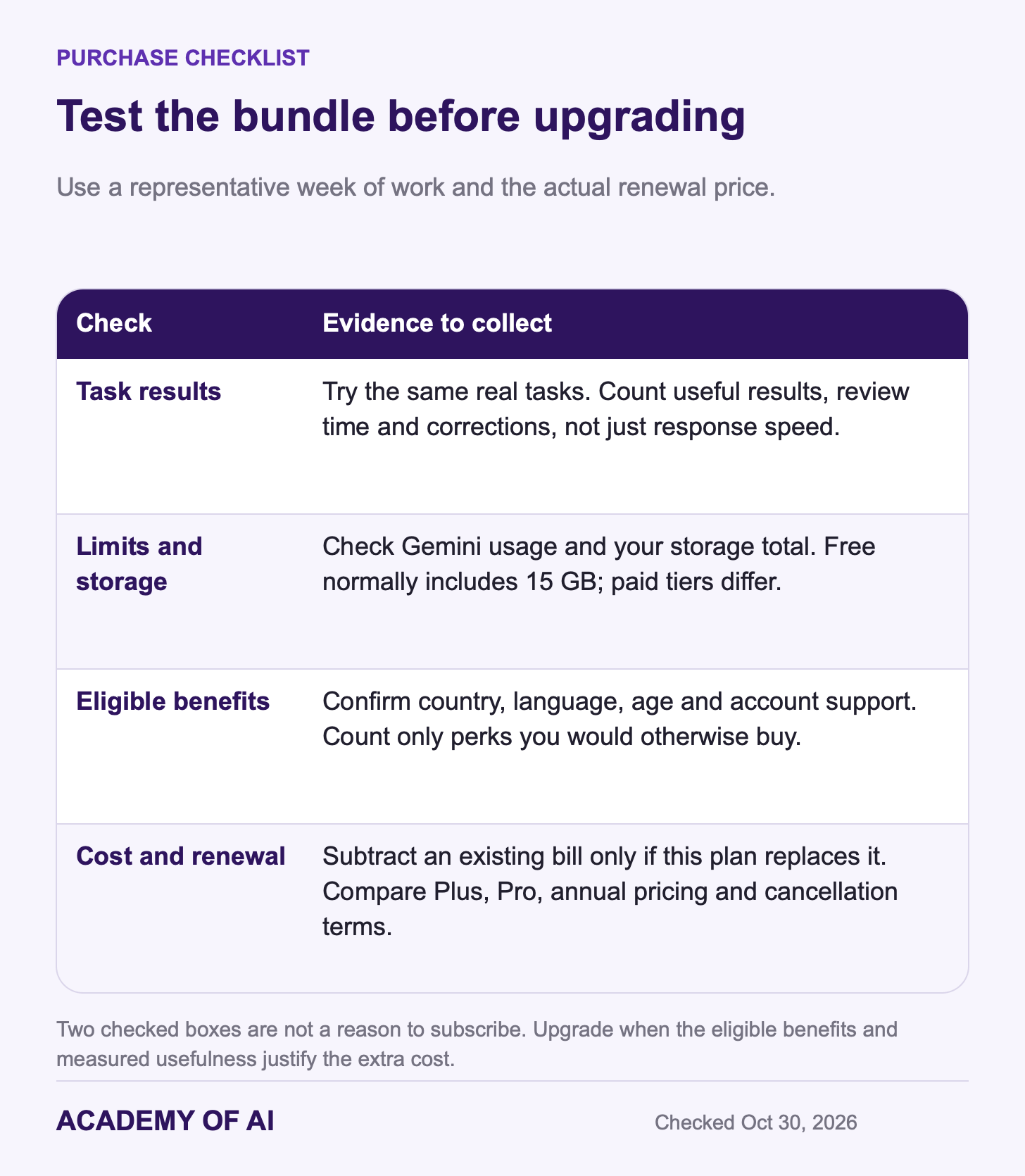
Use your current eligible access for a normal work week. Check Settings → Usage limits, record any interrupted tasks and inspect your storage total. Free Google accounts normally have 15 GB, not 400 GB. Then compare the extra cost of Plus or Pro against measured usefulness and benefits you would otherwise purchase. If you upgrade, set a review date before renewal.
Google AI Pro Subscription Questions, Answered
Is Gemini Advanced the Same Thing as Google AI Pro?
Yes: Gemini Advanced was the name of the paid Gemini experience inside Google One AI Premium from February 2024, and Google folded both names into Google AI Pro in May 2025, keeping the US price at $19.99. The bundle is what changed: 2 TB of storage back then, 5 TB and Gemini 4 Argon now.
Is Google One AI Pro Different From Google AI Pro?
No. A Google One AI Pro subscription and a Google AI Pro subscription are the same plan, with two names because it’s billed and managed through Google One. You’ll find it under Manage membership in Google One or under Manage subscription in Gemini’s settings.
Can You Pay for Google AI Pro Yearly?
Yes. Google confirms monthly and annual billing. Compare the annual checkout price for your country and chosen storage version against 12 monthly payments, including any promotion and renewal terms. An annual commitment is less flexible if you are still testing whether the plan fits.
Does Google AI Pro Include NotebookLM?
Yes, under its new name. NotebookLM became Gemini Notebook in July 2026, and Pro includes it with 500 notebooks, 300 sources per notebook and five times more Audio Overviews than the free tier.
Can You Use Google AI Pro on an iPhone?
Yes. Google’s plans FAQ says Pro works in the Gemini mobile app, though some features differ from the web version. If you buy through the App Store, Google’s cancellation page says you’ll need to cancel through Apple too.
Keep reading on Academy of AI