


Choose an AI image generator around the job you need to finish. ChatGPT and Gemini offer conversational generation and edits; Ideogram documents tools for text-heavy designs; Firefly offers Adobe workflows and model-specific terms; Midjourney offers visual-style controls. Canva, Recraft and Leonardo cover other needs, from finishing a social layout to exporting vectors or trying different models. None is the universal winner for every brief.
Model names and plan details change quickly. ChatGPT Images 2.5 arrived September 8, 2026; Midjourney now defaults to V8.2. Google lists August 17, 2026 as the shutdown date for its Imagen 4 endpoints in the Gemini API. An API retirement is not a statement that Google’s consumer image tools have disappeared.
How to read this guide: This is a documentation-based shortlist, not a hands-on ranking. We checked linked company pages, displayed plans and terms on October 30, 2026. Prices below are US-dollar amounts as displayed, with billing cadence stated; local taxes, offers and account eligibility can differ. The five prompts below give you a repeatable way to compare results. We have not run that comparison for this article.
Pick-by-Job Guide to the Best Image Generating AI
Most people don’t need the single “best” model. They need the tool that handles their most common job with the fewest fixes, under terms that let them use the result.
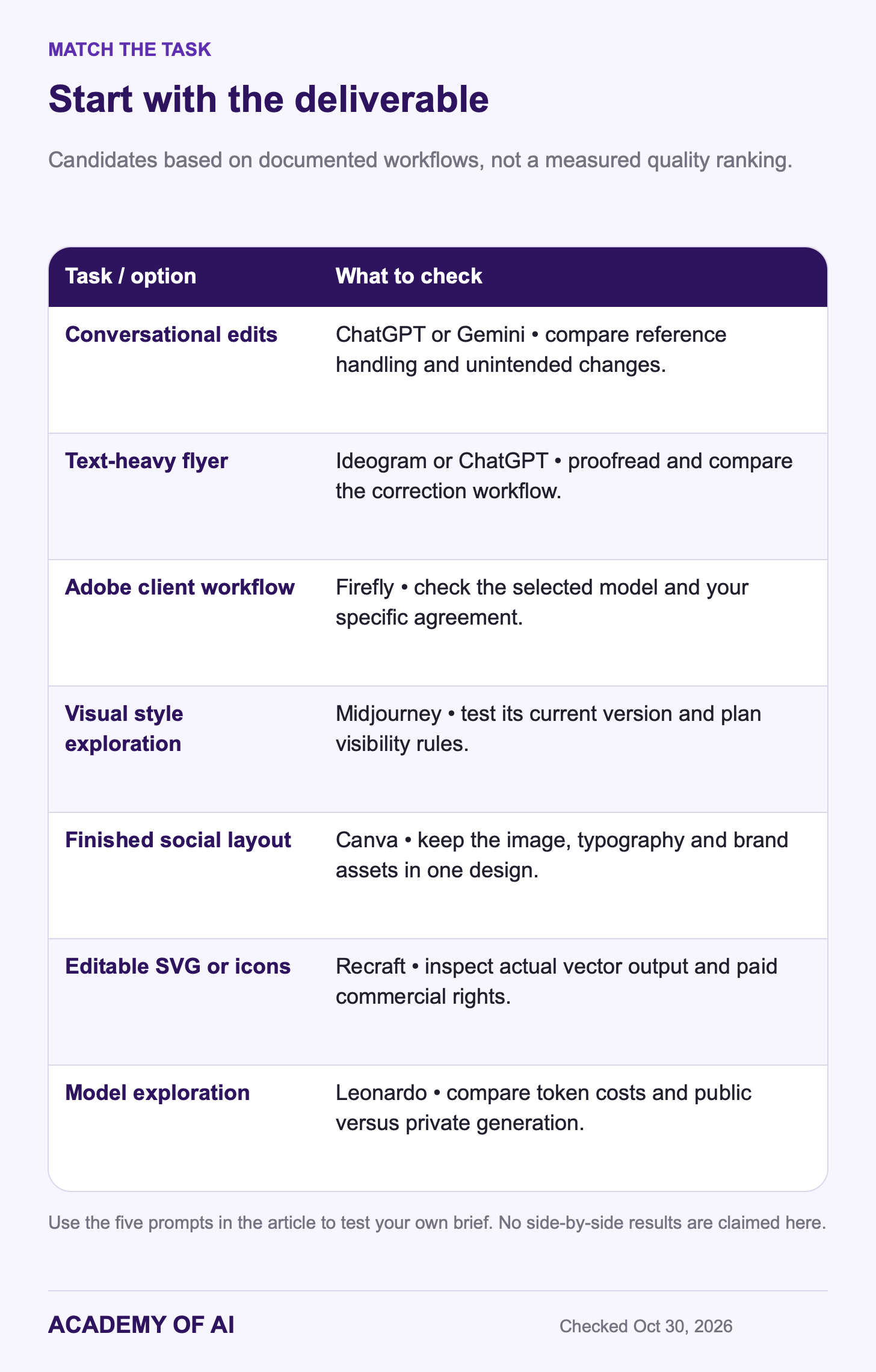
Treat the chart as a shortlist based on documented workflows. It does not report measured winners. If you already finish layouts in Canva, that may matter more than changing image models; if the deliverable must be an editable SVG, the file format may decide the choice before visual taste does.
How AI Image Generation Tools Made This List
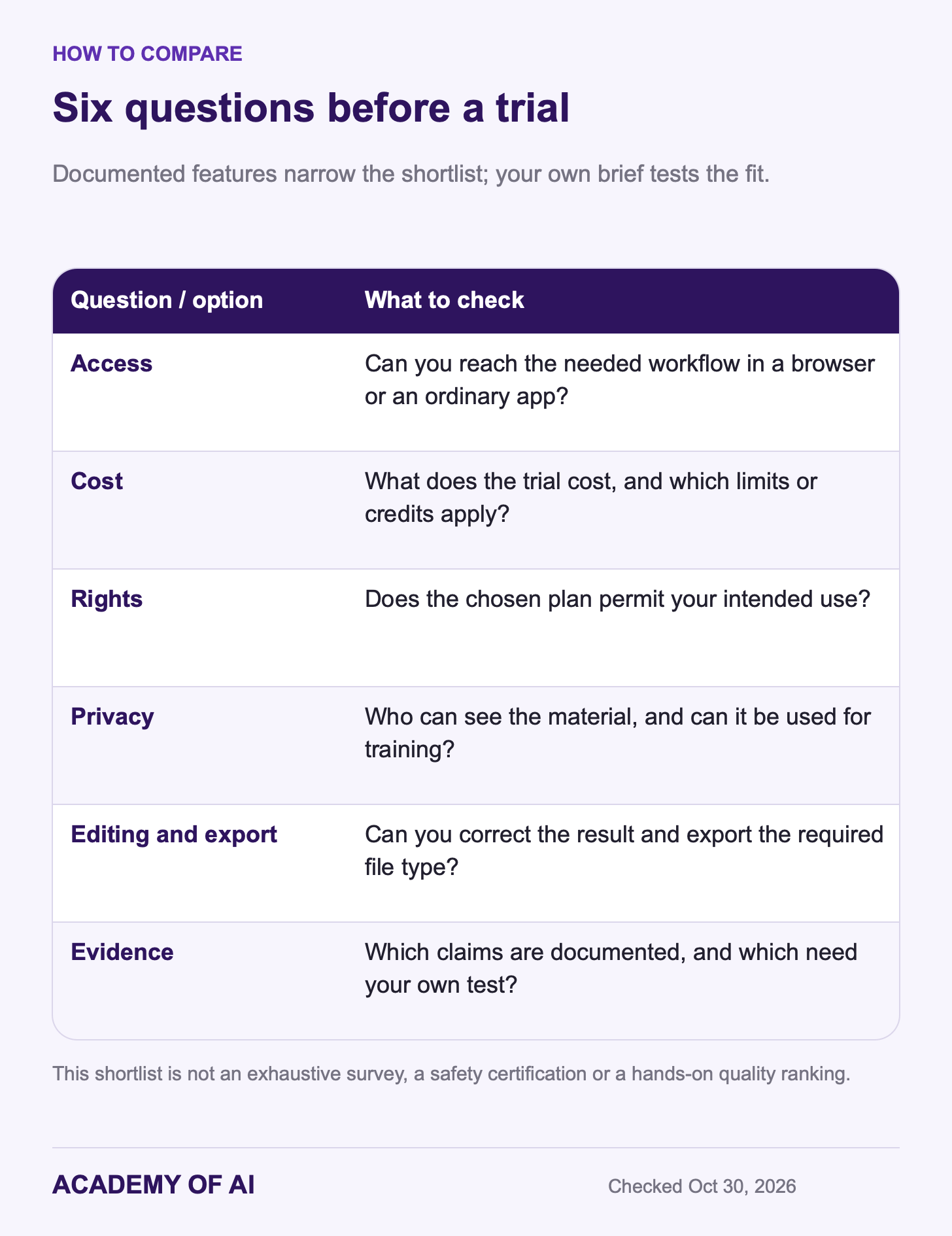
The selection focuses on accessible creative apps with a distinct use case and public information about plans and rights. The comparison asks six practical questions:
Can you reach the workflow through a browser or an ordinary app?
What does a small trial cost, and what limits apply?
Does the chosen plan permit your intended use?
Who can see the uploads and results, and can they be used for training?
Can you edit or export the format your project needs?
What evidence supports a feature claim, and what still needs your own test?
The eight main entries are not an exhaustive market survey or a safety certification. Vendor feature descriptions support the shortlist; they do not establish comparative output quality. Privacy, commercial-use permission and copyright protection are separate questions. C2PA Content Credentials describe provenance information; invisible watermarks such as SynthID provide another signal. Neither is a complete truth detector.
Five Prompts to Compare Any Image Generator Yourself
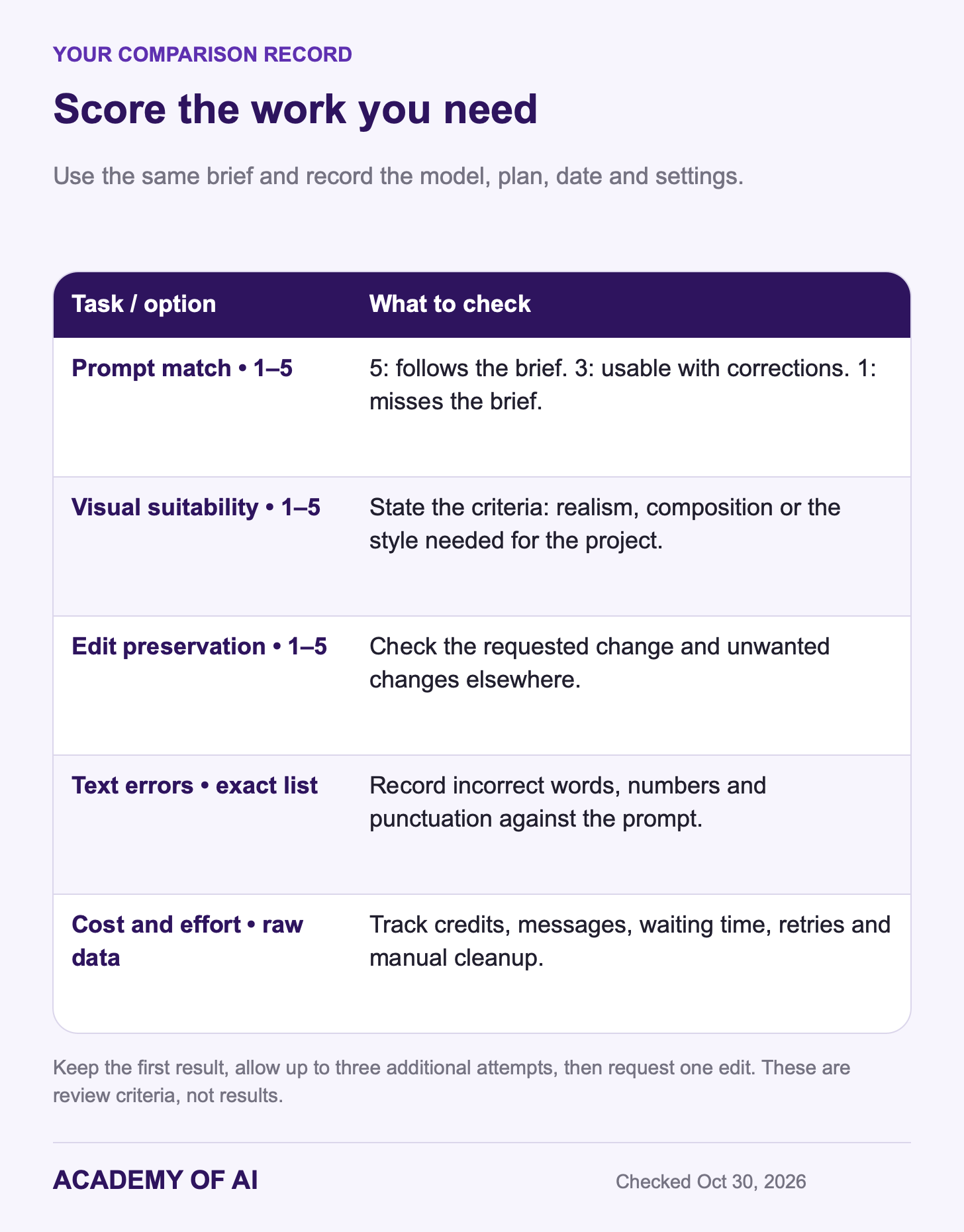
Use the same brief, reference material and aspect ratio wherever a tool supports them. Keep the first result, allow up to three further attempts, then request one targeted edit. Record the model, plan, date, settings and any unsupported feature. Different interfaces and limits prevent a perfect laboratory comparison, but a consistent process makes the tradeoffs easier to see.
Prompt 1: Product Shot on a Clean Background
Studio product photo of a matte sage-green ceramic coffee mug on a light oak table. Soft morning window light from the left, gentle shadow falling to the right. Plain off-white wall behind. A small sprig of eucalyptus beside the mug. Shallow depth of field. Square format. No text, no logos.Inspect the handle attachment, rim and shadow direction. Record concrete defects rather than deciding from the overall polish alone.
Prompt 2: Branded Social Graphic With One Headline
Square social media post for a small accounting firm. Headline text, exactly: "3 Tax Deadlines to Watch". Bold sans-serif lettering in white on a deep navy background. One coral circle as an accent shape behind a simple calendar icon. Generous margins. No other text.Check the exact headline and count unwanted elements. If the result needs precise typesetting, compare how easily you can fix it in the tool or finish it in a layout editor.
Prompt 3: Realistic Portrait of a Fictional Person
Photorealistic head-and-shoulders portrait of a fictional woman in her late 50s with short gray curly hair and deep brown skin. She wears a navy blazer and smiles slightly. Bright modern office behind her, softly out of focus. Natural window light. Vertical 4:5 format.This prompt asks for a fictional person. Check anatomy, texture and lighting without treating a plausible result as a real person’s photograph. For a portrait based on your own reference photo, see our ChatGPT self-portrait prompts.
Prompt 4: Flat Illustration for a Blog or Newsletter
Flat illustration of a small bakery storefront on a rainy street at dusk. Warm light glowing in the front window, a bicycle leaning against the wall, puddles reflecting the light. Limited palette of teal, mustard yellow and cream. Clean simple shapes, no outlines. Landscape 16:9 format. No text.You’re judging taste and consistency. Did it keep to three colors? Would a second run look like it belongs in the same set?
Prompt 5: Text-Heavy Event Flyer
Vertical event flyer for a community garden open day. Top headline: "Riverside Garden Open Day". Below it: "Saturday, June 12, 2027 | 10:00 AM to 2:00 PM". Then a line reading: "Free seedlings • Kids' planting table • Compost demo". Bottom line: "12 Mill Lane". Hand-drawn leaves around the border, cream background, dark green lettering. Spell every word exactly as written.Proofread every word, number, date and punctuation mark against the prompt. The practice flyer is fictional; June 12, 2027 is a Saturday. Record the errors and the work needed to correct them. Do not rely on the generated image to validate an event’s real details.
Scoring the Five Prompts Side by Side
Use a simple review scale and record the raw costs separately:
Prompt match, 1–5: 5 means all requested elements are present without unwanted additions; 3 means a usable result with several corrections; 1 means it misses the brief. Use 2 or 4 for intermediate results.
Visual suitability, 1–5: judge realism for the product and portrait, and your intended style for the social graphic, illustration and flyer. State your criteria; taste is subjective.
Edit preservation, 1–5: request one change, such as a terracotta mug or moving the flyer date to June 19, 2027. Check both the requested change and unintended changes elsewhere.
Text errors: list incorrect words, numbers or punctuation alongside the intended text. Do not use an assumed word-count denominator.
Cost and effort: record credits or messages, elapsed time, retries and manual cleanup. A credit is not necessarily one image.
Use the record to decide which tool fits your work, not to declare a universal winner. A slightly less polished first image may be the better option if its text is editable, its privacy settings fit the job or the final file is usable without conversion.
ChatGPT Images 2.5: Conversational Generation and Edits
ChatGPT keeps image requests and follow-up edits in a conversation. OpenAI’s Images 2.5 announcement reports better reference handling and editing consistency, plus faster generation than Images 2.0. Those are vendor comparisons. Image comments and supported transparent-background workflows can help specify a request; they do not guarantee that an edit leaves every other pixel unchanged.
The current image guide describes generation and editing across plans, with some features dependent on account or platform. Selections can affect areas outside the highlight. Use the flyer prompt to check text and the targeted edit to check preservation before committing a real design to the workflow.
Free can create images with limits. Plus is $20 per month in the US; Pro starts at $100 per month. Higher plans offer more image access, but do not convert that into an invented fixed daily image count. Unlimited wording remains subject to safeguards and operational limits.
OpenAI’s Terms of Use assign its rights in output to you to the extent permitted by law, while warning that output may not be unique. You still need the rights for your inputs and intended use. The Images 2.5 system card describes C2PA metadata and an invisible SynthID watermark.
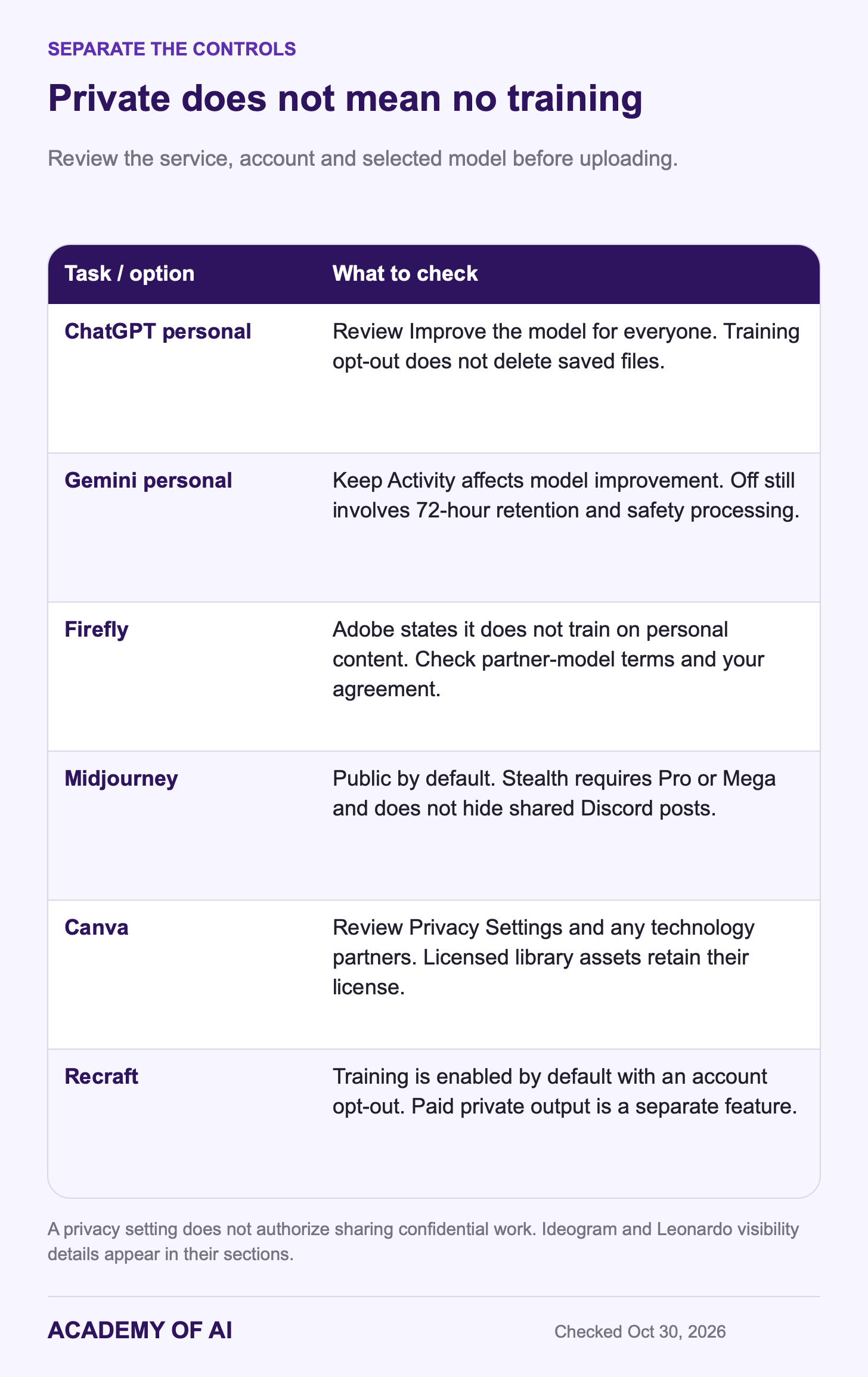
For personal accounts, review Improve the model for everyone before uploading. Turning it off controls model improvement; it does not delete files or make an unapproved work upload permissible. Business offerings have different defaults. Our ChatGPT setup guide explains the controls.
Consider ChatGPT when a conversation is the workflow you want or you already have access. Compare the actual edit results and limits before upgrading; our Plus decision guide covers the wider subscription.
Google Gemini and Nano Banana: A Free Starting Point
Google’s Free plan lists Flash-Lite access. Its image guide maps Flash-Lite to Nano Banana 2 Lite, intended for quick images rather than multiple references or repeated edits. Flash and Pro image requests use Nano Banana 2; eligible paid users can redo an image with Nano Banana Pro. Availability depends on account, age and region. App features and API model names should not be treated as interchangeable.
US Google AI Plus is $4.99 per month and Pro is $19.99. Google advertises two and four times Free usage respectively; that is not a fixed image count. The image help page lists 1K downloads without an AI plan and 2K with one. See our Google AI Pro guide for the rest of the bundle.
Use the free workflow for a small trial, then compare a more capable model if multiple references or repeated edits matter. Google’s feature descriptions are reasons to test those tasks, not evidence that Gemini wins them against another product.
Google now documents its Media watermark setting directly. The visible-mark toggle does not remove SynthID or C2PA signals. In India, South Korea and Vietnam, Google says the toggle is available only to AI Ultra subscribers. Treat these as product availability rules, not a complete summary of local disclosure law.
The Gemini Privacy Hub says chats and uploads can improve services when Keep Activity is on, with some human review; reviewed material can be retained for up to three years. With the setting off, future chats are retained for 72 hours and are not used for model training unless you send feedback. Reviewers may still be involved for safety. These personal-account controls do not replace an organization’s rules for confidential material.
Gemini is a candidate when you want to try image generation without paying or already use a Google AI plan. Check the selected model and download dimensions rather than assuming all Nano Banana experiences are the same.
Adobe Firefly: Adobe Workflows and Model-Specific Terms
Adobe says its own Firefly models use licensed Adobe Stock and public-domain training content and do not train on users’ personal or generated content. It also says partner models in its apps do not train on Creative Cloud subscribers’ personal content. Firefly outputs include Content Credentials. These are relevant vendor commitments, not a guarantee that every result is free of legal risk.
Firefly also offers third-party models. Adobe’s partner-model coverage applies only to eligible models and qualifying agreements, with exclusions including beta and preview releases. Selecting an Adobe model does not by itself establish indemnity for your account. If contractual protection is essential, confirm the model, license and agreement that actually cover the project.
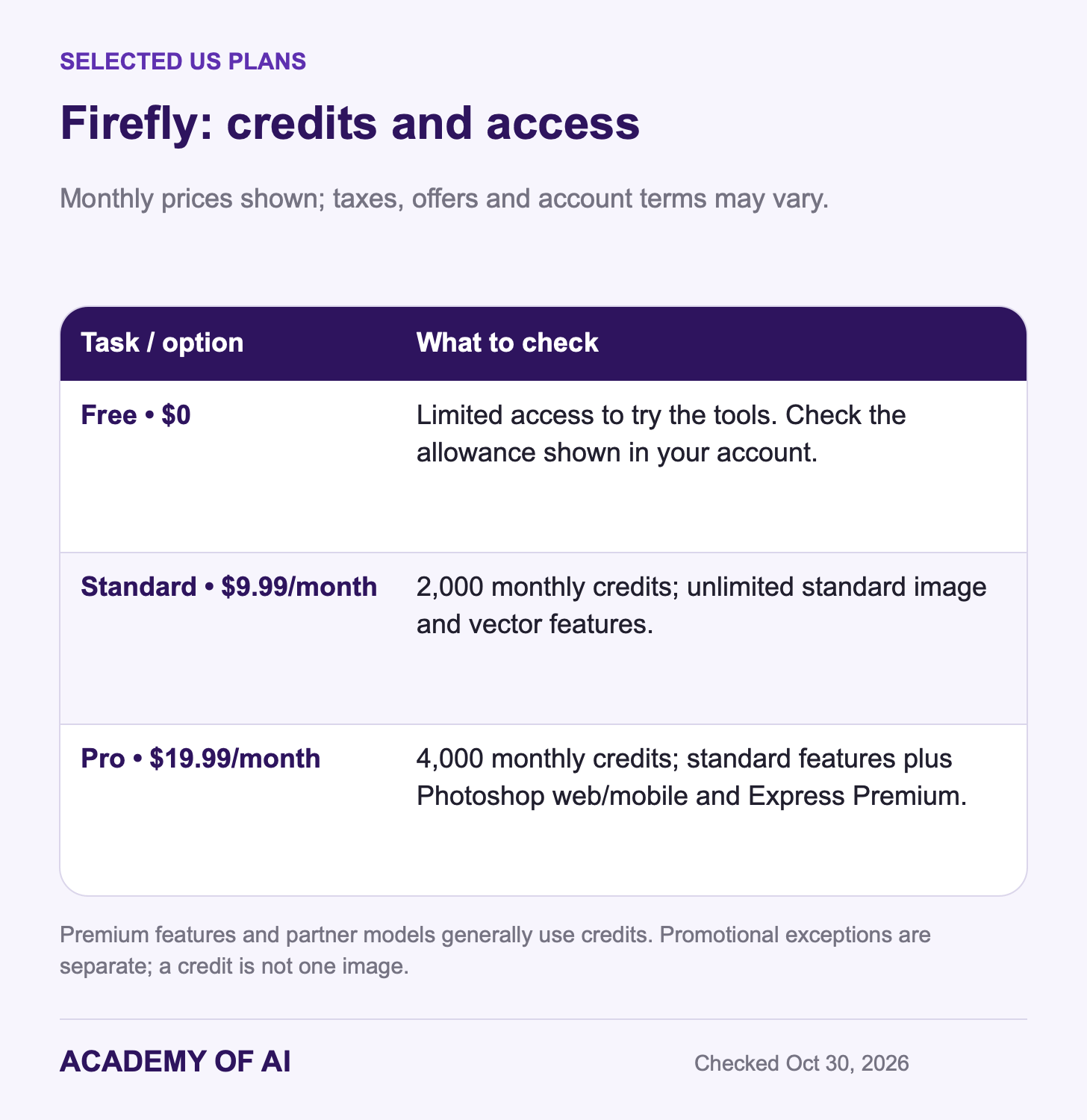
Adobe’s US listings show Standard at $9.99 and Pro at $19.99 per month. The credit guide lists 2,000 and 4,000 monthly credits respectively, plus unlimited standard image and vector features on paid Firefly plans. Pro includes Photoshop on web and mobile and Adobe Express Premium. Premium features and partner models generally draw credits; promotional exceptions have their own terms. Free offers limited access.
Consider Firefly when you want Adobe editing tools, documented model sourcing or a workflow your client already approves. Check which model is selected: paying for the Firefly app and choosing an Adobe-trained model are different decisions.
Ideogram: Text-Heavy Images and Editable Lettering
Ideogram’s text guide supports exact quoted wording, layout instructions and targeted corrections. It also describes editable Studio text layers. This makes it a candidate for flyers and posters, but every word still needs proofreading. Do not assume that a particular font, language or long passage will render correctly.
Its current site lists Ideogram 4.5 and 4.0 alongside other models and apps. If a typo matters, compare the time needed to correct it with simply adding text in a conventional layout tool. A good generated illustration with manually set lettering may be the more dependable deliverable.
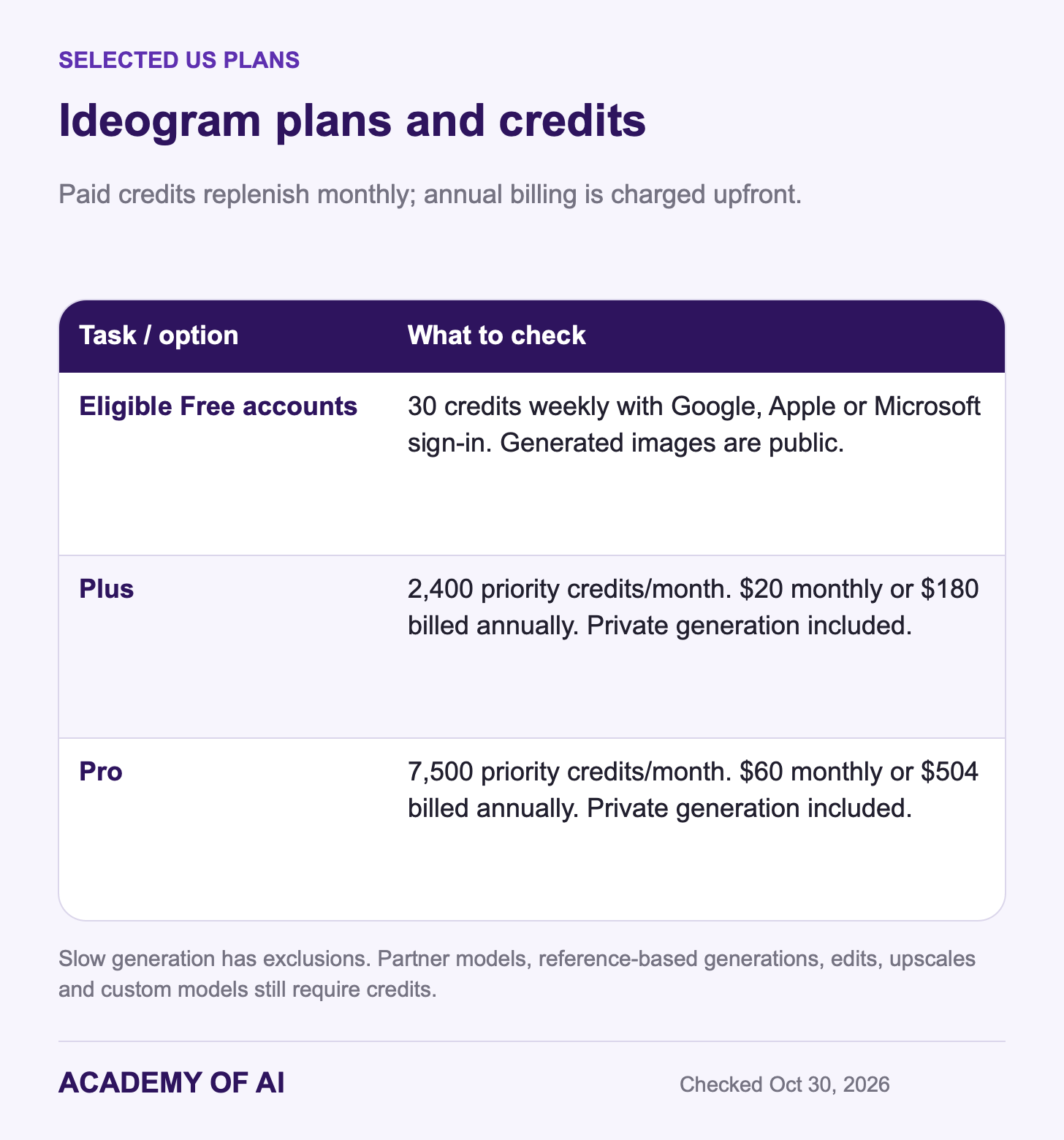
Ideogram’s plan documentation gives eligible Google, Apple or Microsoft sign-ins 30 free credits weekly; email-and-password accounts do not receive that allowance. Free generations are public. The docs and pricing page both list: Plus costs $20 monthly or $180 annually, with 2,400 monthly priority credits; Pro costs $60 monthly or $504 annually, with 7,500. Paid slow generation has exclusions: partner models, reference-based generations, edits, upscales and custom models still require credits. Private generation is included on Plus and Pro.
Ideogram’s terms do not claim ownership of your output or restrict commercial use, but require you to respect third-party rights. Public material can be remixed through the service; private content has different sharing protections. Private visibility should not be mistaken for a blanket statement about all data processing.
Put Ideogram on the shortlist for text-heavy designs and compare its correction workflow with ChatGPT or the layout tool you already use. Keep confidential material out of a public-generation workflow.
Midjourney: Style Controls With Paid Web Access
Midjourney’s current version guide lists V8.2 as the default, released July 24, 2026. Its newer Edit Model replaces older Omni Reference, Character Reference and Retexture workflows. If you follow a tutorial written for V7 or V8.1, check the version and feature names before expecting the same controls.
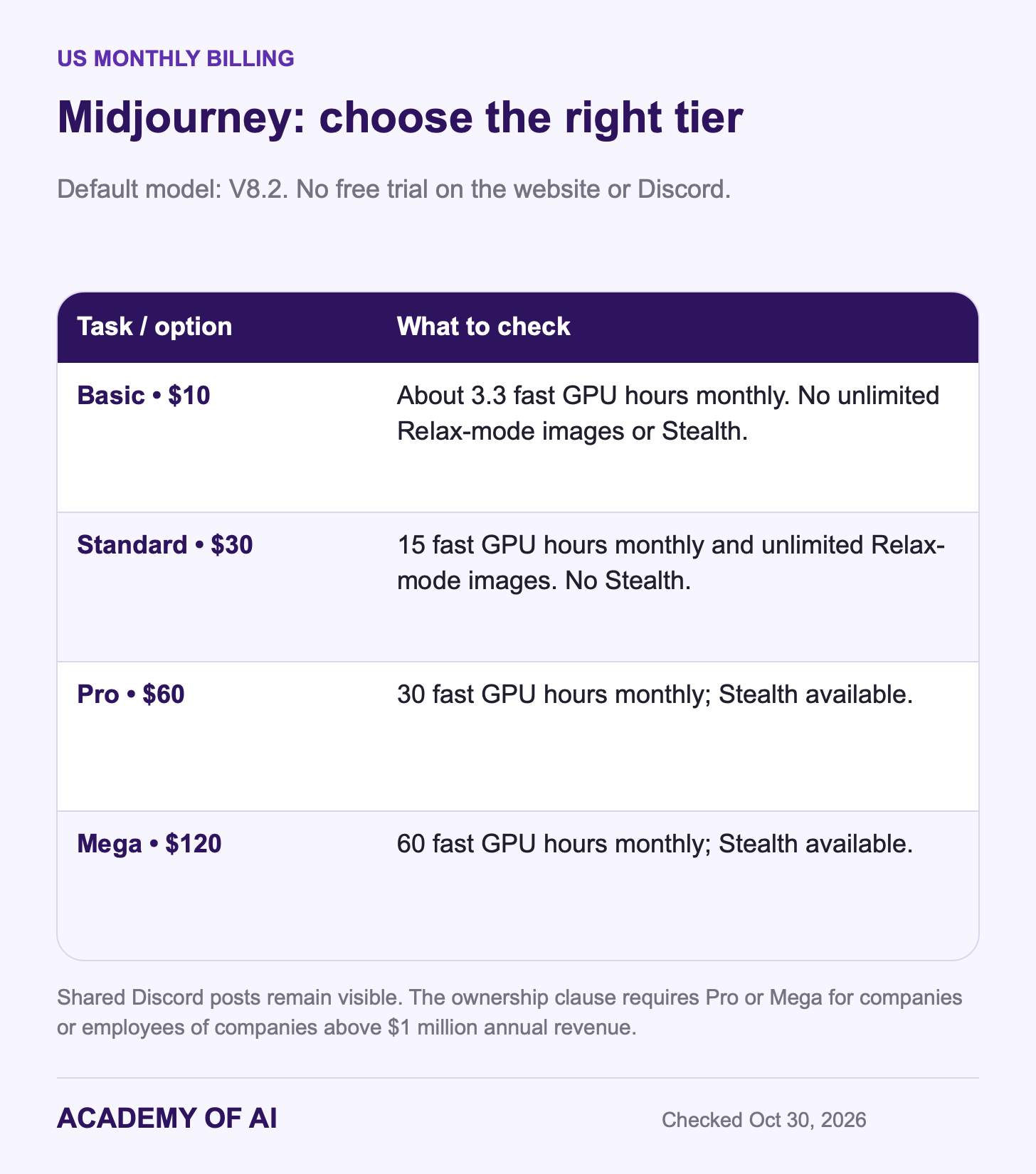
There is no current free trial on the website or Discord; the niji journey mobile app has a separate limited trial. Basic is $10 monthly with about 3.3 hours of fast GPU time. Standard is $30 with unlimited Relax-mode images. Annual plans cost less per month but require the year’s payment upfront.
Midjourney’s terms make content public and remixable by default and give the company a broad continuing license. Pro ($60 monthly) and Mega ($120) offer Stealth Mode, but anything made in a shared Discord space remains visible there. The ownership provision requires Pro or Mega for a company, or an employee of a company, with more than $1 million in annual revenue. Review that condition for work use.
Consider it for a visual-style workflow you want to control and iterate. Test text-heavy work rather than declaring the current model incapable from older results. If you need free web access or private generation on an inexpensive plan, the plan structure may rule it out before the image quality does.
Canva AI Images: Generate Inside the Finished Layout
Canva can be useful when your final flyer, slide or social post already lives in its editor. The US pricing page displayed Pro at $18 per month or $144 billed yearly for one person. Its shared AI allowance estimates up to 20 Premium uses on Free, or up to 200 Premium or 20 Ultra uses on Pro—not separate additive pools. Standard AI on paid plans does not draw from that allowance, subject to fair use. Complex tasks can consume more, so these are not guaranteed image counts.
Under Canva’s AI terms, output incorporating or modifying licensed library content remains subject to that content’s license. Editing a library photo does not make you its owner. Your privacy settings control use of data to improve AI services, and technology partners may process inputs to provide features. Review both the assets used and the tool’s settings before client work.
Choose Canva for the whole design workflow if that is where you will arrange text, brand elements and exports. A standalone image benchmark would not capture the value—or limits—of finishing everything in the same editor.
Recraft: Editable Vectors With Plan-Dependent Rights
Recraft supports raster and vector workflows. Its current documentation demonstrates SVG output, which is different from asking a raster generator for a vector-like style. For logos or icons, inspect the actual file, shapes and editability before handing it to a designer; a clean preview alone does not establish a production-ready asset.
Recraft’s October 21, 2026 terms restrict free-tier assets to personal use and assign them to Recraft. Paid subscriptions permit business use and assign output rights, subject to the terms. Training use is enabled by default; account settings offer an opt-out, with the terms specifically stating that opted-out uploads are not used to train its image model. Private output and training choices are separate.
The monthly pricing view displayed Basic at $12 with 1,000 credits and the entry Pro option at $20 with 2,000 credits. Recraft notes that offers and allowances may vary during product tests. Monthly credits reset; separately purchased top-ups do not expire. Free generations are public and not licensed commercially. Confirm the offer shown to your account before buying for a client project.
Leonardo: Daily Free Tokens and Optional Private Generation
Leonardo’s pricing page lists 150 daily tokens on Free, public creations and Auto-only model access. Monthly paid prices are Essential $12 with 8,500 tokens, Premium $30 with 25,000 and Ultimate $60 with 60,000. Premium and Ultimate offer relaxed generation only for selected models; it is not unlimited access to every model or operation. Tokens pay for operations at varying rates, not a fixed image count.
Its commercial-use guidance permits use of your free generations commercially, but they are public and can be reused through the service. Leonardo retains broad rights to public images and prompts. Paid users can generate privately, but must ensure private mode is on; merely paying does not make every image private. Provider ownership language does not settle copyright protection in every jurisdiction.
Use the free plan to explore with material suitable for public display. For client assets, check the private-mode setting, model access and terms that apply to the work before generating.
Other Options and Why This Shortlist Is Limited
Bing Image Creator is another consumer option, with its own terms. Do not apply a different Copilot product’s terms automatically to it. Its entertainment-purpose wording and absence of a rights guarantee deserve review for work use, but that wording alone is not enough to declare every commercial use prohibited. We have not completed the same feature comparison for it here.
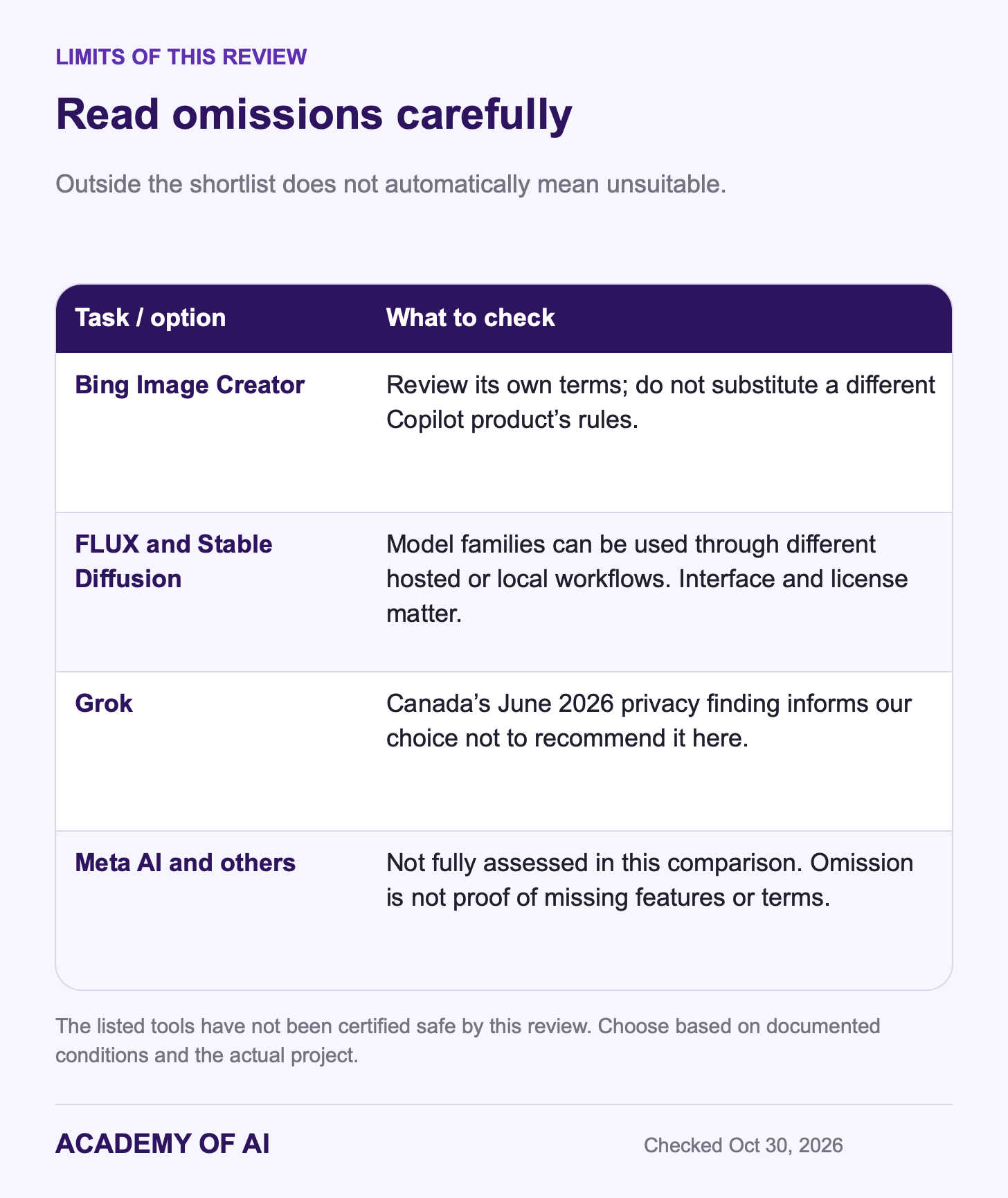
FLUX and Stable Diffusion also appear through hosted services as well as developer or local workflows. Black Forest Labs offers pay-as-you-go access and model-licensing options; a model name alone does not tell you which interface, privacy controls or license you will use. They are outside this app-focused comparison, not disqualified on the claim that they always require a local install.
For Grok, there is a concrete concern to weigh: Canada’s Privacy Commissioner reported on June 11, 2026 that X and xAI violated federal private-sector privacy law by launching the image tool without appropriate safeguards, enabling sexualized deepfakes. The statement also describes subsequent safeguards and commitments. That finding informs our decision not to recommend it here; it is not a claim that every listed alternative has been certified safe. See our Grok comparison for broader context.
Meta AI and other products are not fully assessed in this shortlist. Omission is a limit of this review, not proof that a product lacks usable features or published terms.
Who Owns Generated Images, and When to Label Them
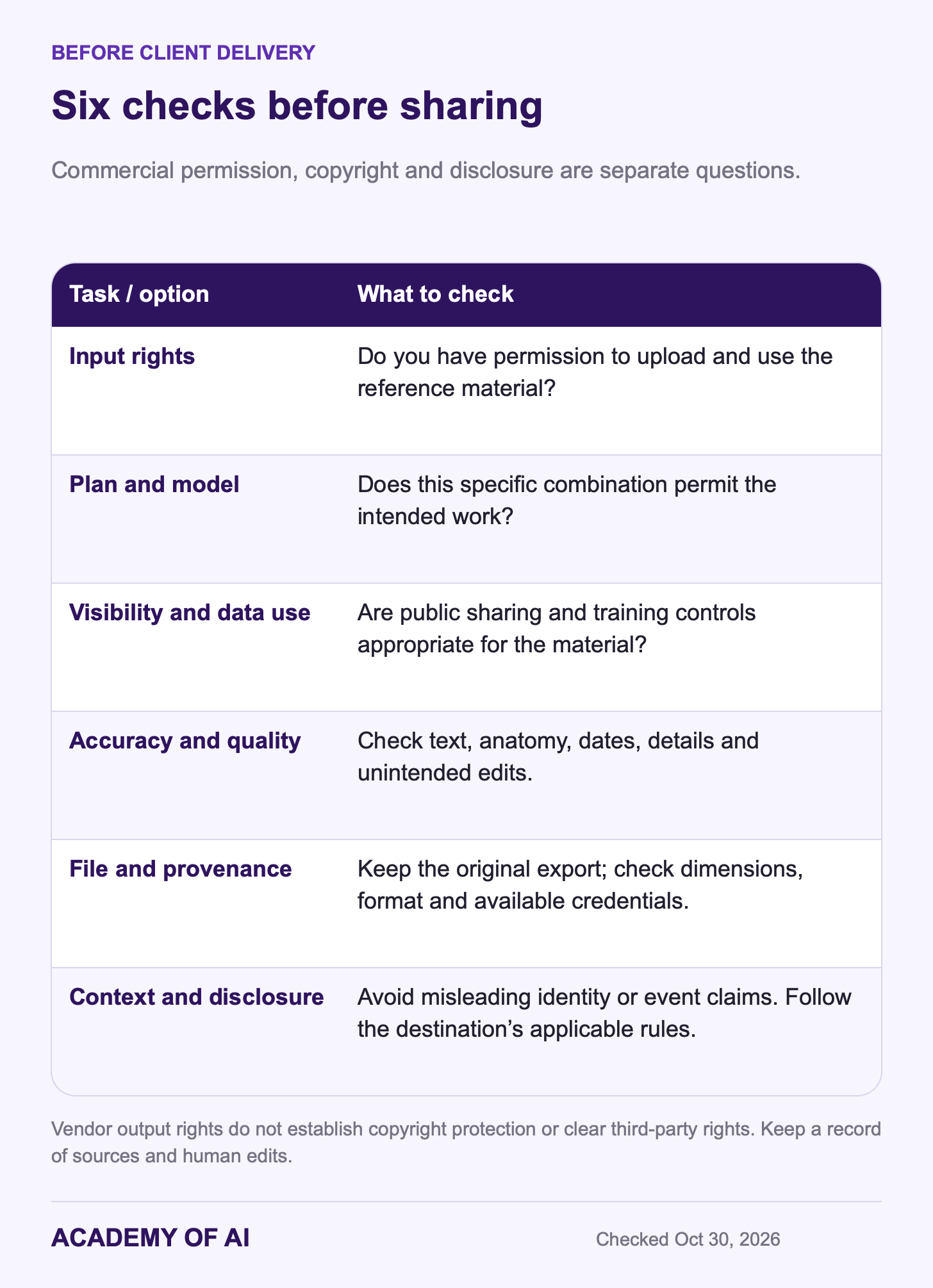
A vendor’s permission to use output is separate from copyright protection. The US Copyright Office’s January 2025 report says protection depends on sufficient human-authored expression; prompts alone do not establish it. Human creative arrangements or modifications may qualify. Do not assume a subscription grants exclusive rights to a generated logo or clears trademarks, likeness rights and licensed source assets.
Use reference photos and brand assets you have permission to use, and check the service’s rules for depicting identifiable people. Describe the look through composition, palette, lighting and medium. For a client deliverable, document the source assets, tool, model and human edits so the approval is based on what you actually made.
YouTube requires disclosure for realistic synthetic or meaningfully altered content, while minor aesthetic edits and clearly unrealistic scenes have different treatment. The European Commission’s Article 50 guidance says the AI Act’s transparency rules apply from August 2, 2026. Professional deployers must disclose qualifying deepfakes; personal nonprofessional use is outside that deployer definition, and artistic works have tailored disclosure rules. These are context-specific obligations, not a universal requirement to label every AI-assisted edit in the same way.
Preserve the original exported file and its provenance information. Missing Content Credentials do not prove an image is human-made; a credential is not a guarantee that the scene is true. If you upload a file to a verification service, first check whether you are permitted to send that material to that service.
Try the Relevant Brief Before Paying
Pick two candidates for your main job. Use a free allowance where available, or decide on a small test budget before subscribing; Midjourney does not offer a free web trial, and Recraft’s free output is not for commercial use. Compare the finished result, cleanup time, privacy controls and permitted use. Subscribe only if the chosen plan solves a recurring need you have actually tested.
AI Image Generator Questions, Answered
Which AI Program Is Best for Images?
There is no measured overall winner in this article. Start with the task: conversational edits, text-heavy layouts, visual style, an editable vector file or a finished design in an existing app. Then test the relevant prompt in two candidates whose plans and terms fit your work.
Which Tool Makes the Most Realistic Images?
The documentation does not establish a directly comparable realism winner. ChatGPT and Gemini are accessible candidates for the fictional portrait prompt; other tools may fit your taste. Inspect anatomy, skin texture, lighting and unwanted changes, and record the model and settings used.
Which of the Best AI Tools for Image Generation Are Free?
ChatGPT, Gemini, Firefly, Canva, Ideogram, Recraft and Leonardo offer free access with different limits and conditions. Free does not mean private or commercially licensed: Ideogram and Leonardo free generations are public, and Recraft’s free assets are for personal use only. Check the specific plan before using real client material.
Do These Tools Watermark What You Make?
Some use invisible watermarks, provenance metadata or both. OpenAI’s Images 2.5 system card describes C2PA and SynthID; Google’s Media watermark control changes only the visible mark; Adobe says Firefly output includes Content Credentials. Preserve these signals and follow the destination’s disclosure rules. No marker is a complete substitute for explaining a material AI alteration.
Keep reading on Academy of AI