


A useful ChatGPT self-portrait prompt names the features you want preserved, describes a visual style, and specifies the image’s destination. Upload a clear photo you have permission to use, choose one of the 15 style prompts below, and compare the result with your reference. A likeness instruction is a request, not a guarantee that your face will remain unchanged.
OpenAI introduced ChatGPT Images 2.5 on September 8, 2026, with improvements it reports in reference-image handling and editing consistency. Those are company claims, not results from our own portrait comparison. This guide includes 15 style prompts, six targeted photo edits and current privacy controls, checked October 30, 2026.
What Photo to Upload for Pictures of Yourself
Choose a recent photo in even light, facing the camera or turned slightly, with your face clearly visible. A head-and-shoulders crop gives a straightforward reference. Crop out other people and keep everyday features such as glasses, a head covering or hearing aids if you want them represented. Avoid filters that have already changed your face; the reference should look like you.
OpenAI’s Images help page lists image creation on every ChatGPT plan on web, iOS and Android. Its higher-capability Images with thinking option is listed for Plus, Pro and Business, with Enterprise and Edu availability still described as forthcoming. Free image generation has tighter limits. Describe the image in a chat or use More > Images where available; labels and access can vary by account.
Every style prompt below includes a likeness line. You can also keep this one handy and paste it at the end of any prompt that drifts:
Use the attached photo as the reference for my face. Keep my face shape, skin tone, eye shape and color, nose, hairline and hairstyle recognizable. Keep my [glasses / head covering / freckles / gray hair] as they are. Don't slim, smooth, lighten or "beautify" my face unless I ask.Keep the final sentence if those changes would be unwanted. Then check the result: even an explicit instruction can be missed. Ask for a narrow correction or choose another result instead of assuming the prompt protected your likeness.
Start with the prompt that fits the job:
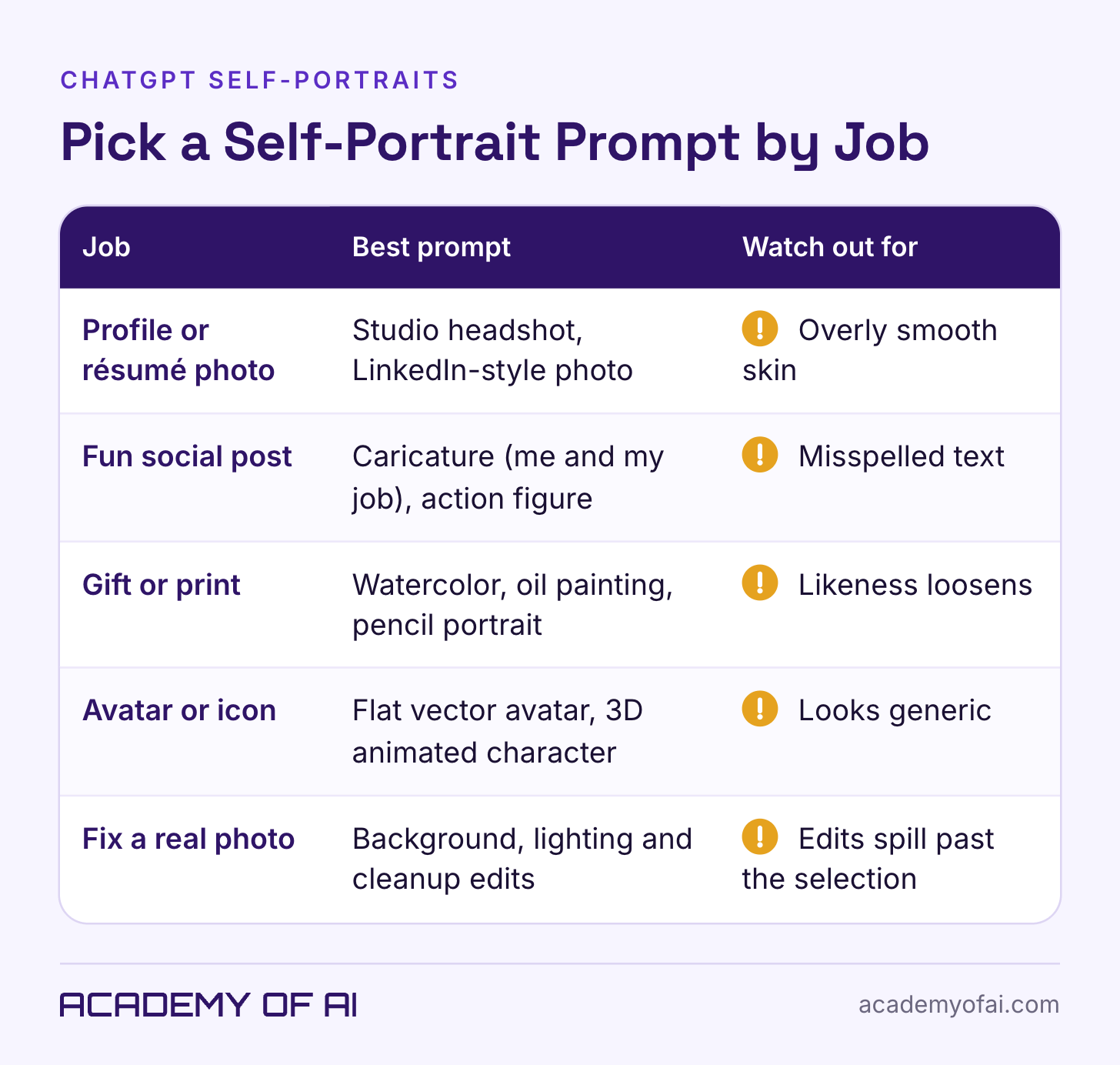
How These ChatGPT Self-Portrait Prompts Were Chosen
The prompts cover distinct uses: work-related caricatures, professional profiles, illustrated portraits and playful social formats. They describe line, lighting, texture and framing directly, so you can change those choices without relying on an artist or studio name. Each is designed around one reference photo, but a complex scene may still require retries or manual cleanup.
Testing note: We have not run these prompts for this article. They are starting points based on OpenAI’s documentation and portrait and illustration vocabulary, not a ranked test of likeness or output quality. Results can vary between runs, accounts and model updates.
ChatGPT Caricature Prompts: Me and My Job
For a job caricature, provide the details you want included: your role, a specific work setting and a short list of objects. This makes the personal information in the request explicit. A memory-based version can only use context available to that conversation; it is not a complete or reliable biography.
Caricature of You and Your Job
Using the attached photo, create a caricature of me as a [job title] who [one specific detail, e.g. runs a cake business from my kitchen].
Exaggerate my head size and my most distinctive feature ([big smile / curly hair / round glasses]) in a friendly, flattering way, on a small cartoon body.
Surround me with things from my work: [3 to 5 objects, e.g. stand mixer, order notebook, cooling racks, delivery boxes].
Style: hand-drawn caricature, clean ink outlines, warm marker-style color, plain off-white background.
Keep my face recognizable: same skin tone, eye shape, hairline and [glasses / head covering].
Square format. Add the words "[short caption]" on a hand-lettered banner at the bottom.
Use this for a playful work-themed post or team-page illustration. Proofread the banner at full size, including names and punctuation. If exact wording matters, add the text in a layout tool after generating the portrait.
If you use personalization, this optional variation asks for an approval list first. Check the list yourself; remove private or inaccurate details before asking for the image:
Make a caricature of me and my job based on what you know about me from our past chats. Before you create the image, list every detail you plan to include (job, hobbies, objects, places, anything personal) and wait for me to approve or remove items.Review the finished image as well as the list. A school name, home address or identifiable location can still appear through an invented detail or a visible part of the reference photo. Share only what you intended to make public.
Classic Street-Fair Caricature
Turn the attached photo into a classic street-fair caricature: oversized head, tiny body, kind but exaggerated features, quick confident black ink lines and light gray marker shading on white paper.
Show me [doing a hobby, e.g. riding a bike / holding a giant coffee / walking my dog].
Keep my face recognizable: same eye shape, smile, hairline and skin tone.
Portrait orientation, plain background.
This exaggerated style can suit gifts or a retirement card. It deliberately distorts proportions, so decide whether the result still feels recognizable and kind to the person pictured.
Studio Headshot and LinkedIn Photo Prompts
Professional portraits need a stricter likeness check than a comic illustration. Compare age, skin tone, face shape, hairline and visible aids with the original before using a result on a profile or speaker page.
Studio Headshot on a Plain Backdrop
Create a professional studio headshot of me from the attached photo.
Framing: head and shoulders, centered, eyes about one third from the top of the frame.
Lighting: soft key light from the front left, gentle fill, a subtle rim light on my hair.
Background: smooth studio paper backdrop in [light gray / warm beige / deep navy] with a slight gradient.
Clothing: [plain dark crew-neck sweater / white collared shirt / the outfit in my photo].
Expression: relaxed, natural closed-mouth smile.
Photorealistic, sharp focus on the eyes, natural skin texture with visible pores. Don't smooth my skin, change my face shape or alter my skin tone.
Aspect ratio [4:5 / 1:1].
The lighting directions describe a studio setup. The output is still an AI-generated interpretation, not a photograph from a real studio session. Check for altered features, excessive skin smoothing and invented details before using it in a bio or press kit.
LinkedIn-Style Professional Photo
Make a professional profile photo of me for LinkedIn from the attached picture.
Setting: [a bright modern office / a bookshelf-lined study / outdoors near green trees], softly blurred behind me.
Wardrobe: [business casual, navy blazer over a plain top / smart knitwear / my own outfit, cleaned up].
Pose: shoulders angled slightly, face toward the camera, chest-up crop.
Light: natural window light from one side.
This should look like a photo a good photographer took of me on a good day, not a different person. Keep my age, face shape, skin tone, hairstyle and [glasses / head covering] the same.
Square 1:1, high resolution.
Choose a setting appropriate to how you plan to use the image, without implying a workplace or affiliation you do not have. Keep your actual age and features. LinkedIn’s profile-photo guidelines allow artistic renderings, but require the image to reflect your likeness.
Watercolor, Oil, Sketch and Cartoon Portrait Prompts
Illustrated styles deliberately simplify or exaggerate features. Use them for a particular look rather than assuming they preserve identity better than a headshot. If a result looks like someone else, name the feature that changed and compare the next version with the original.
Watercolor Portrait
Paint a watercolor portrait of me from the attached photo.
Loose, transparent washes with soft edges, visible cold-press paper texture, some white paper left unpainted around the edges.
Palette: [muted blues and warm ochres / soft greens and pinks].
Head and shoulders, three-quarter view. Keep my face recognizable: same eye shape, nose, smile and skin tone.
Portrait orientation, framed for [4:5 / the proportions of A4]. Leave space around the head for cropping.
For a print, specify the intended proportions and check the downloaded pixel dimensions against your printer’s requirements. Asking for an 8-by-10-inch image does not itself guarantee enough resolution for a good print.
Classical Oil Painting
Create a classical oil portrait of me based on the attached photo.
Dark, warm background, dramatic light from one side, rich shadows, visible brushstrokes and a slightly cracked varnish texture.
I'm wearing [a dark velvet jacket / a high-collared shirt / my own outfit], seated, three-quarter view.
Keep my face realistic and recognizable, with my real skin tone and features.
Portrait orientation, 4:5.
The setting can be playful or formal. If you include a pet, supply a separate reference you have permission to use and check both likenesses; adding another subject adds another detail to review.
Pencil or Charcoal Sketch
Draw a realistic [graphite pencil / charcoal] portrait of me from the attached photo.
Careful shading, cross-hatching in the shadows, smudged soft edges, visible paper grain, no color.
Head and shoulders, looking slightly off-camera.
Match my face closely: eye shape, nose, jawline, hairline and expression.
Square format on an off-white sketchbook page.
For a tribute or memorial, have someone who knew the person check the likeness. A pencil style can still alter facial structure or invent details; it is not inherently a more accurate option.
Hand-Painted 2D Animation Still
Using the attached photo, turn me into a character in a still from a hand-painted 2D animated film.
Soft, painterly backgrounds with watercolor-like skies, gentle clean line work, warm afternoon light, slightly simplified features with expressive eyes.
Setting: [a cozy kitchen / a seaside town / a train platform in summer].
I'm [reading / cooking / looking out a window].
Keep my hairstyle, skin tone and [glasses / head covering] the same.
Wide 16:9 frame.
Choose this one when you want a whole scene around you. The 16:9 frame makes it work as a desktop wallpaper or a video thumbnail.
Stylized 3D Animated Character
Make me into a stylized 3D animated movie character from the attached photo.
Smooth rounded shapes, slightly larger eyes, soft subsurface skin lighting, warm studio light, shallow depth of field.
Outfit: [what I'm wearing in the photo / a cozy sweater and scarf].
Expression: [curious / mid-laugh / confident].
Keep my skin tone, hair color and texture, and face shape recognizable. Don't make me look like a child.
Square 1:1 on a [soft pastel / plain] background.
This can suit an illustrated avatar. The age instruction asks the model to keep an adult appearance, but inspect the result for unwanted changes to age, face shape or skin tone.
Comic Book Panel
Draw me as the hero in a single comic book panel based on the attached photo.
Bold black ink outlines, flat bright colors, halftone dot shading, dramatic angle from slightly below.
I'm [stepping out of my office with a laptop / standing on a rooftop at sunset].
Add one speech bubble that says "[short line, under 8 words]".
Keep my face, skin tone and hairstyle recognizable. No existing superhero costumes or logos.
Portrait orientation.
Keep the speech bubble short and proofread it. For an announcement that needs exact wording, consider adding the bubble and text in a design tool after generation.
Pop Art Screen Print
Create a pop art screen print portrait of me from the attached photo.
Four repeated panels in a 2x2 grid, each in a different bold flat color combination ([hot pink and yellow / teal and orange / red and blue / purple and lime]).
High contrast, simplified shapes, visible halftone dots, slight misregistration like a real print.
Keep my face recognizable in every panel.
Square 1:1.
The four-panel layout offers several color treatments in one composition. Check that the face remains consistent across all four; a grid does not guarantee identical facial features.
Flat Vector-Style Avatar
Make a minimal flat vector-style avatar of me from the attached photo.
Simple geometric shapes, no outlines, [3 to 4] solid colors plus my real skin tone, a [circle / rounded square] background in [color].
Head and shoulders, facing forward, friendly expression.
Keep the features that make me recognizable: [e.g. my curly hair, beard and round glasses].
Square 1:1, clean enough to read at small sizes.
This asks for a flat visual style, not an editable vector file. Image generation produces a raster image; requesting “vector” does not turn it into an SVG. Keep only a few identifying features and check the avatar at the small size where it will appear.
Trend Formats: Action Figure, Yearbook Photo and Sticker Sheet
These formats put the concept in the foreground. Keep checking the face, and label a playful transformation where the context might otherwise make it look like a real photo or product.
Collectible Action Figure in a Box
Create a product photo of a collectible action figure of me, based on the attached photo, sealed in a plastic blister pack on a cardboard backing.
The box says "[my name or nickname]" at the top and "[a short tagline]" underneath.
Accessories in molded slots beside the figure: [4 items that sum up my life or work, e.g. laptop, coffee mug, running shoes, sourdough loaf].
Figure wears [my usual outfit]. Keep my face, skin tone and hairstyle recognizable on the figure.
Studio product lighting, clean background. Don't use any real toy brand names or logos.
Portrait orientation.
The accessory list is where the joke lives, so make it specific. Choose objects you’d be comfortable showing strangers.
Vintage Yearbook or Film Photo
Recreate the attached photo as a [1970s / 1990s] school yearbook portrait of me.
Period-accurate hair and clothing for that decade, [mottled blue / laser] studio backdrop, slightly soft focus, film grain and faded color.
Same face, skin tone and expression as my photo.
Frame it as a single portrait, chest up, 4:5. No names, school names or text.
Check that the result contains no invented school name or other text. Treat it as a stylized reinterpretation, not a genuine photo from that decade.
Sticker Sheet of Your Expressions
Make a sticker sheet of me based on the attached photo: [6] die-cut stickers in a 2x3 grid on a white background, each with a thick white border.
Expressions: [laughing, thumbs up, facepalm, sleepy with coffee, celebrating, thinking hard].
Style: cute cartoon, bold outlines, flat colors, consistent across all six.
Keep my hairstyle, skin tone and [glasses] the same in every sticker.
Square 1:1.
A generated sheet is one image, not six automatically separated sticker files. Check every expression and hand, then crop or export individual stickers in an image editor. If you generate them separately, reuse the reference and style directions, while expecting possible differences.
ChatGPT Photo Editing Prompts for an Existing Photo
For an existing photo, upload it and describe the specific change, or open it in the image editor and use Select where available. OpenAI cautions that selections are not always precise and edits can extend beyond them. Compare the whole result with the original, including areas you asked to leave alone.
These ChatGPT prompts for photo editing each name what to change and tell ChatGPT to leave everything else alone. Keep that second half every time.
Replace the Background
Edit the attached photo. Change only the background to [a softly blurred city street at dusk / a plain warm-gray wall / a sunlit park]. Keep me exactly as I am: face, hair, clothing, pose and lighting on my skin unchanged. Match the background light direction to the light on my face so it looks like one photo.Matching light direction can help the request stay coherent. Still inspect the hairline, shoulders and background edges for cutout artifacts or changes to your face.
Fix Bad Lighting
Edit the attached photo. Fix the lighting only: brighten my face, soften the harsh shadow under my eyes, and correct the [orange / green] color cast so my skin tone looks natural. Don't change my features, expression, background or clothing.For a dim photo, ask for a restrained correction and compare skin tone with the original. If the result invents facial detail, use a conventional brightness or color adjustment instead.
Change the Outfit
Edit the attached photo. Replace only my [top / jacket] with [a navy blazer over a white T-shirt / a plain black turtleneck]. Keep the fit realistic for my body, keep my face, hair, pose and background exactly the same.Ask for one clothing change at a time. Check necklines, hands, body proportions and the boundary between the new garment and the original photo. A simple request can still alter more than the outfit.
Clean Up Distractions
Edit the attached photo. Remove only these: [the person in the background on the left / the cables on the desk / the glare on my glasses / flyaway hairs]. Leave my face, skin texture and everything else unchanged.Name the exact distraction and inspect the removed area afterward. If the photo documents an event, consider whether removal changes its meaning; a cleaner image can also become a misleading record.
Resize or Extend for a Platform
Edit the attached photo into a [wide 4:1 LinkedIn banner / 16:9 YouTube thumbnail / 9:16 story]. Extend the background naturally on the [left / right / top] so I sit [off-center on the right], and don't crop my head. Keep me unchanged.The editor’s aspect-ratio control regenerates the image, so inspect the face again afterward. For exact pixel dimensions or a crop that should preserve the original pixels, use a conventional image editor for the final resize.
Restore an Old Photo of Yourself
Restore the attached old photo of me as a child. Repair scratches, creases and fading, and gently sharpen. Keep it looking like a real photo from [decade], with natural film color and grain. Don't change the face, expression, clothing or composition, and don't add color if it was black and white.Use it for family history projects, and keep the original scan, because a restored version is an interpretation, not a recovery.
The Adobe plugin for ChatGPT provides a separate editing route, including color, lighting, background, crop and resize tools. Adobe says it supports English on ChatGPT web and desktop, subject to regional restrictions, and offers guest access. Available workflows depend on the Adobe services and capabilities accessible to you. Connecting a third-party plugin also introduces its own terms and data handling.
How to Iterate When the Portrait Doesn’t Look Like You
If a portrait does not look like you, compare it with the reference and identify one concrete difference. A narrower request can make the next result easier to assess, but it cannot guarantee recovery of the original face. Keep the source file and any version you prefer.
Try a direction such as “My eyes are more hooded; keep the rest unchanged,” and attach the original reference again. Images 2.5 also supports comments placed on an image to identify an area, according to OpenAI’s announcement. Review the full image after every edit, not only the marked area.
There is no reliable number of rounds after which an image must be restarted. Start over when successive edits move farther from the reference, or use a conventional editor if exact preservation matters. If you share a mobile Prompt template, inspect the shared content first and remove private details; a reusable prompt should not expose someone else’s photo or information.
What Happens to Face Photos You Upload to ChatGPT
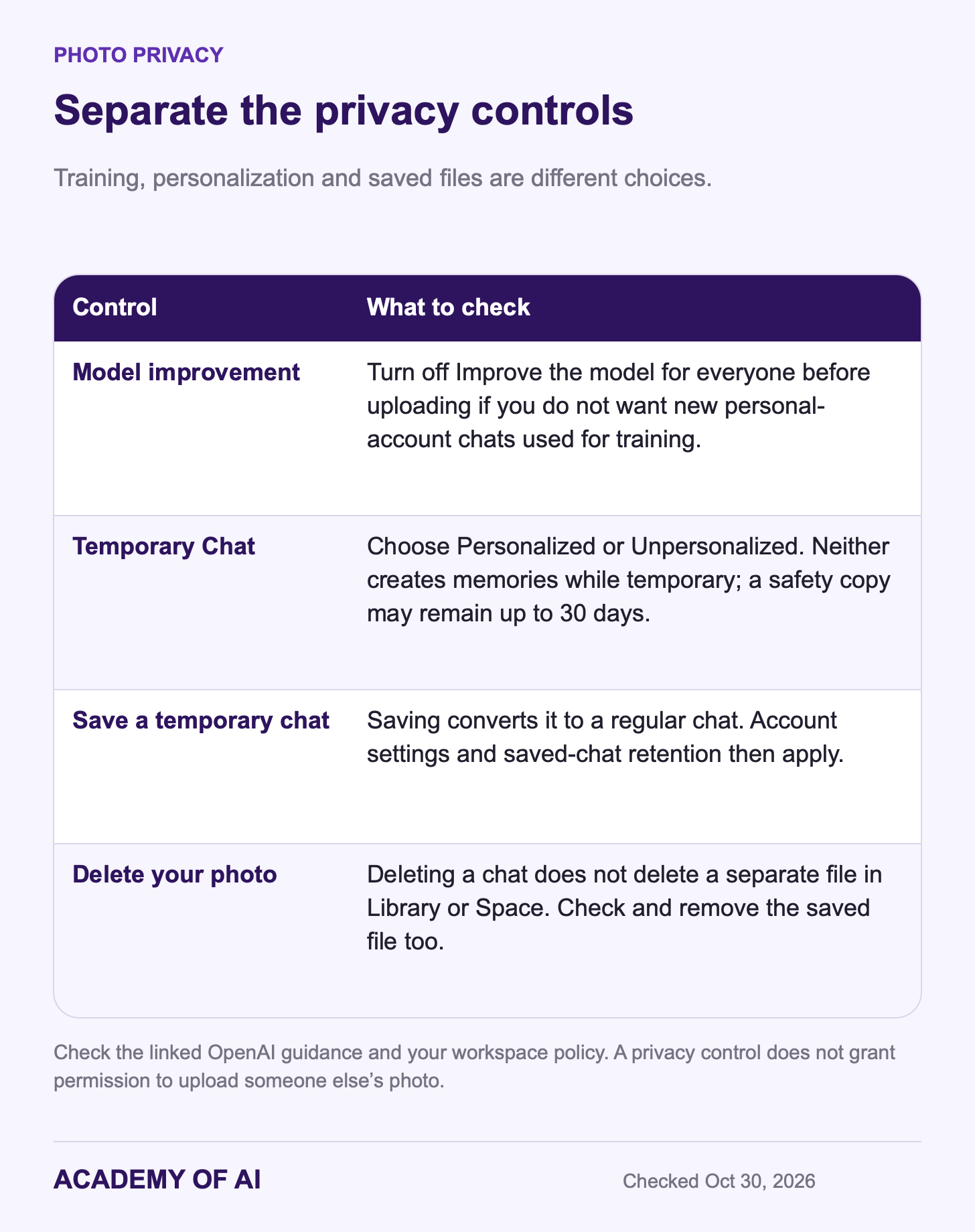
A face photo is personal data, so it’s worth five minutes in settings before you run any self-portrait prompt. These are OpenAI’s controls as of October 30, 2026.
Training: On personal accounts, Improve the model for everyone controls whether new conversations can be used to improve models. OpenAI’s Library guidance explicitly includes uploaded files, including images. Turn the setting off before uploading if that is your preference. Opting out does not delete a chat or a saved photo, and business workspaces have different data policies.
Temporary Chat: The current controls offer Personalized and Unpersonalized modes. Personalized can use existing memories and custom instructions; Unpersonalized leaves them out, along with plugins. Neither creates or updates memories while temporary. Temporary chats are not used to improve models, and a safety copy may remain for up to 30 days. If you save one, it becomes a regular chat and your account’s personalization, training and retention settings apply. A limited safety context may be handled separately. Check which tools your account offers before relying on a particular workflow.
Saved images and deletion: Generated images appear in Images; OpenAI’s image guide says deleting their conversation removes them from that view. An uploaded reference photo may also be saved separately in Library or Space. Deleting the chat does not delete a separately saved file—remove that copy too if you want it gone. Temporary uploads are not normally saved to Library, but eligible files can be saved if you convert the chat to a regular one. Memory controls and file deletion are separate; see our ChatGPT setup guide.
The Images 2.5 system card describes checks on input images, prompts and generated output. It also describes C2PA provenance metadata and an invisible SynthID watermark. These mechanisms can help identify AI-generated content, but they are not an infallible authenticity test. Preserve provenance information and disclose material edits where the platform or context requires it.
Use photos of other people only with their express permission and the rights needed for the use. OpenAI’s image-capability terms require express consent to reproduce a person’s likeness. Avoid deceptive impersonation or compromising depictions. For children’s photos, consider whether uploading is necessary at all, who else is visible and what permission you have; a playful intention does not remove privacy concerns.
OpenAI’s Terms of Use assign its rights in output to you to the extent permitted by law, while warning that output may not be unique. That does not establish copyright protection or clear another person’s likeness, trademark or other rights. Our account-deletion guide covers the broader exit process if you want to remove the account itself.
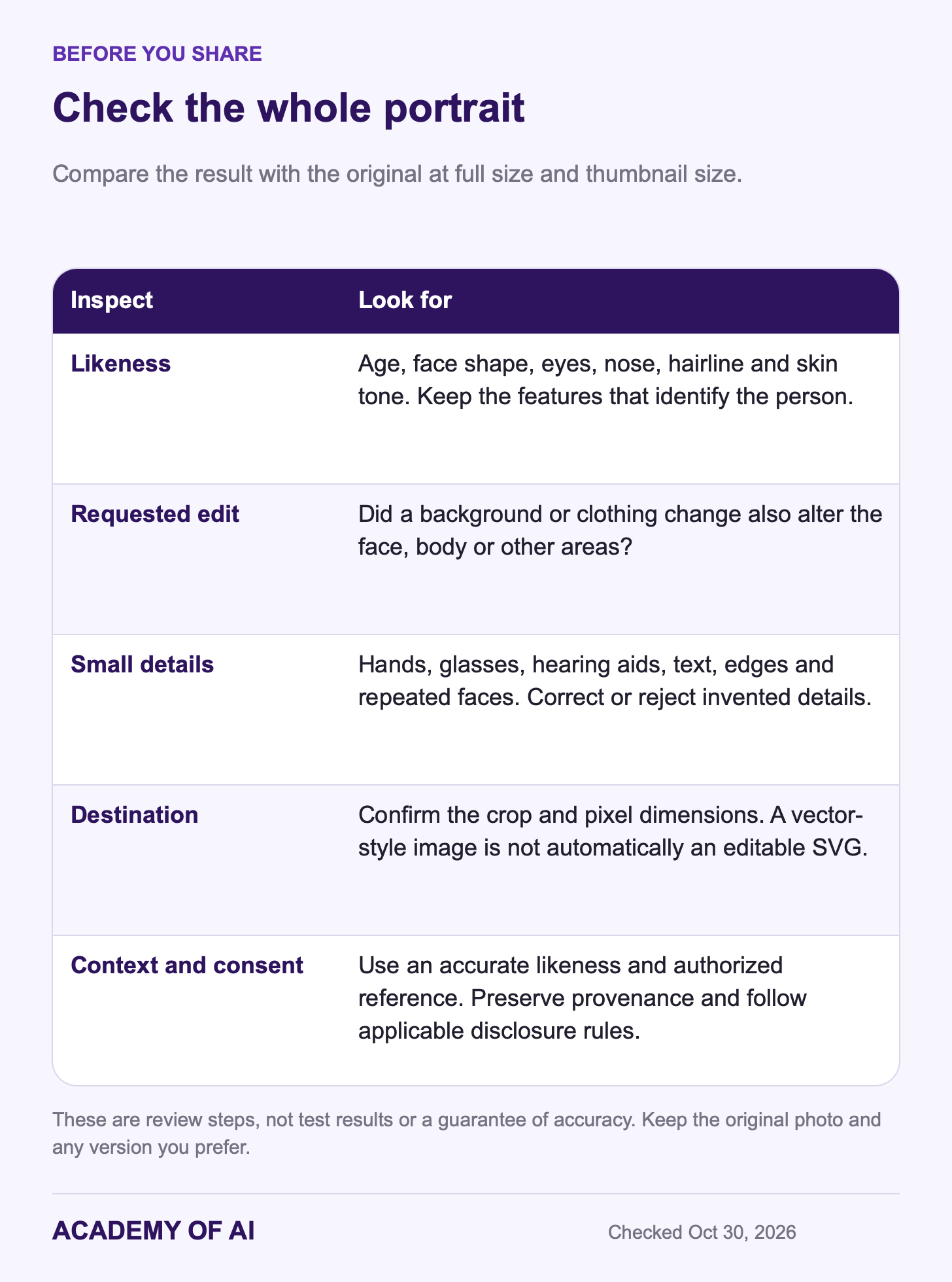
Start with one prompt and one photo you are comfortable uploading. Check the result at full size and at the size where you will use it. If it changes who you look like, try a clearer reference, narrow the request, or keep the original photo.
Questions About Free Limits, Likeness, LinkedIn and Video
Can I Make a ChatGPT Self-Portrait for Free?
Yes. OpenAI lists image creation and editing on Free, with tighter limits than paid plans. You do not need to subscribe just to try a prompt. Check the limit shown in your account and avoid assuming a fixed number of daily generations.
Why Doesn’t My ChatGPT Portrait Look Like Me?
The model can invent or simplify features even with a good reference. Lighting, angle, occlusion and deliberate stylization can also affect the result. Compare specific features with the source and request a narrow correction; no prompt guarantees a faithful likeness.
Can I Use an AI Headshot on LinkedIn?
LinkedIn permits an illustration or other artistic rendering that reflects your likeness under its profile-photo rules. Its community policies also prohibit misleading identity claims and require disclosure of certain synthetic depictions. Use an accurate likeness, avoid invented affiliations and follow any disclosure rules that apply. For identification or an application requiring a real photograph, follow that specific requirement.
Can ChatGPT Turn My Photo Into a Video?
ChatGPT’s native image tool creates still images. OpenAI discontinued the Sora web and app experiences on April 26, 2026, and the Sora API on September 24, 2026. Connected third-party tools may offer video workflows under their own access and terms; a ChatGPT subscription alone is not a promise of video generation. See what ChatGPT can currently do with video.
Keep reading on Academy of AI