


ChatGPT does not currently include native text-to-video generation. It can help you write a script, create still images and make selected edits through a connected tool. OpenAI’s Sora app and website closed on April 26, 2026; its API closed on September 24.
Those dates come from OpenAI’s Sora discontinuation notice. Its API deprecations page lists no replacement video model. This guide covers what ChatGPT can still do, how to retrieve old Sora work, and a practical way to assemble a short video from a script and stills. Product details were checked on October 30, 2026.
Can ChatGPT Make Videos on Any Plan Today?
Not natively. The current ChatGPT plans include image creation with different usage limits, but do not list native video generation. Upgrading for more image capacity does not restore Sora. Check a plan’s current features before paying for a video workflow.
Camera sharing is a separate feature: video goes into a conversation so you can discuss what the camera sees. OpenAI’s current voice guide says the newer Live mode does not support camera or screen sharing. Advanced voice may offer it where available; access depends on your account and platform. Neither mode generates a finished video clip.
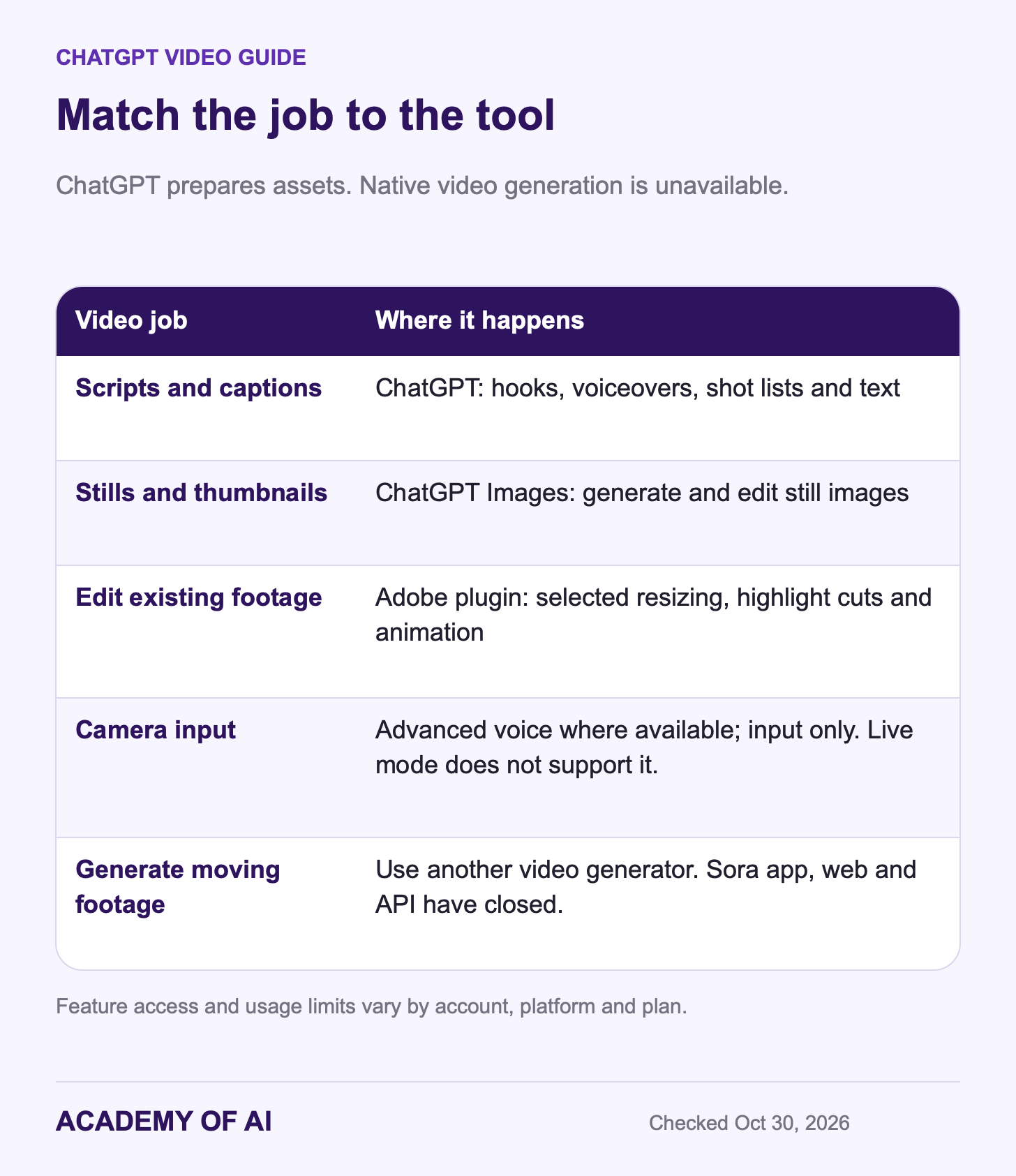
Any 2025 tutorial that tells you to open Sora from ChatGPT is out of date. That door is closed.
When and Why OpenAI Shut Down the Sora App
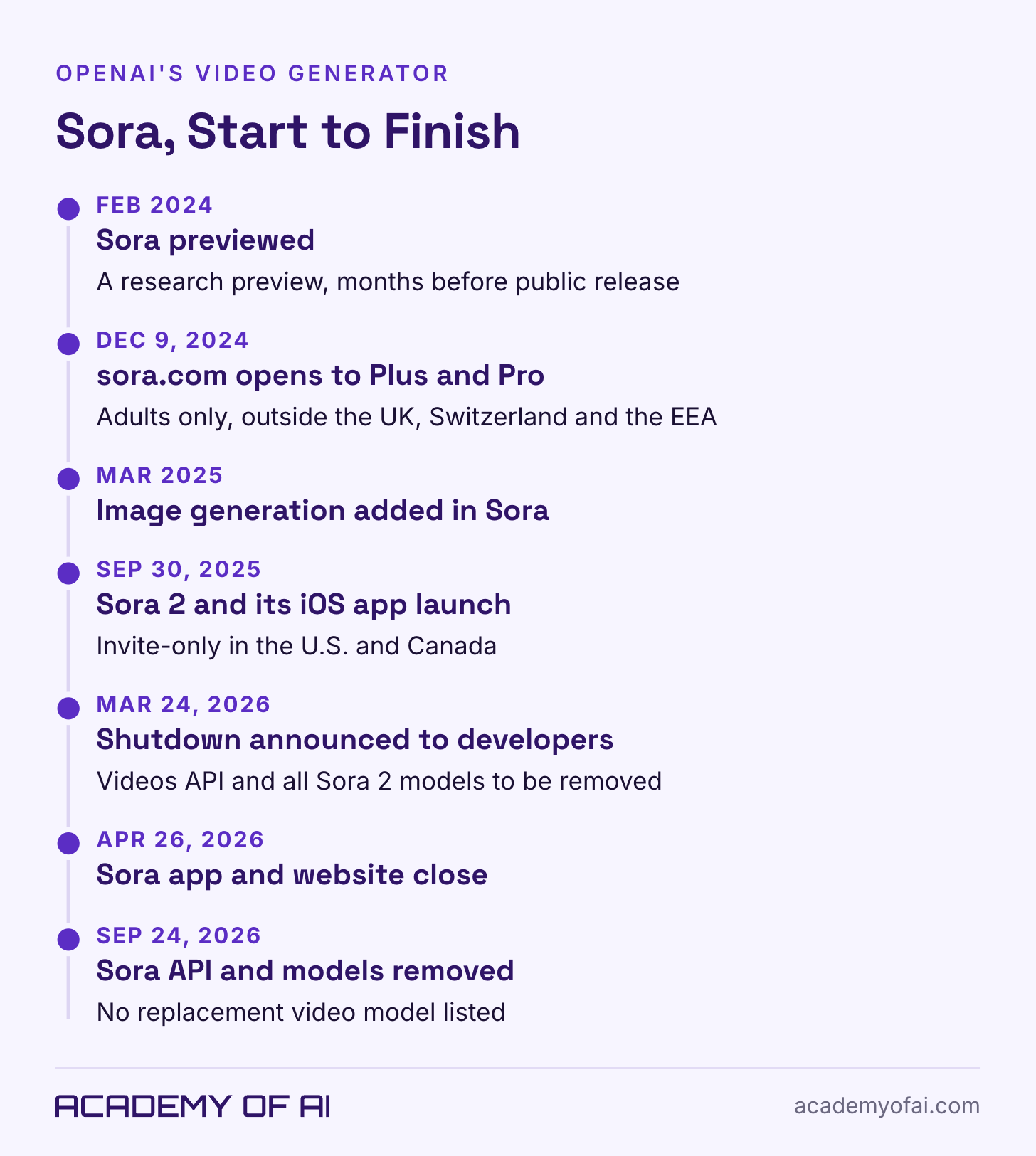
Sora had a short, busy life. OpenAI previewed it in February 2024, then released it at sora.com on December 9, 2024 for ChatGPT Plus and Pro subscribers, outside the UK, Switzerland and the European Economic Area, and only for adults. In March 2025 OpenAI’s new image generator was also made available inside Sora. Then Sora 2 arrived on September 30, 2025 with a social iOS app, synchronized dialogue and sound effects, and an invite-only rollout in the U.S. and Canada.
OpenAI announced the API retirement on March 24, 2026 in its deprecations log. CBS News reported OpenAI’s explanation: rising compute demand and a research shift toward robotics. That explains the company’s stated direction; it does not establish an exact cost or usage figure.
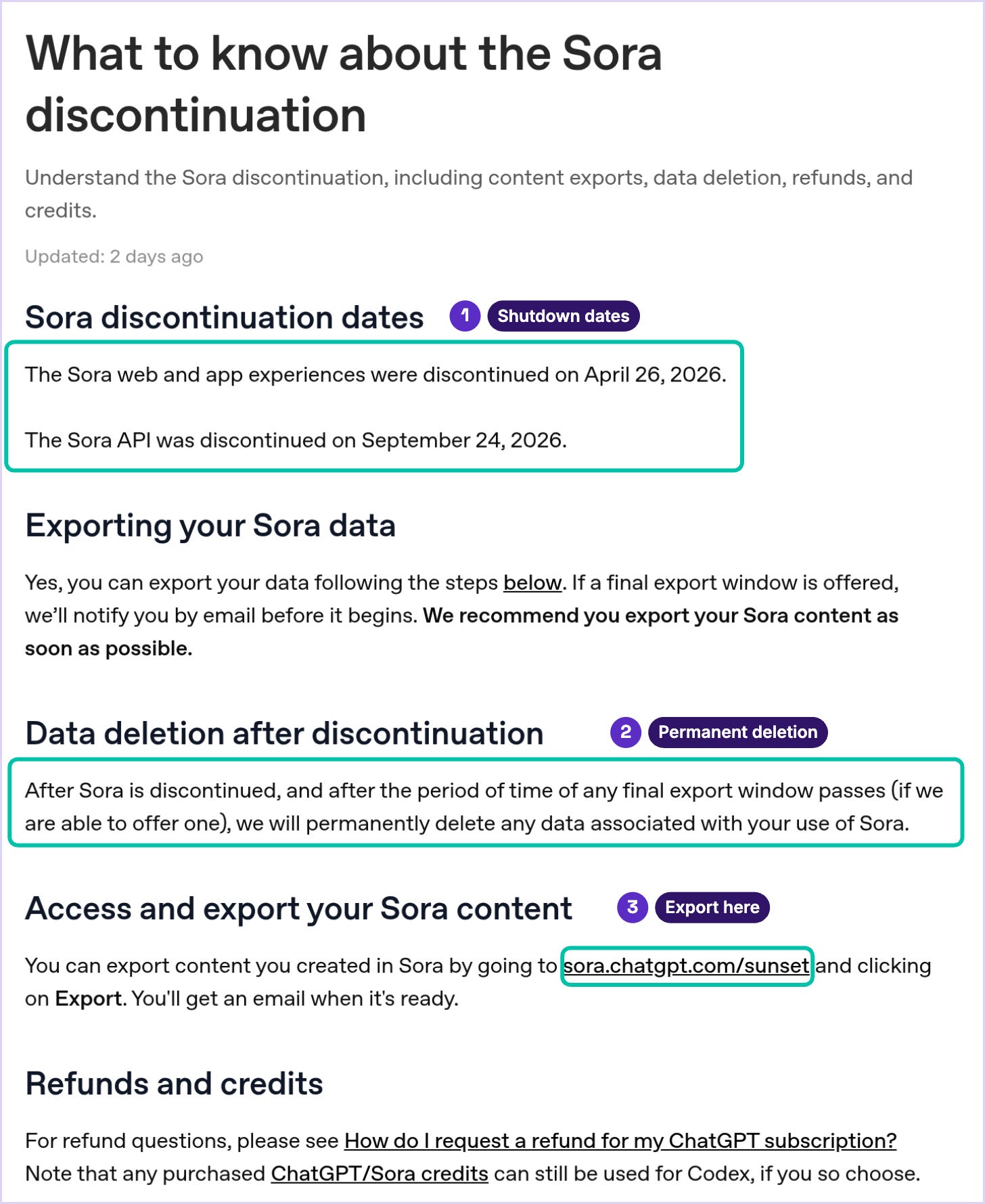
Even OpenAI’s Sora 2 announcement now opens with a note that the product is gone.
Was Sora Included With ChatGPT Plus or Free?
It was, at different points, and now it isn’t on any plan. When Sora launched in December 2024, OpenAI said it was included with Plus at no extra cost, with up to 50 videos a month at 480p or fewer at 720p. Pro got higher resolutions and longer clips. Team, Enterprise and Edu plans weren’t included at launch.
Sora 2 changed that arrangement. Its September 2025 launch offered free access with limits and an invite-based rollout, while ChatGPT Pro subscribers could use an experimental Sora 2 Pro model. Those are historical offers, not features available now.
A current Plus subscription does not include Sora. OpenAI’s discontinuation notice says purchased Sora or ChatGPT credits can be used with Codex, and links to its refund process. If video was your reason for subscribing, compare the remaining benefits with your actual work in our guide to whether ChatGPT Plus is worth it.
Export Your Sora Videos Before OpenAI Deletes Them
OpenAI’s help article directs former users to the Sora export page: sign in, click Export, then wait for the email saying the file is ready. OpenAI recommends doing this as soon as possible. These are documented instructions; we have not tested an export from a Sora account for this guide.
The deadline isn’t published, but the help article says that if OpenAI offers a final export window, it’ll email you before that window opens, and once any final window closes it’ll permanently delete the data tied to your Sora use. Check the inbox you used for Sora, including spam, because that’s where the warning would land.
Preserve original downloads and their provenance information. OpenAI’s Sora 2 launch safety page described C2PA metadata on generated videos and visible watermarks at launch. Those launch statements do not guarantee that every copy you encounter still has both. Label AI-generated footage clearly when sharing it.
Scripts, Stills and Adobe Edits Inside ChatGPT
The prep work is where ChatGPT still earns its place in a video project. Hooks, voiceover scripts, shot lists, captions and thumbnail concepts are all text or still-image jobs, and those run on every plan.
Stills got better in September. OpenAI released ChatGPT Images 2.5 on September 8, 2026, rolling out across all tiers on web, desktop and mobile. According to OpenAI, the update cuts generation time by up to 50% compared with Images 2.0 and keeps earlier edits more consistent across a long back-and-forth. A new @Sketch tool turns a rough drawing into a finished image, which is handy for storyboards and thumbnails. Each image carries C2PA metadata plus an invisible watermark, and the Images 2.5 system card says that watermark comes from Google DeepMind’s SynthID.
The Adobe plugin for ChatGPT offers selected video edits: resizing footage, making a quick-cut highlight video and animating an Adobe Express template. Install it through Plugins, then invoke @Adobe. Adobe lists web and desktop Work/Codex support, in English, subject to its regional trade restrictions. Guest use is available; a free Adobe account adds tool calls, storage and continuity. ChatGPT’s pricing table lists plugin access on Free, but that is not a promise of unlimited Adobe operations.
What it edits is footage you already have. It won’t generate a scene from a sentence, though for a creator with a camera roll full of raw clips, that’s still useful.
Make a 20-Second Vertical Video With ChatGPT’s Help
For this workflow, ChatGPT creates the words and stills; your video editor supplies the motion and final export. Aim for a 20-second vertical Reel, Short or TikTok. A desk-reset tip, product explanation or simple announcement works well because each can be broken into five clear shots.
Use any ChatGPT plan, your phone for voice recording, and a video editor you already have. Free ChatGPT has tighter image limits. The steps below are a documented workflow with an illustrative storyboard, not a timed end-to-end test.
Get the script and shot list. Paste this into a new chat and fill in the brackets.
I'm making a [20]-second vertical video for [Instagram Reels / TikTok / YouTube Shorts] about [topic]. My audience is [who they are and what they care about].

Write:
1. Three hook options for the first 2 seconds, each under 10 words.
2. A voiceover script I can read aloud in [20] seconds at a natural pace.
3. A shot list of [5] shots. For each shot, give: what the viewer sees, the on-screen text (under 8 words), and how many seconds it stays up.
4. Three caption options under 150 characters, with no hashtags.

Tone: [plain and friendly / dry and funny / calm and expert]. Don't invent statistics, prices or customer quotes. If you need a fact you don't have, write [FACT NEEDED] instead.
Pick one hook, then read the voiceover out loud with a timer. If it runs long, ask ChatGPT to “cut this to [18] seconds without losing the offer.” A lean script reads better than a crammed one.
Make the stills. Ask for one image per shot, in vertical format, in a single consistent style. Repeat the style sentence and reuse a reference image when possible, then check that objects and colors stay consistent.
Create a vertical 9:16 image for shot [number] of my video.
Scene: [paste the shot description from the shot list].
Style: [flat illustration, cream background, one coral accent color, soft shadows].
Leave the top third of the frame empty so I can add on-screen text later.
Don't put any words or logos in the image.
Record the voiceover yourself. Record a phone voice memo in a quiet room, then listen for background noise and rushed words.
Assemble the edit. Drop the stills and voiceover into your editor, add slow zooms or pans on each image, and paste in the on-screen text from the shot list. If you filmed real clips instead, upload one to ChatGPT and try a request like
@Adobe resize this video for Instagram Reels and keep the speaker centeredif that tool is available in your account.Check it before you post. Watch it once on your phone with the sound off. Check captions, text size, pacing and any factual claims. Add readable on-screen text so the message also works without sound.
Storyboard example: a five-step desk reset. Clear the clutter, sort it, wipe the desk, set out the notebook, and finish with a clean workspace. The illustration below shows five matching still concepts. Generate or crop individual assets, then add your own timing, captions and voiceover in the editor.
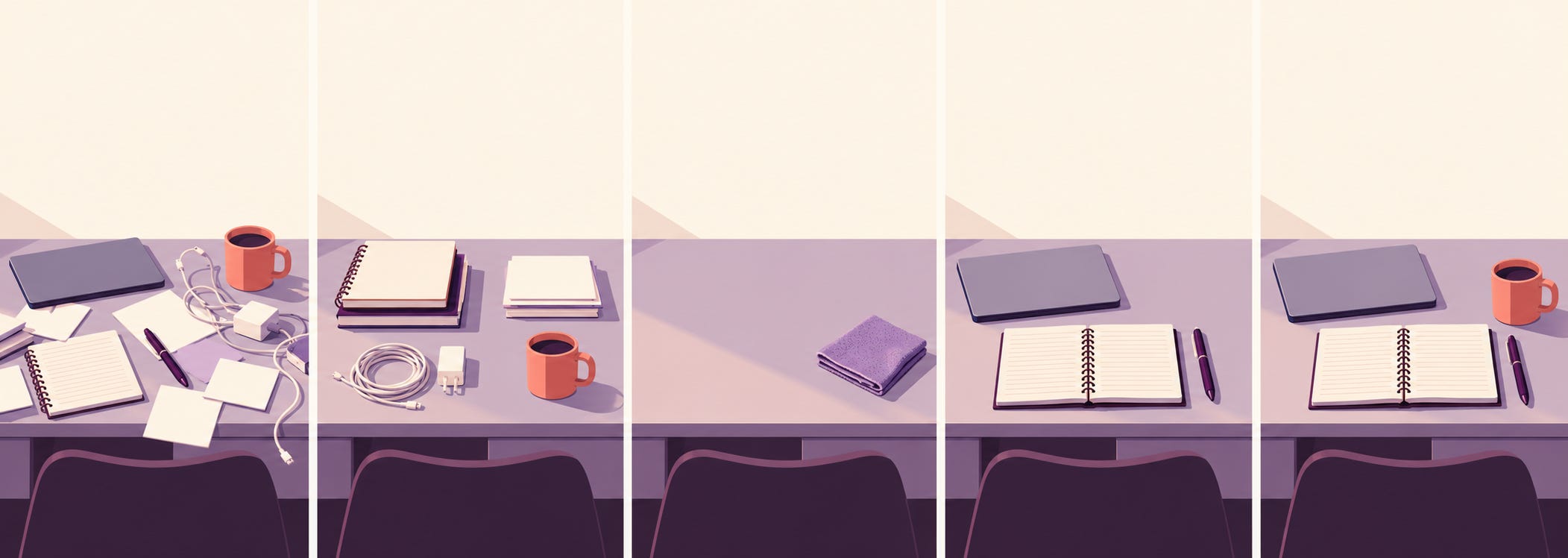
The mistakes are predictable. Asking ChatGPT for “a video” gets you frustration, so ask for the specific asset: a script, a shot list, a 9:16 still. Letting the style drift between images makes the cut look like clip art from five different kits. Skipping the read-aloud test is how a “20-second” script turns out to run 34 seconds. And if you need moving footage of a scene you can’t film, that’s the one job you’ll have to take outside ChatGPT.
Sora’s Image Tool Lives On in ChatGPT Images
People still search “Sora AI image generator” because Sora could make images too: OpenAI made its image model available in Sora in March 2025. That part didn’t disappear with Sora. Image generation lives in ChatGPT itself, now on ChatGPT Images 2.5, and it’s on every plan, including Free.
If you want to put your own face into those images, our guide to ChatGPT self-portrait prompts has copy-ready prompts for caricatures, headshots and photo edits, plus what happens to the photos you upload. For a wider look at the field, see our roundup of the best AI image generators.
Gemini and Other Tools That Generate AI Video Clips
For generated moving footage, check a dedicated video tool, including any access you already have. Google’s Gemini video page introduces Omni 1.1 Flash as the replacement for Veo 3.1 in the Gemini app, with 10-second clips and generated audio. It requires a Google AI subscription, is for adults 18 and older, and varies by tier and region. Google says generated videos carry an invisible SynthID watermark. Our Google AI Pro guide explains the bundle.
Other video generators sell their own plans, and their terms differ a lot on who owns the output, how long your uploads are kept and whether you can use a real person’s face. Read those three sections of the terms before you upload anyone’s photo, including your own.
Consent Rules for Real Faces, Public Figures and Characters
Sora had guardrails built in, and they don’t follow you to other tools. OpenAI’s Sora safety page described consent-based characters where only you decided who could use your likeness and you could revoke access any time, plus measures to block depictions of public figures. Other tools set their own rules, so the guardrails depend on which one you pick.
For a commercial video, use original material or assets you have permission to use. Get clear written permission before using someone else’s face or voice, and check that it covers the intended campaign and tool. Avoid realistic impersonation that could mislead viewers. Recognizable characters, logos and music need a separate rights check; a model agreeing to generate them does not establish permission.
On commercial use, OpenAI’s terms of use assign you its rights in the output you create, as long as you follow the terms. They also warn that other users can get similar output, so a generated image doesn’t come with exclusivity. Owning the output doesn’t make an infringing image legal either. For the privacy side of ChatGPT, our explainer on ChatGPT’s terms of service and privacy policy goes through what OpenAI collects and keeps.
If you have old Sora clips, request the export and check the downloaded files. For a new video, run the first prompt above, read the script aloud, and decide which shots you can film or illustrate. Only add a video generator if the idea needs footage you cannot otherwise create.
Sora and ChatGPT Video Questions, Answered
Is There a Free Sora AI Video Generator Anymore?
OpenAI’s Sora app, website and API have closed. A third-party site advertising “free Sora” is not proof of an official service or access to the retired model. Check its operator and upload terms before providing files.
Can ChatGPT Edit a Video I Upload?
Selected edits are available through connected tools. Adobe documents resizing, quick-cut highlights and Express template animation through its ChatGPT plugin. Invoke @Adobe after installation, and check which operations your account offers. This is different from native text-to-video generation.
Will OpenAI Bring Video Generation Back to ChatGPT?
OpenAI’s deprecations page lists no replacement for the retired Sora models. A future launch is possible, but it is not a feature to budget around today. Check current announcements before choosing a subscription.
Do Downloaded Sora Videos Carry a Watermark?
OpenAI described C2PA metadata and visible watermarks in its Sora 2 launch safeguards. Check the original file rather than assuming every downloaded or reposted copy retains them. Keep provenance information and identify AI-generated footage clearly.
Keep reading on Academy of AI