



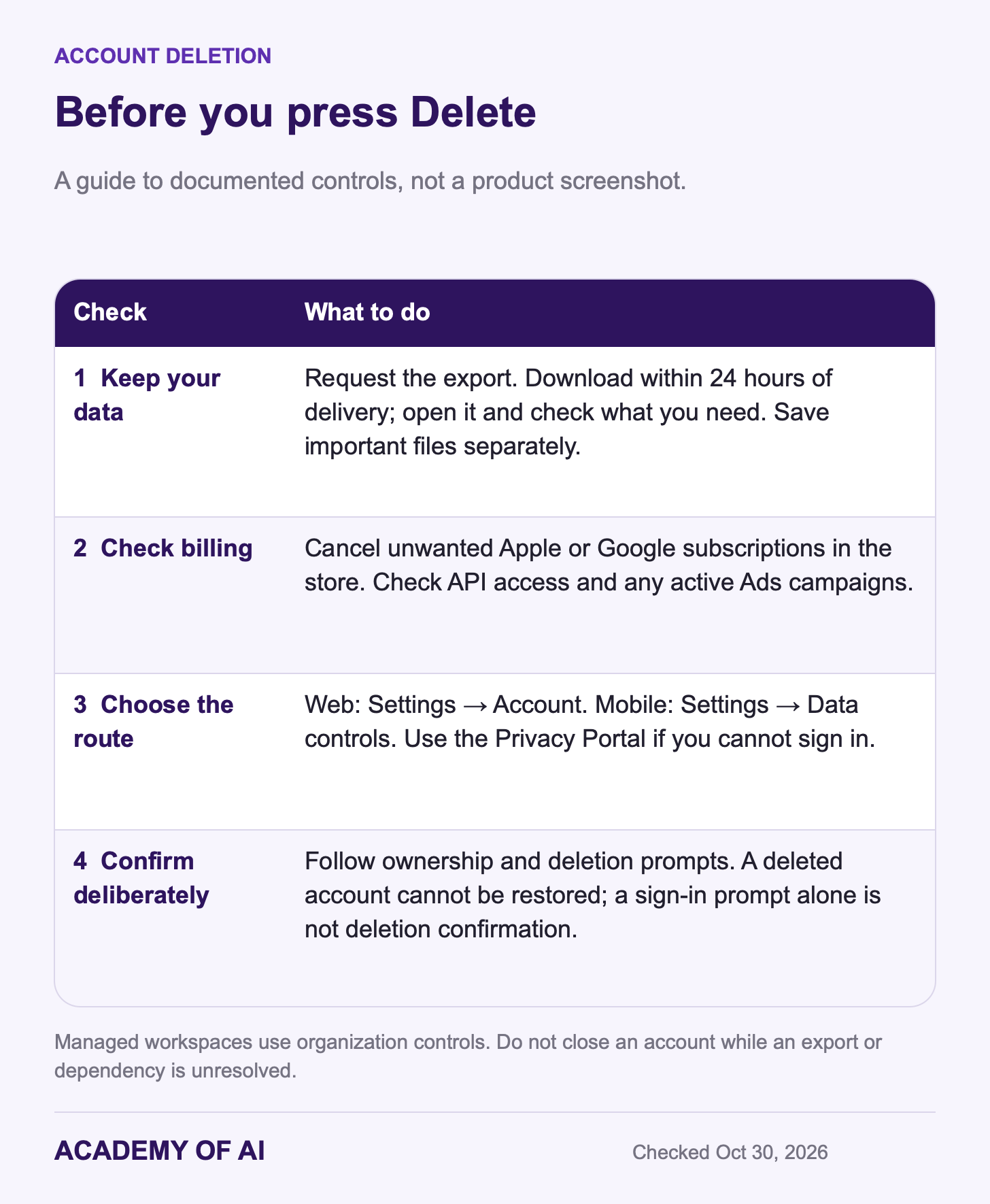
To delete your ChatGPT account on the web, open Settings → Account → Delete account. Follow the ownership and deletion prompts. In the iPhone and Android apps, look under Data controls. Deletion is permanent; export and check anything you want to keep first.
Cancel unwanted Apple or Google subscriptions before deleting, and check any API or Ads access tied to the login. Deleting the app is not the same as deleting the account. These steps follow OpenAI’s documentation checked October 30, 2026. The data-retention section explains why deletion is not a promise that every copy disappears immediately.
Export Your ChatGPT Data Before Deleting the Account
On an eligible personal account, OpenAI’s export instructions start in Settings → Data controls. The web steps are:
Sign in to the account whose data you want to keep.
Open Settings → Data controls → Export data.
Select Export, then Confirm export.
Wait for the email or SMS notification, then download while signed in to that same account.
The link expires 24 hours after it arrives; the export can take up to seven days. Open the ZIP and check the conversations you need before proceeding. If the link expires, request another export. Do not delete the account while you are still waiting for or checking the download.
The export includes chat history and other relevant account data, which can be sensitive. Keep it somewhere private. Do not assume it contains every original attachment or separately saved file: download important files and check that they open before closing the account.
Self-service exports are unavailable in Business, Enterprise and Healthcare workspaces; eligible Edu workspaces depend on administrator settings. Managed accounts also have different deletion controls. Ask the workspace owner about organization data rather than applying these personal-account steps to a work login.
Cancel App Store or Google Play Billing First
Deleting an account cancels subscriptions billed directly by ChatGPT. OpenAI explicitly warns that it does not cancel an Apple subscription and tells users to check and cancel unwanted Apple App Store or Google Play subscriptions before deletion. Open the store where you subscribed and confirm the cancellation there.
iPhone or iPad: open the Settings app, tap your name, tap Subscriptions, choose ChatGPT, then tap Cancel Subscription. Those are Apple’s cancellation steps.
Android: open your subscriptions in the Google Play Store, choose ChatGPT and tap Cancel subscription. Google’s subscription help page warns that uninstalling the app won’t cancel it.
Cancel an ordinary paid subscription at least 24 hours before renewal. Paid access normally lasts until the billing period ends; free promotions can have different cancellation terms. Refund eligibility is separate and can depend on purchase channel and local law. If you cannot access a web-billed account, follow OpenAI’s support cancellation process; provide the requested identifying billing details, never a full card number or password.
How to Delete Your ChatGPT Account on chatgpt.com
Follow OpenAI’s account deletion instructions only after your export and subscription checks:
Sign in at chatgpt.com and open Settings.
Select Account, then Delete beside Delete account.
Enter your account email or phone number and type DELETE when prompted.
Select Permanently delete my account only when you are ready to lose access.
The web route is Account; the mobile route is Data controls. Follow any ownership-verification prompts. If the app returns to your chats without a deletion confirmation, that alone does not establish that deletion finished.
The account loses access to both ChatGPT and the API. Before deleting, check whether any tools, automations or organization access depend on it. Resolve those dependencies with the relevant owner first; downloading chats does not preserve a working API integration.
Delete Your Account in the ChatGPT iPhone App
Open the app’s account settings → Data controls → Delete account. If an Apple subscription is active, use Manage subscriptions to cancel it before continuing. Review the deletion confirmation and either confirm or cancel.
Delete Your Account in the ChatGPT Android App
Open Settings from your profile menu → Data controls → Delete OpenAI account. Older versions may say Delete Account. Review the confirmation, then confirm only if you intend to close the account.
If the same email also accesses an OpenAI Ads account, active campaigns may continue accruing charges after you lose access. Pause or end campaigns and arrange appropriate authorized access first. If you are the only account user, contact support before deletion.
Can’t Log In? Use OpenAI’s Privacy Portal
The Privacy Portal lets you submit a deletion request when you cannot sign in. Select Make a Privacy Request → I have a consumer ChatGPT account → Delete my ChatGPT account. Verify a linked email address or phone number. If neither is accessible, contact support for an ownership review; having a paid plan alone does not require a different portal route.
How Long OpenAI Keeps ChatGPT Data After Deletion
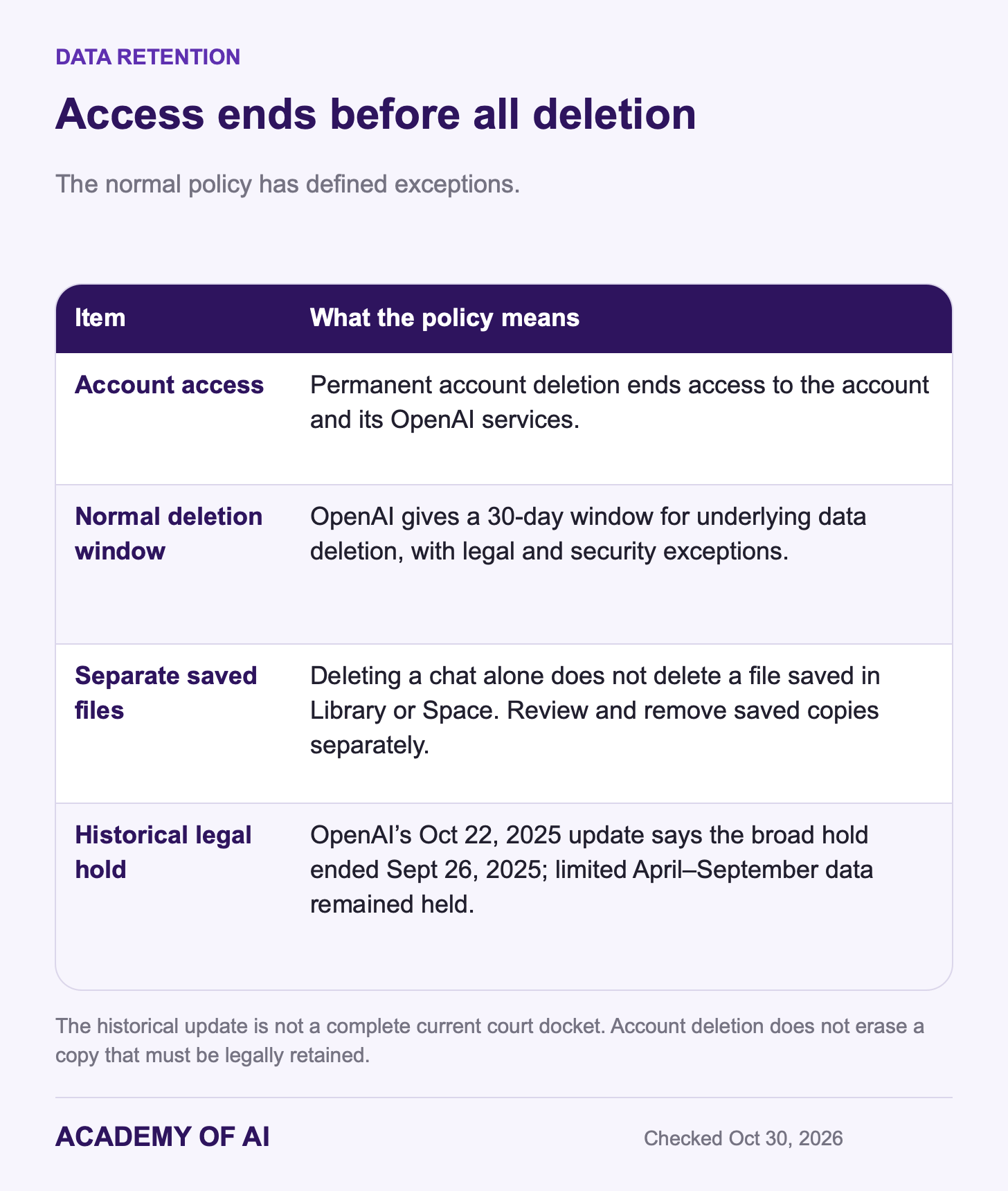
OpenAI’s account deletion guide gives a normal data-deletion window of 30 days, with limited legal exceptions. Its chat-retention guidance also identifies security obligations and chats already de-identified and disassociated from an account. The practical distinction is immediate loss of account access versus later deletion from underlying systems. Do not interpret the 30-day policy as a guarantee about every legally preserved or de-identified copy.
A historical example is the publishers’ copyright litigation. In its October 22, 2025 update, OpenAI said the broad preservation obligation ended September 26, 2025, while limited historical data from April–September 2025 remained under legal hold. That statement concerns the preservation order; it does not mean deleting an account erases material already held for litigation.
The latest dated update visible on that OpenAI page when checked October 30, 2026 was October 22, 2025. This is not a complete account of later court proceedings. For a particular legal or privacy request, use the Privacy Portal or the appropriate professional adviser rather than relying on a general deletion timeline.
Can You Reuse Your Email After Deleting ChatGPT?
Yes, OpenAI’s current main deletion guide says you can create a new account with the same email after 30 days if the old account was fully deleted, not merely deactivated. That is a new account: it does not restore old chats. The guide also lists exceptions for addresses previously associated with an Enterprise organization or disabled for policy violations.
A deleted account cannot be reactivated. Phone-number reuse and API verification are separate: deleting an account does not reset the three-account limit for verifying a first API key. If your only aim is changing an email address or sign-in method, check the available account controls before choosing permanent deletion.
Turn Off Training and Memory but Keep Your Account
Match the control to what you want to change. Training, personalization, saved chats and saved files are separate. None of these settings is blanket permission to upload confidential material.
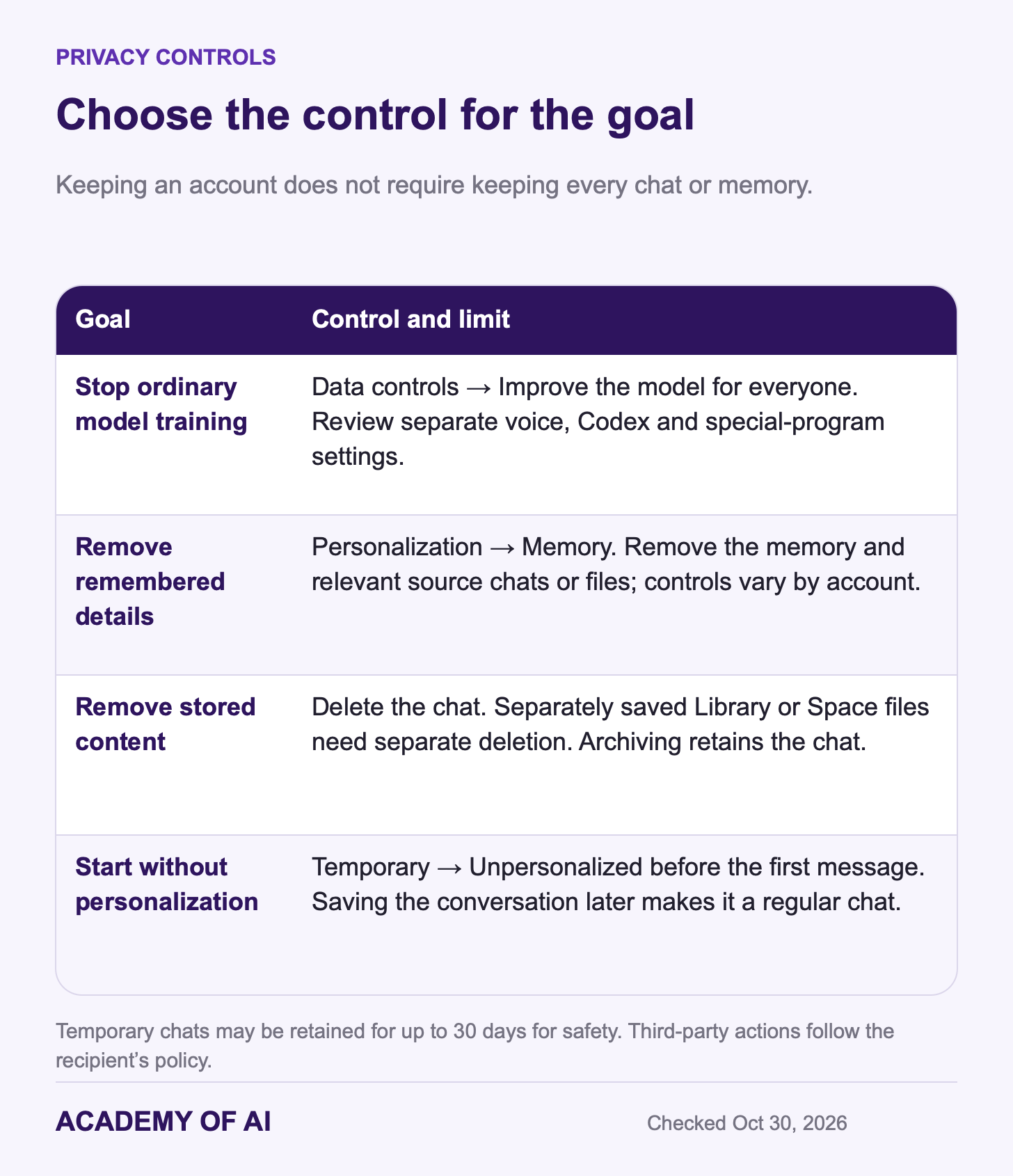
Model training: turn off Improve the model for everyone under Settings → Data controls. The setting syncs across signed-in devices. Voice sharing and Codex environment context have separate controls; submitting feedback can allow use of the associated conversation, and special Trusted Access sessions have separate rules.
Memory: review Settings → Personalization → Memory. Controls vary by account. Removing remembered information may require deleting the memory and its source chats or files. Turning a feature off is not the same as deleting its underlying data.
Saved conversations and files: delete the conversation you want removed; archiving keeps it. A file saved separately in Library or Space survives chat deletion unless you remove that saved copy too.
Temporary Chat: choose Unpersonalized before starting if you do not want existing memories, instructions or plugins used. Personalized temporary chats can use them; neither option creates or updates memories while temporary. Temporary chats stay out of history and model training while temporary, may be retained up to 30 days for safety, and become regular chats if saved. Third-party actions follow the recipient’s policy.
Our ChatGPT settings guide covers the rest of these menus, and our breakdown of the ChatGPT terms of service and privacy policy explains what OpenAI’s contract allows with your data. If you’re switching assistants, read our guide to moving chats and projects between ChatGPT and Claude before you delete.
If you want fewer stored conversations, review chats, memories and separately saved files. If you want to stop paying, cancel the subscription. If you want to close the account, finish your export and billing checks first, then use the deletion flow. Reusing an email later does not bring the old account back.
ChatGPT Account Deletion Questions, Answered
How Long Does It Take to Delete a ChatGPT Account?
Completing the deletion flow ends account access. OpenAI’s normal underlying data-deletion window is 30 days, with security and legal exceptions described above. Finishing a sign-in or verification prompt alone is not proof that the deletion completed.
Can I Recover a Deleted ChatGPT Account?
No. A fully deleted account cannot be reactivated, and deleted chats cannot be restored through ChatGPT. Keep and verify any export or separately downloaded files before deleting.
Does Deleting the ChatGPT App Delete My Account?
No. Removing the app leaves the account, your chat history and any subscription in place. Use the Delete Account option inside the app or the web steps above.
Will Deleting ChatGPT Cancel My Plus or Pro Subscription?
Account deletion cancels subscriptions billed directly by ChatGPT. For Apple App Store or Google Play billing, check and cancel the unwanted subscription in that store first. Managed workspaces have separate administration and billing; contact the workspace owner.
Keep reading on Academy of AI