


I open ChatGPT first for work. I would put Grok on your shortlist if you spend much of your day on X, or already use Cursor. That is where I land on Grok vs ChatGPT. The interesting part is what you get for the money, and how much work you still have to do yourself.
I run news brands, so I care about useful drafts, accurate research and tools that can handle a real workload. A chatbot can get through an enormous amount of work and still leave you with cleanup. I learned that while using ChatGPT with Semrush, which I describe below. Keep that tradeoff in mind as you compare the features.
This guide was checked on October 30, 2026. The pricing has changed: new Grok subscribers choose from The X Subscription plans. Existing SuperGrok subscribers can keep their old plans unless they switch. OpenAI is also rolling out models with different access in Chat, Work and Codex. I have kept those distinctions in the comparison.
How I Compared Grok and ChatGPT
I used product documentation for features and prices, privacy policies for data rules, and independent benchmarks for model scores. My own experience is with ChatGPT. I have not conducted a controlled comparison of every Grok and ChatGPT tier, so the picks here are my recommendations, with the reasons attached.
For the benchmark section, I use Artificial Analysis. When a result comes from xAI itself, I say so. The safety section also draws on dated reporting and official announcements. You can follow the links to check the underlying claims.
One complication runs through the whole comparison: a model, an app and a subscription are three different things. A high-scoring model may be unavailable in the free app. A paid plan may include a feature but limit how often you can use it. That is why the details below sometimes need more than a checkmark.
Free Plans, Live X Search and Ads: The Biggest Differences
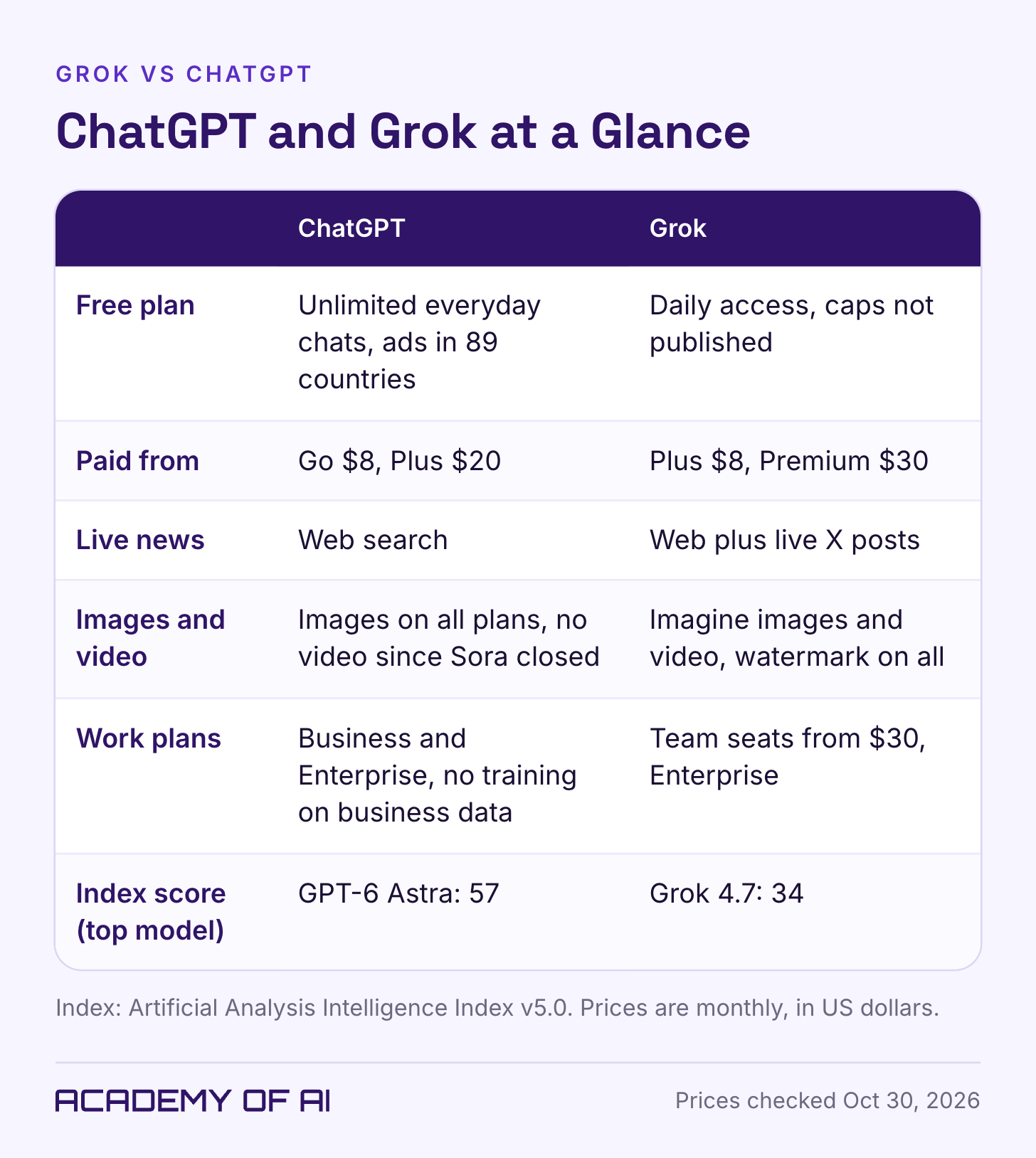
If you mostly want help with text, ChatGPT has an appealing free offer. OpenAI lists unlimited everyday text chats for Free and Go, subject to abuse-prevention safeguards. Images, uploads, voice and data analysis have their own limits. You can keep chatting and still run out of access to a tool you need.
Grok Free offers limited chat, images and agent access. There is no fixed free request count on the pricing page. Video starts at Premium; neither Free nor the $8 Plus tier includes it. Before setting aside an afternoon for a task, look at the allowance your account actually shows.
Grok’s access to X is the more interesting difference for me as a publisher. It can search live posts as well as the web. ChatGPT has web search, but lacks that same direct X integration. If the question is about a conversation happening on X, Grok has an obvious place to begin.
You may also encounter ads. ChatGPT Free and Go can show them to eligible users; Plus and higher plans are ad-free. Reuters reported the rollout to 89 countries on October 21. Account and regional rules still apply. Grok advertises benefits concerning ads on X, which should not be confused with ads inside the assistant.
Which Models Power ChatGPT and Grok in October 2026
The model names take some untangling. According to OpenAI’s model guide, Free and Go use GPT-5.6 Luna. GPT-6 is rolling out to eligible paid Chat accounts, with older selectable models still available. GPT-6 Sol handles the Instant through Extra High settings, depending on your plan.
Plus gives you Medium and High thinking levels. Extra High and Pro require the appropriate higher plan or workspace permission. The thinking slider lets the model spend longer on a question. I would try it on a difficult analysis before assuming I needed a more expensive subscription.
Astra is the model behind GPT-6 Pro. It is listed for eligible Pro, Business and Enterprise users in Chat. Plus users can access Astra in Work and Codex, not ordinary Chat. GPT-6.1 Sol is a separate Work and Codex option. So “included with Plus” needs a follow-up: included where?
On the Grok side, Premium and higher include the latest models. The Grok 4.7 announcement describes access through Cursor, Grok Build and the API. Look at the model in the product you plan to use. Do not assume the free chat window is running the model in a benchmark chart.
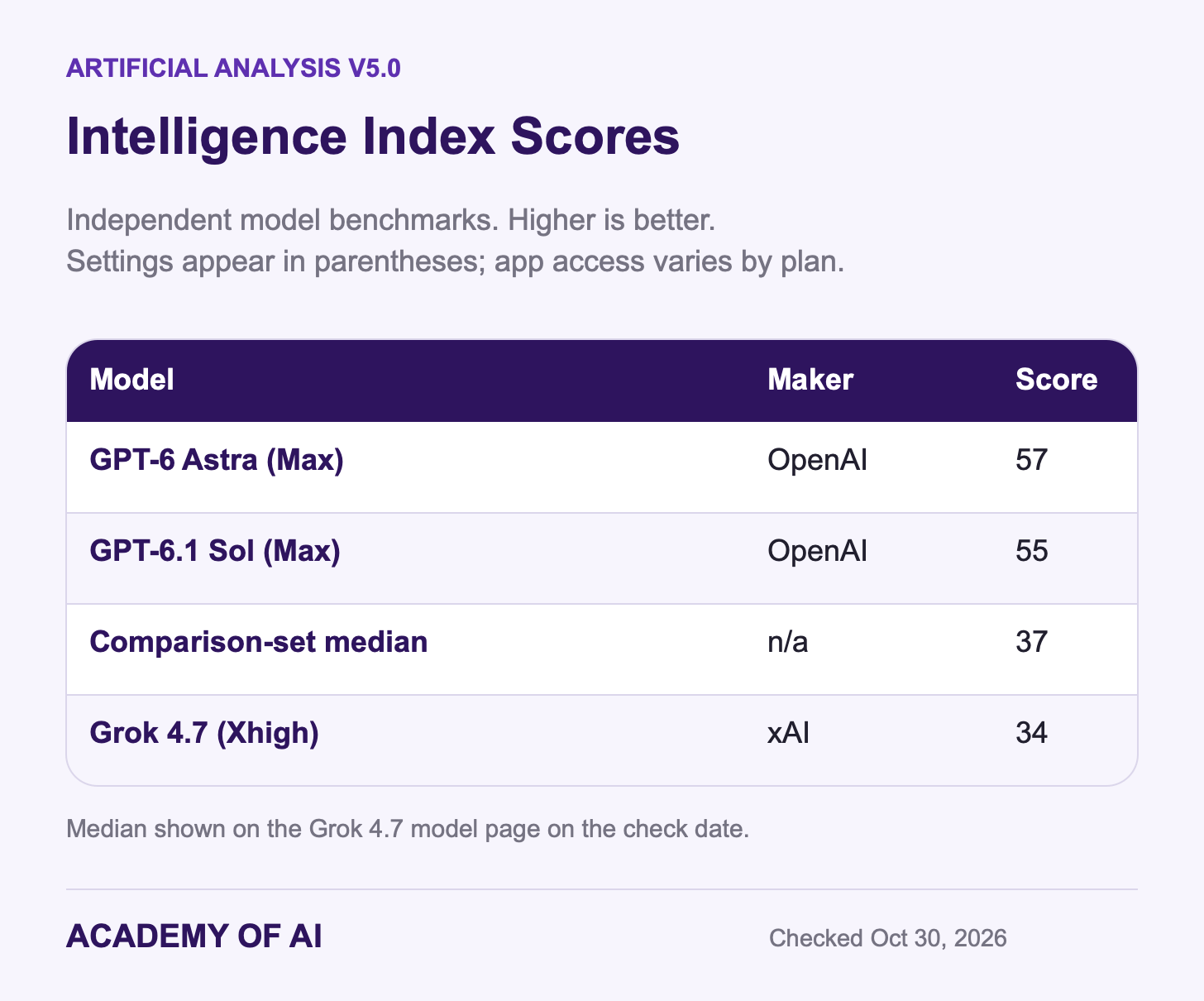
The checked Artificial Analysis Intelligence Index v5.0 scores were 57 for GPT-6 Astra at Max, 55 for GPT-6.1 Sol at Max and 34 for Grok 4.7 at Xhigh. The comparison-set median on the Grok page was 37. OpenAI has a substantial lead in this particular independent comparison.
xAI reports a stronger showing for Grok on its own GDPval comparison of work tasks. I would read that alongside the independent results, with the different methods in view. Neither number tells me whether I will like an email draft or trust a spreadsheet total. For those decisions, I want to see the actual output.
Writing Emails and Reports: Instructions, Tone and Editing
An email can be grammatically perfect and still be wrong for the person receiving it. A missed deadline does not need three paragraphs of sympathy. It needs an apology, a realistic date and a clear next step. That is the kind of everyday writing problem I would use to compare these assistants.
ChatGPT lets you save your role, audience and style in custom instructions. My ChatGPT setup guide covers that process. For a writer or consultant, having those instructions ready is a useful reason to start there. You still need to supply the facts for each assignment.
X describes Grok as witty and humorous. Fine for some posts; less useful as a brief for an upset client. Tell either assistant who will read the message and what it must accomplish. “Make this better” leaves too much room for the assistant to decide what you meant.
Here is a small comparison you can run with an email of your own. Paste the same draft into both tools, then use this prompt:
Rewrite the email below for a client who is upset about a missed deadline.
Keep it under 150 words. Take responsibility once, give the new delivery
date of [DATE], and don't over-apologize. Tone: plain, warm, professional.
Don't add anything I didn't say.

[PASTE YOUR DRAFT HERE]
I would check the promises first. Did the assistant offer a refund you never mentioned? Did it quietly turn a proposed date into a firm commitment? After that, read for tone. You should be able to send the result without feeling as though someone else has taken over your inbox.
My pick for a regular writing workflow is ChatGPT. The saved instructions are useful, and it is where I already work. Try Grok on the same brief if you want another version, especially for X content. Judge the drafts you receive, not the personality promised on a product page.
Research With Sources vs Real-Time News From X
For a news brand, finding a claim and verifying it are separate jobs. A post can be useful as a lead without being ready to appear in an article. That is the distinction I would keep in mind when choosing a research tool.
ChatGPT’s deep research feature gathers material into a cited report, with access varying by plan. I would start there for a vendor comparison or a background report. Open the sources before passing the findings along. A citation that looks convincing can still point to something that does not support the sentence.
Grok also offers research with sources and citations. Its X connection is the reason I would try it for live reactions, an emerging outage or a statement attracting attention. Both assistants can work with sources; Grok has a particularly relevant starting point when those sources are posts on X.
Suppose people are saying a service is down. I would want the original reports and their timestamps, then the company’s status page. Ten accounts repeating one old screenshot are not ten independent reports. Ask the assistant to separate what it found from what it could confirm.
The same applies to a quote. Ask for the original announcement, recording or transcript. A summary of someone else’s summary is several steps away from the person who said it.
I would start with Grok for live X discussion and ChatGPT deep research for a longer report. The graphic below lays out that choice. Whichever route you take, leave time to open the sources.
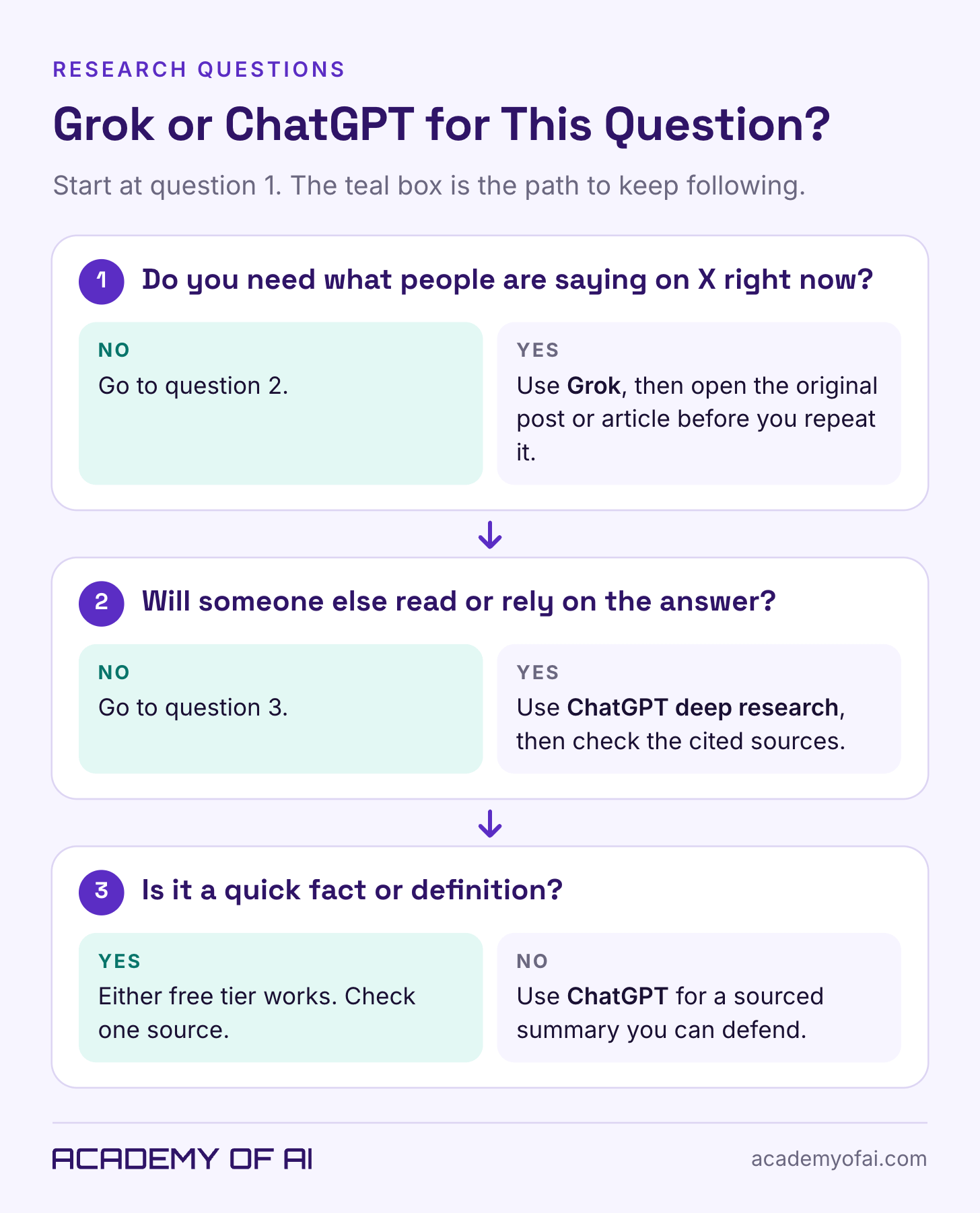
Image and Video Generation: Grok Imagine vs ChatGPT After Sora’s Shutdown
ChatGPT includes image generation across its plans, though the allowances differ. If you are already working on copy there, you can keep the image brief in the same conversation. The free plan has tighter limits than paid access.
Sora is no longer part of this buying decision. OpenAI closed the Sora app and website on April 26, 2026, then the API on September 24. ChatGPT can help with a script or storyboard, but you should not subscribe expecting the former Sora video service.
Grok Imagine covers images and video. The current plan table puts video on Premium and higher. Free and Plus do not include it. That makes Grok the option to investigate if generated video is your reason for choosing between these two subscriptions.
Two details in the Grok app FAQ deserve attention before you pay. Generated images and videos carry a watermark you cannot disable. And 720p video falls back to 480p once the tier’s 720p allowance is used. A developer announcement about higher resolutions does not change those consumer-app terms.
Make one sample in the format you intend to deliver. Look at the lettering, crop and watermark at full size. If the client needs a clean asset, discovering an unavoidable watermark after making 20 images is an expensive way to read the documentation.
For branded work, use source assets you have permission to use and check the commercial-use terms. Avoid misleading depictions or nonconsensual sexual images. An image generator accepting a request does not settle the rights to the finished picture.
For images alone, I would begin in the assistant you already use. For generated video, look at Grok Premium or higher and check those output limits first. Availability settles this comparison more clearly than a blanket claim about which tool is more creative.
Grok Voice and File Uploads vs ChatGPT Data Analysis
Voice is worth trying before you pay. Read part of a presentation aloud, interrupt the assistant and ask it to change direction. Does the exchange feel comfortable, or are you waiting for it to stop talking? I have not tested both closely enough to pick a voice-quality winner.
ChatGPT offers voice across its plans. The Grok FAQ also lists free voice access, with separate paid allowances. Grok’s companion characters are currently iOS-only. Those characters are a different feature from ordinary voice chat.
File limits are easier to compare, though the largest number is not always the most useful one:
Grok: the website and apps FAQ lists roughly 100 files per message on the web and 20 on Android. Most supported file types can be up to 150 MB each. Platform and subscription differences can apply.
ChatGPT: the upload guide lists a 512 MB ceiling for files, with smaller limits for some formats. Spreadsheets are roughly 50 MB and images 20 MB. Text documents also have a two-million-token cap. Upload-rate limits apply separately.
ChatGPT can run code to clean, calculate and chart spreadsheet data. Grok’s FAQ also describes code execution and charts from CSV and Excel files. Both therefore belong in a spreadsheet comparison. I would give them a workbook with a result I could independently check.
Start with a copy. Ask for the total of a known column, an explanation of blank cells and the calculation method. Then compare the answer with your own total. My ChatGPT spreadsheet prompts give you a few ways to frame the work.
Grok’s web allowance may appeal if you work with batches of documents. But uploading 100 files is only the first step. Ask which files and pages support the answer. A tidy summary is not much help if an important document was missed.
ChatGPT Plans vs The X Subscription: Monthly Prices Compared
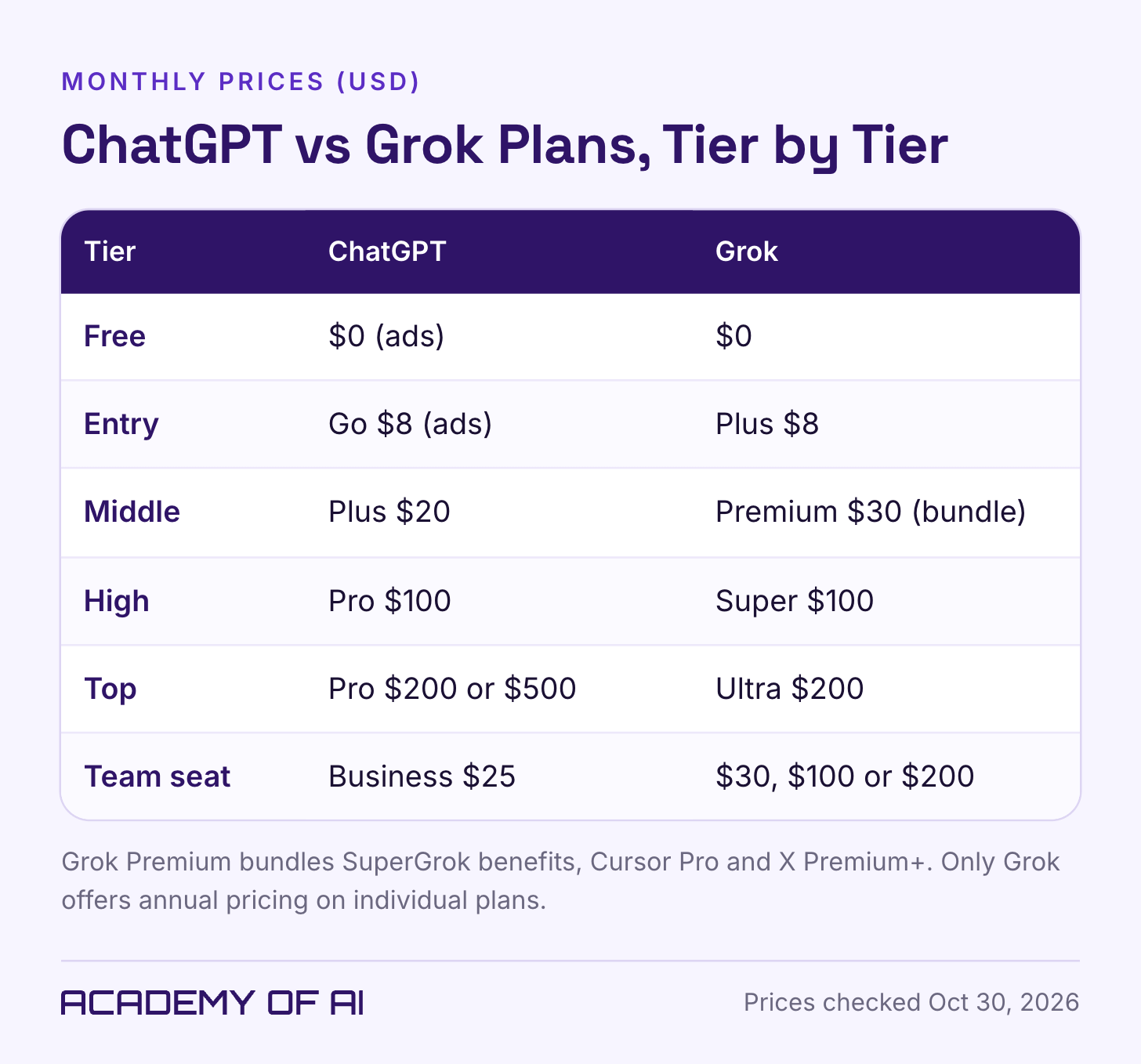
ChatGPT Plus is $20 a month; Grok Premium is $30. Those are the two paid plans I would compare first for general use. Both companies also sell an $8 entry plan: ChatGPT Go and Grok Plus. The cheaper tiers leave out some of the next tier’s features.
Heavy users have more expensive choices. ChatGPT Pro is listed at $100, $200 or $500 a month. Grok Super is $100 and Ultra is $200. Read the allowances before treating similarly priced plans as equivalent.
Grok Premium is also a bundle. It includes SuperGrok benefits, Cursor Pro and X Premium+ benefits. Cursor is an AI coding editor. Someone already paying for those tools has a different calculation to make from someone who just wants help writing emails.
Pay attention to the shared weekly usage pool for eligible first-party Grok and Cursor use. Supported third-party models in Cursor are billed separately. API access is also not prepaid API usage; the pricing FAQ lists that billing separately. Those are easy distinctions to miss in a bundle.
I would write down the tools I actually need, then compare the total bill. I would not count an included product as a saving if I had no intention of buying it.
Grok Premium costs $300 on an annual individual subscription. OpenAI’s Pro help page says Go, Plus and Pro have no annual billing option. Business is separate: standard ChatGPT Business seats cost $25 monthly or $20 per month billed annually.
All prices here are US dollar list prices. Taxes, country and purchase channel can change the checkout total. My preference would be to pay monthly until I knew the tool was earning its place.
Training Data and Privacy: Your X Posts vs Your Chats
There are several privacy questions hiding inside “does it train on my data?” Chats, public X posts and business files have different rules. The controls below address training. Retention and access still need their own checks.
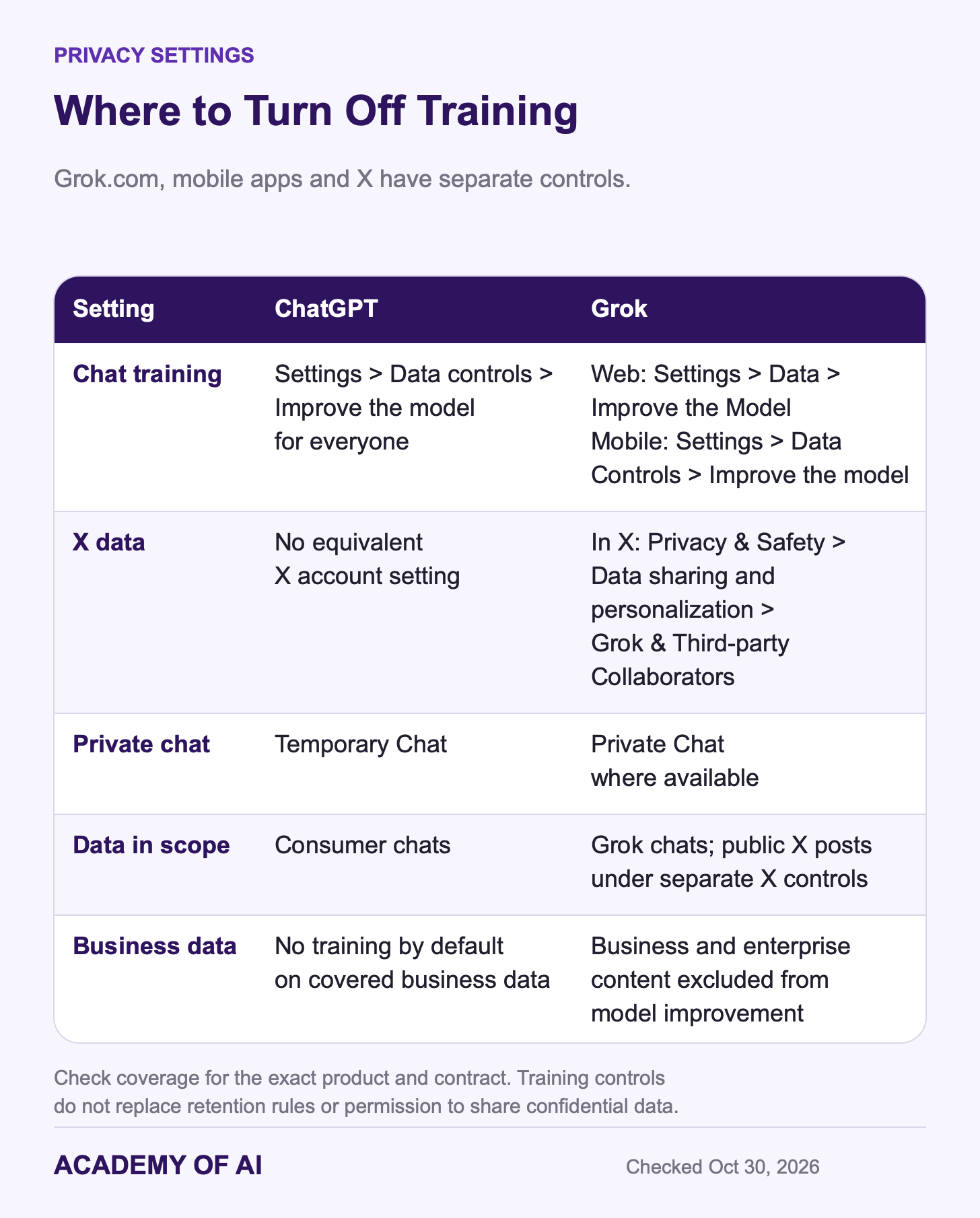
In ChatGPT, open Settings > Data controls > Improve the model for everyone. Turning that off stops new conversations from being used for training. Temporary Chat also keeps conversations out of training and chat history, subject to retention rules.
Ads have separate controls. OpenAI says advertisers do not receive your conversations, and eligible users can manage ad personalization based on past chats and memory. Turning off model training should not be taken to mean that every other data setting is off.
Grok has separate settings for the website, mobile apps and X. The Grok privacy FAQ and X’s help center give these paths:
Grok.com: Settings > Data > Improve the Model.
Grok mobile apps: Settings > Data Controls > Improve the model.
X: Privacy & Safety > Data sharing and personalization > Grok & Third-party Collaborators, according to X’s help center.
The X control covers data that may include public posts and Grok interactions on X. Protecting an X account keeps its posts out of that training use. It does not replace the Grok.com or mobile-app settings. Check the service where you actually chat.
Grok’s Private Chat, where available, excludes those interactions from training. A training opt-out applies to new conversations, and submitted feedback can still be used. Again, read the retention rules if deletion is what matters to you.
For a client document, I would start with the agreement covering the document, then choose an approved account. A privacy toggle does not give me permission to upload material I am required to keep confidential.
Content Moderation Records for xAI and OpenAI, With Dates
I would include the safety record in any serious comparison, particularly for a team choosing an assistant. The events below are dated examples. They explain concerns readers may have heard about; they do not measure how often either product fails today.
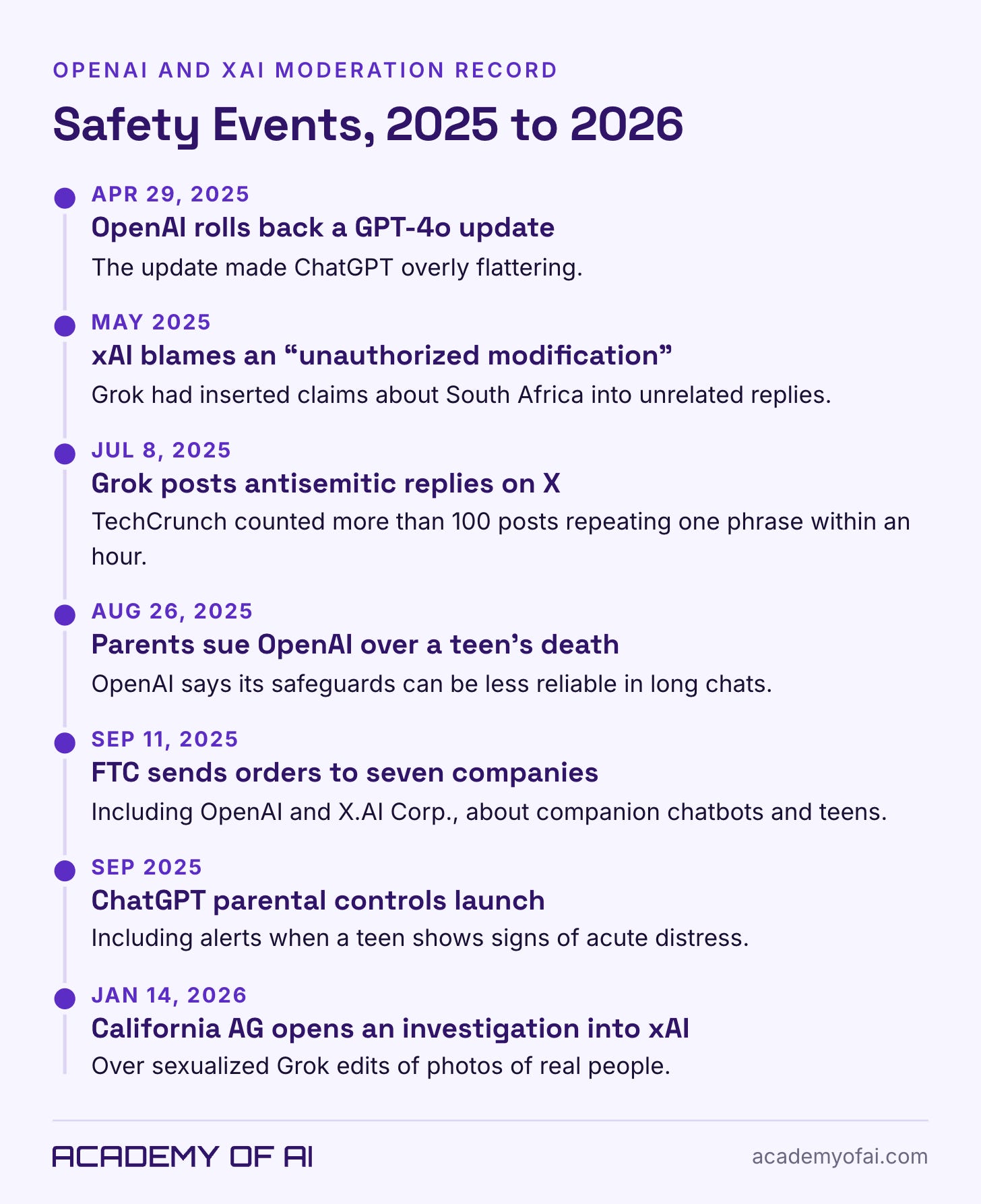
Grok generated unrelated claims about “white genocide” in South Africa in May 2025, followed by antisemitic replies that July. TechCrunch reported the incidents and xAI’s explanation of an unauthorized instruction change in the earlier case.
On January 14, 2026, California’s attorney general opened an investigation into nonconsensual sexual images generated using Grok. The announcement raised concerns involving women and children. Bloomberg reported new xAI restrictions the following day. An investigation is not a final legal finding.
OpenAI rolled back an overly flattering GPT-4o update on April 29, 2025. In August, a family sued over ChatGPT’s conversations with their teenage son before his death by suicide, Bloomberg Law reported. Those are allegations, not findings established here.
OpenAI separately acknowledged weaker safeguards in long conversations and later introduced parental controls. In September 2025, the FTC opened an inquiry involving seven chatbot companies, including OpenAI and xAI.
For my own work, the practical response is to review anything that will carry my name. A team also needs to decide what work the assistant may do and who checks it. Families have a different set of questions about age rules, conversation limits and parental controls. I would not let a product’s friendly tone answer those questions for me.
ChatGPT Business vs Grok Team Seats for Workplace Use
Here is the experience behind my preference for ChatGPT. I connected it to Semrush to help correct issues on one of my larger news brands. It helped me tackle literally thousands of issues on the site. I still had to fix a few design elements when they broke.
That is a useful tool, and it is also work that needed supervision. I would want a colleague to hear both parts before trying the same approach. It says something about the workload ChatGPT helped me handle. It does not tell me what Grok would have done with the same site.
For a workplace purchase, I would put the account terms next to the feature list. A personal paid plan may be the wrong account for company files, even if the person using it likes the assistant.
OpenAI does not train on covered business data by default. ChatGPT Business and Enterprise offer workplace controls and are ad-free. Check the seat, model and retention options that apply to your team.
xAI also excludes business and enterprise content from model improvement. Its enterprise API FAQ covers API customers specifically. I would check which agreement covers the service being purchased, rather than apply an API promise to every Grok product.
The Grok team table lists central administration, usage analytics, team privacy settings, custom chat retention and SSO. Enterprise adds more controls. For a Cursor or X bundle, confirm the coverage for each connected service as well as Grok.
I would begin with ChatGPT for a general office workflow. If the team already relies on Cursor or X, I would compare Grok’s team bundle before deciding. Approval will depend on the organization’s requirements and the data involved.
Is Grok Better Than ChatGPT? My Picks by Reader Type
These are starting picks. The job you need done can change them.
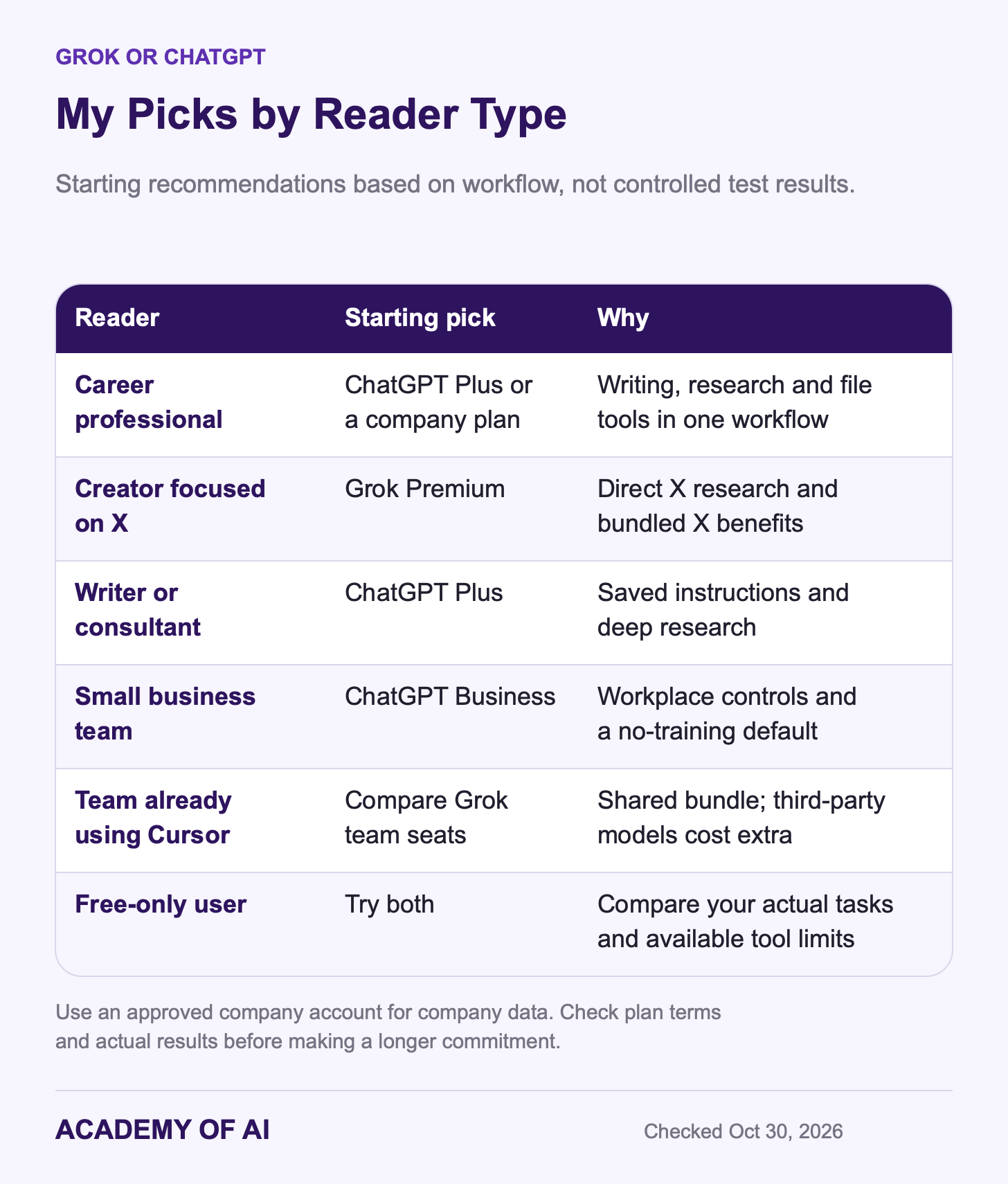
Career professionals, writers and consultants: I would try ChatGPT for emails, reports and spreadsheet work. Plus costs $10 less per month than Grok Premium. Saved instructions can also reduce how often you repeat the same brief. Use an approved company plan for company data.
Creators who work mainly on X: look at Grok Premium. Direct X research and the bundled benefits are relevant here. Check your existing subscriptions before switching so you do not end up paying twice for overlapping access.
Small teams: start by comparing workplace terms. ChatGPT Business is my general starting option. Grok team seats are worth a look when Cursor is already part of the work. Remember the extra charges for third-party Cursor models. ChatGPT plans also include Codex, with usage allowances that vary by plan.
Free-only users: try both. ChatGPT’s everyday text allowance is attractive for drafting; Grok gives you another way into X discussion and web research. Let the actual tool limits, and the amount of cleanup each answer needs, decide which one you open first.
If you are undecided, use both for a week on work you already need to finish. Pick an email, a research question and a file task. Give them the same material. Keep a quick note of errors, edits and limits. By the end, you should have a better reason to subscribe than a feature you might use someday.
My own starting point remains ChatGPT. Yours may be Grok. Either way, I would choose the assistant that gets useful work finished with the least cleanup.
ChatGPT vs Grok Questions, Answered
Is Grok better than ChatGPT for free users?
For text-heavy work, I would start with ChatGPT Free. OpenAI lists unlimited everyday text chats, subject to safeguards, with separate tool limits. Grok Free has limited chat and image generation. Try it if the X connection matters to your research. Both leave features and usage for paid tiers.
Grok AI vs ChatGPT: which is cheaper?
Both offer $8 entry plans. ChatGPT Plus is $20 monthly and Grok Premium is $30. Premium bundles Cursor and X benefits, so compare the tools you would otherwise pay for. Third-party Cursor models cost extra. Grok offers annual individual subscriptions; ChatGPT Go, Plus and Pro are monthly.
Does Grok use my X posts to train its models?
X says public posts and Grok interactions on X may be used for training unless you opt out. Open X’s privacy settings and find Grok & Third-party Collaborators. Protecting your account also keeps its posts out of that use. Grok.com and Grok mobile apps have separate training controls.
Can I use Grok or ChatGPT for confidential work?
Use an approved account covered by terms appropriate for the information. OpenAI and xAI both publish business no-training commitments. Check the exact product, retention, access controls and connected services. Paying for a personal subscription does not by itself make it suitable for confidential files.
What are the biggest Grok vs ChatGPT differences in 2026?
Grok has direct X integration and a Cursor/X subscription bundle. ChatGPT has a different writing, research and file workflow, with Plus priced below Grok Premium. They also differ in model access, media features, limits and workplace terms. Compare the specific plan you would buy, then try it on your own tasks.
Keep reading on Academy of AI
For more detail, see our SuperGrok subscription guide and AI image tools comparison.