



SuperGrok was xAI’s $30 monthly paid Grok plan. New buyers now get its benefits through The X Subscription’s $30 Premium tier, which bundles Grok, Cursor and X perks. Existing subscribers can keep their legacy plans. Grok still has a free tier, with limited access rather than a published universal prompt count.
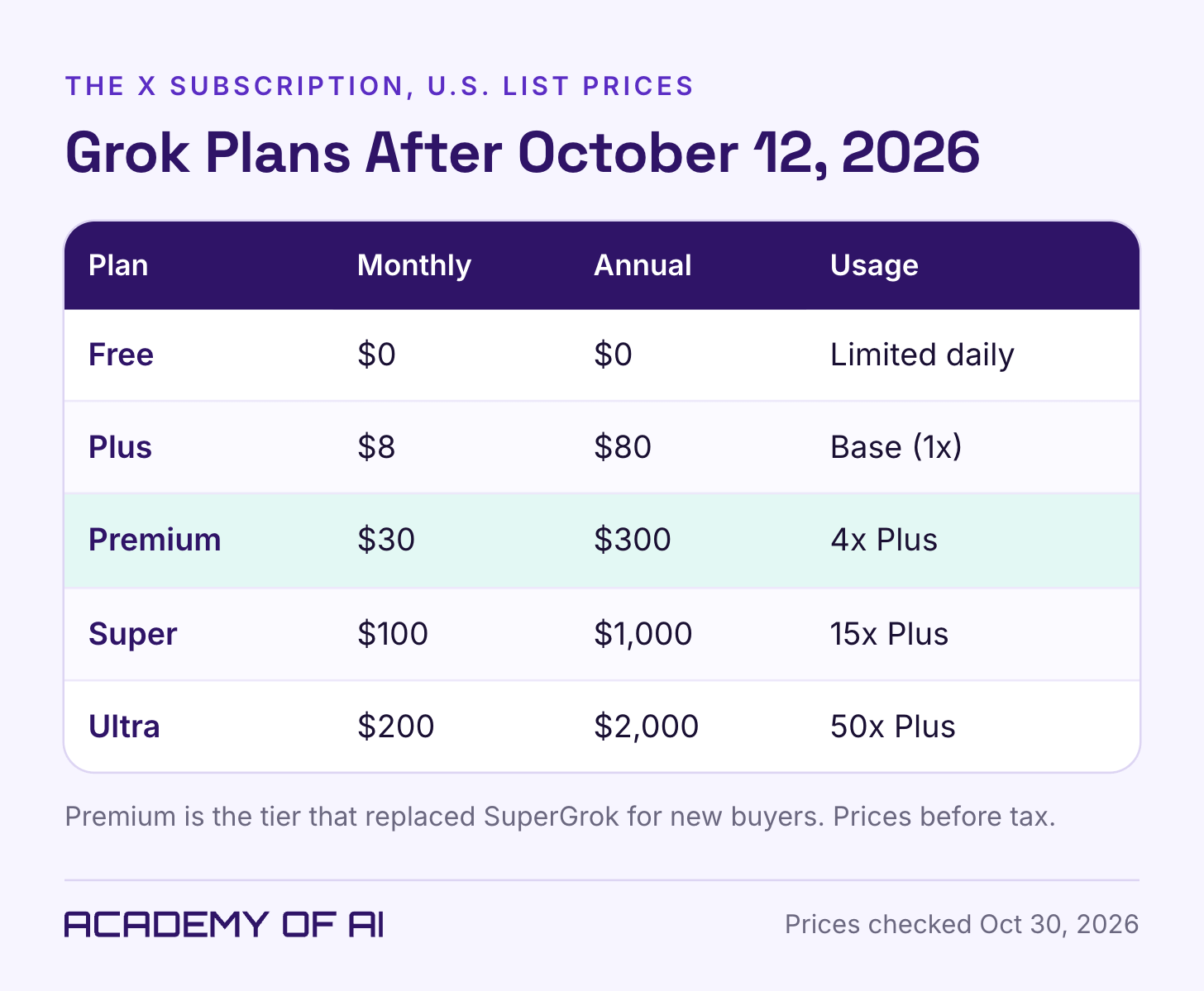
That comes straight from xAI’s announcement of The X Subscription and its pricing documentation, which list five tiers: Free, Plus at $8, Premium at $30, Super at $100 and Ultra at $200 a month. Those are U.S. list prices before tax, as of October 30, 2026. Anyone already paying for SuperGrok keeps their plan, price and features unless they choose to switch.
So the buying question has changed shape. You’re no longer deciding whether Grok alone is worth $30. You’re deciding whether a bundle of Grok, an AI coding app and X perks is worth it, or whether the free plan already covers what you use Grok for.
The current documentation uses the company name SpaceX Super Intelligence, or SpaceXSI. This guide uses Grok for the assistant and The X Subscription for the new bundle, so the company name does not get confused with a plan name.
Super Grok Became Part of The X Subscription on October 12
The X Subscription puts Grok, Cursor and X on one bill. Grok covers chat, voice, image and video generation, and Premium and up add Grok Bot, which xAI’s docs describe as AI teammates working on a persistent cloud computer. Cursor is the AI coding editor.
Each paid seat gets one weekly pool for eligible Grok-model usage across supported Grok and Cursor surfaces, including Grok Bot where the tier includes it. The usage guide says activities consume different amounts. Team seats have separate weekly pools; they share prepaid credit for additional usage. Using Claude or GPT inside Cursor draws on prepaid credit from the first use, even while the included Grok pool remains.
The launch announcement claims better usage value than comparable older plans. The published multipliers compare new tiers with Plus; they do not translate an old SuperGrok allowance into a guaranteed number of chats or videos. Treat the claimed improvement as a vendor claim, then compare your own tasks and actual usage.
The new-customer launch was October 12. The current pricing page now shows the new lineup and places the latest Grok models at Premium and above. The older SuperGrok wording still present in some help pages is not the new-customer plan menu.
Is Grok Free? What the Free Plan Includes
Yes, Grok is free. You can use it at grok.com and in the iOS and Android apps without paying. The Grok product docs describe it as “free to start.” The X Subscription page lists Free as “Daily access to Grok,” a starter allowance for Cursor’s coding agents, and standard X.
The current feature comparison lists limited chat, image generation and Grok Build on Free. Video generation is not included on Free or Plus; it starts at Premium. The Grok FAQ also describes separate free Chat and Voice limits. Grok Build became available on every plan in August 2026, but “available” does not mean unlimited. Do not infer connector access or identical features on every surface from an old pricing page.
The pages checked for this guide do not publish a fixed free prompt or image allowance. The FAQ says free Chat and Voice reset separately from the paid weekly pool. Watch the limit and reset information in your account; a number from an older review may describe a different plan or feature.
Premium is the first new tier with the latest models, Grok Bot and video generation. Paid team seats add centralized billing and administration. Check the exact feature row before subscribing: Plus includes more usage and Imagine images, but it is not a cheaper route to every Premium feature.
The Grok FAQ says generated images and videos carry a watermark with no removal setting, and its policy prohibits obscuring provenance signals. Account for that in a client brief before choosing Grok for deliverables that require a particular appearance or labeling.
Grok Pricing in 2026: Plus, Premium, Super and Ultra
Plus costs $8 a month or $80 a year. It’s the base usage level the other tiers are measured against, and it adds X’s checkmark, creator tools and fewer ads on X. It doesn’t include Grok Bot, and teams can’t buy it.
Premium, at $30 a month or $300 a year, is the tier that replaced SuperGrok for new buyers. It gets four times the usage of Plus and the latest Grok models. xAI’s launch post says it bundles the benefits of SuperGrok, Cursor Pro and X Premium+, which together previously cost $90 a month. Grok Bot is included. Cursor’s third-party models (such as Claude or GPT) are available here too, but they’re billed from prepaid credits from the first use, not from your pool, per the X Subscription overview.
Super costs $100 monthly or $1,000 annually for 15 times Plus usage; Ultra costs $200 monthly or $2,000 annually for 50 times Plus. The current plan cards put ad-free scrolling on most surfaces at Premium and above. That wording does not promise the removal of every ad everywhere.
For legacy Grok, the FAQ describes Settings → Usage with percentage used, a product breakdown and the reset time. For The X Subscription, use the live usage and billing views in the Grok dashboard and select the correct workspace. Inspect the included pool, prepaid balance and extra-usage settings separately. Our guide to Claude usage limits uses the same practical principle: identify the activity causing the interruption before buying more capacity.
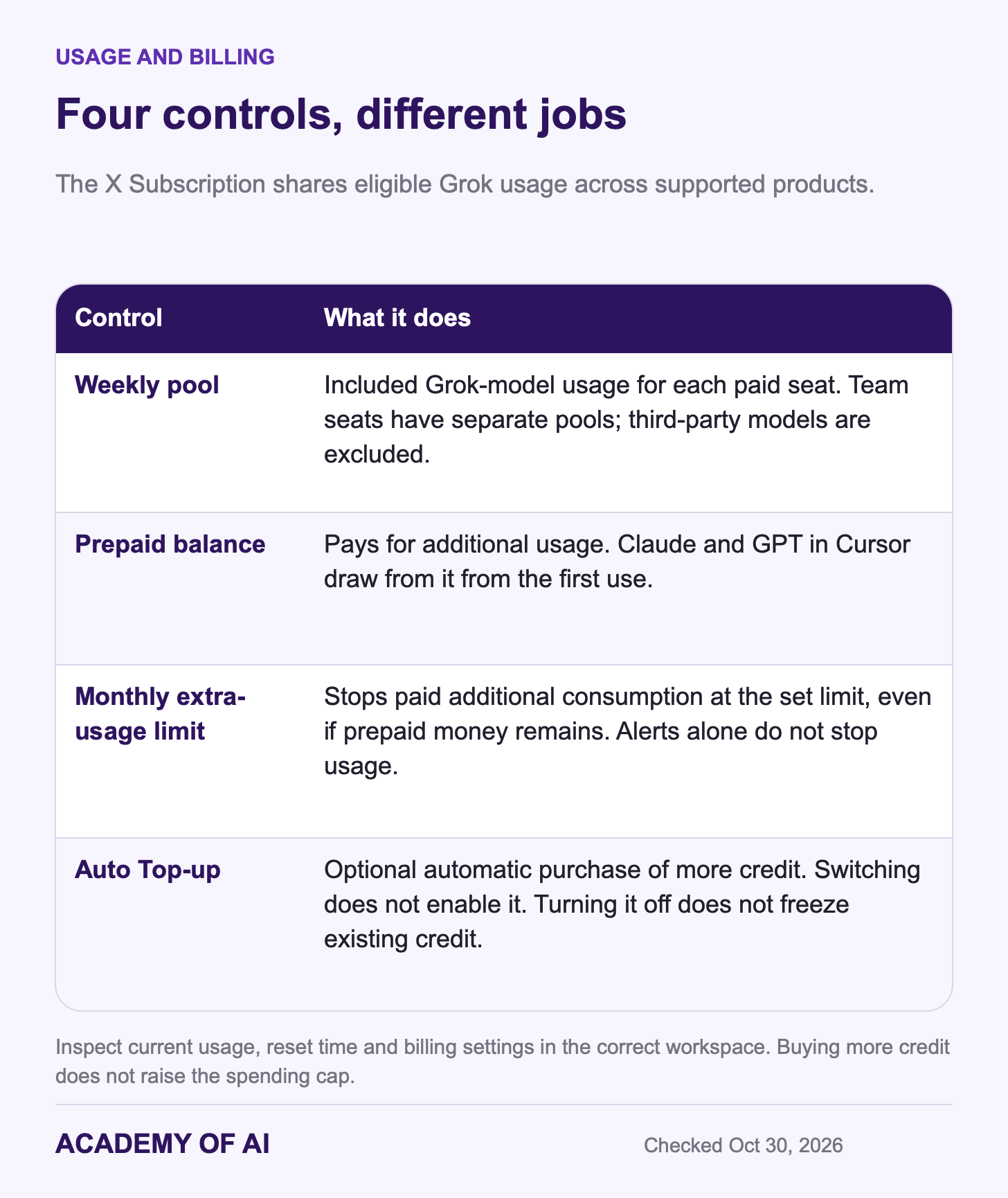
Additional Usage draws on prepaid credits. The unified-plan guide distinguishes these from included usage and says switching does not enable Auto Top-up. Auto Top-up charges your saved payment method only after you turn it on; turning it off does not prevent already purchased credit from being spent. The legacy Grok FAQ describes $5 minimum web top-ups and one-year expiry unless otherwise stated, but check your current purchase terms before applying those details to a new bundle.
Set a monthly additional-usage limit if you want paid consumption to stop at a chosen amount. That limit is separate from the prepaid balance and Auto Top-up settings. Alerts alone do not stop usage, and buying more credit does not raise the cap. Compare measured extra costs with a higher plan instead of enabling automatic payments by default.
Teams can mix Premium, Super and Ultra seats at the matching individual per-seat prices, according to the pricing documentation. Each seat keeps its own included pool; prepaid additional-use credit is shared. The launch announcement lists SSO, admin controls, consolidated billing, analytics and SOC 2 compliance. Request the relevant security report and contract for your organization’s review; a compliance claim is not blanket permission for confidential uploads. Enterprise pricing and limits follow its agreement.
The cited price pages show US-dollar list prices before applicable taxes and fees. Review your own checkout total, billing currency and renewal terms rather than assuming the advertised dollar price is the final charge. Annual billing is a full-year commitment, not a monthly payment at the displayed monthly equivalent.
Legacy SuperGrok, Lite and Heavy Plans: Who Keeps Them
Before the bundle, the standalone lineup included SuperGrok, SuperGrok Lite and SuperGrok Heavy. Standard SuperGrok was $30 a month; Heavy launched at $300. Legacy subscribers may have different billing periods, offers and feature limits. Use your existing subscription record for the amount you actually pay, rather than treating a historical list price as your renewal quote.
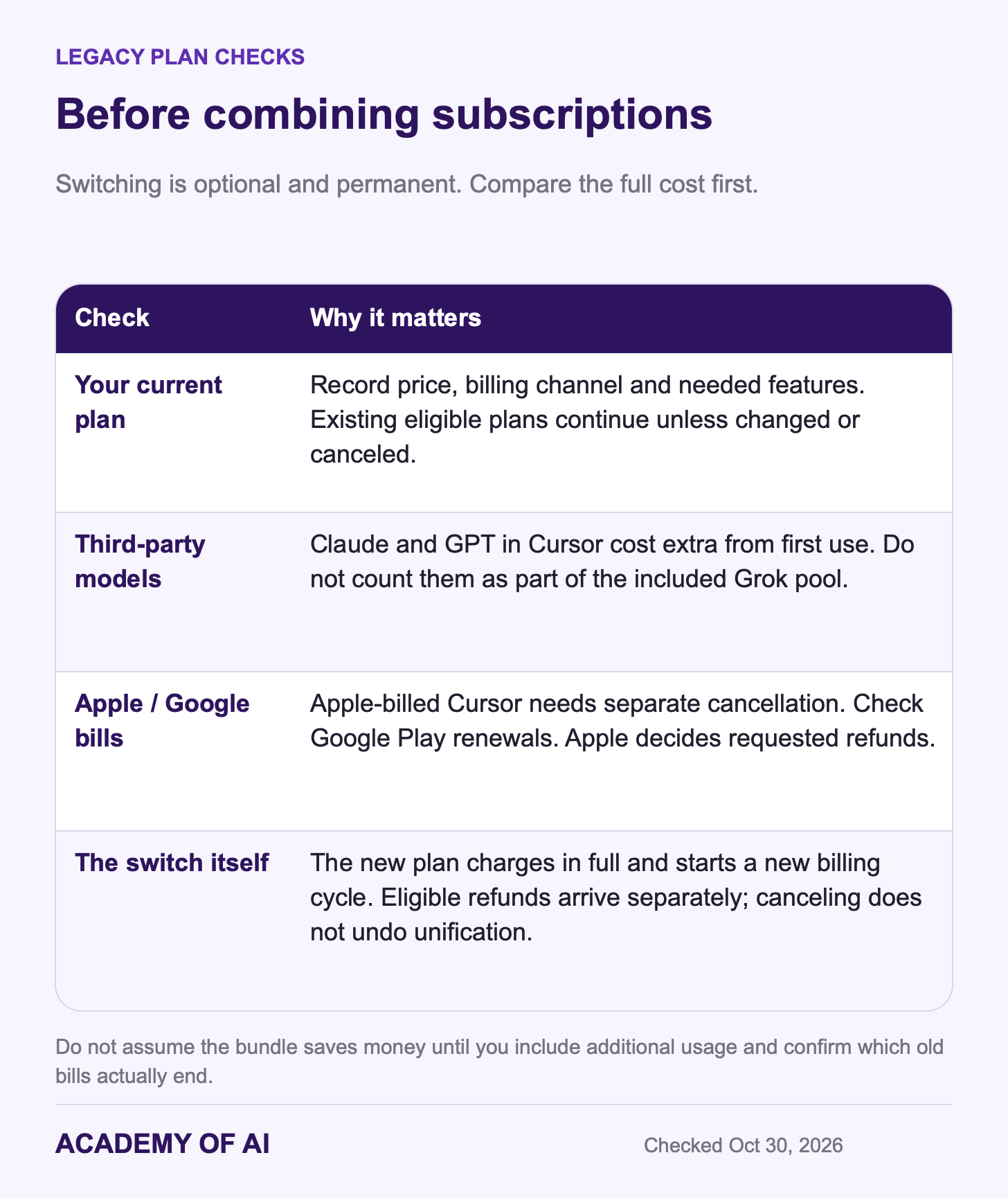
If you’re on any of these, nothing changes unless you cancel or switch.
Switching combines eligible accounts permanently. Canceling the new bundle does not separate them again or restore the old subscriptions. Selected eligible subscriptions are canceled, a new billing cycle starts immediately, and the prorated refund for unused time arrives separately from the full new-plan charge.
The App Store exception matters: an Apple-billed Cursor subscription is not canceled or refunded automatically. Cancel it through Apple and request any refund there. For Apple-billed Grok, Grok Bot or X Premium, the provider requests cancellation and a refund, but Apple decides the refund. For those subscriptions through Google Play, check after switching and cancel there if renewal remains active.
The bundle may reduce duplicate subscription bills, but compare the total after including Cursor’s separately charged third-party models. If you use only Grok chat, the new Premium multiplier does not prove you will get more chats than a legacy plan. A Lite subscriber should confirm the exact replacement features: new Plus does not include video. Save your current plan details before making the permanent switch.
How X Premium and Premium+ Fit With Grok Now
Existing X Premium plans, at any level, carry on as before. New X buyers, including people who only have a free X account, now start on The X Subscription instead, according to the overview docs.
The tiers line up with X perks this way. Every paid tier includes X Premium benefits once you connect your personal X account. Plus adds the checkmark, creator tools and fewer ads. Premium bundles the benefits of X Premium+. On a team plan, each person connects their own X account to get those perks.
Two older rules still apply to legacy X subscribers, per the Grok FAQ. X Premium+ Grok access only works on the Grok account linked to that X account. And refunds for X Premium are handled by X, not by SpaceXSI.
X’s current Grok help page describes access through the Grok icon on web, iOS and Android; it no longer labels that access Premium-only. Try the task on your current free account first and check its actual limits. If you pay mainly for X perks, compare those benefits separately from Grok’s AI capacity.
Grok Privacy Settings to Check Before Upgrading
Review the rules for the product and account you use. Personal Grok chat, Grok on X, Grok Bot and a managed workspace should not be assumed to share one data policy. A paid plan by itself is not authorization to upload work files.
For Grok on X, X’s help page gives this path: Privacy & safety → Data sharing and personalization → Grok & Third-party Collaborators. The training control and Grok Personalization are separate options. Training opt-out does not cover voluntarily submitted feedback; protect your posts if you also want to restrict their visibility and use in Grok responses. None of these controls is a retroactive promise that all previously used data disappears.
For grok.com and the apps, the FAQ points to Profile → Settings → Data Controls. Its file guidance refers to retention windows and legal, compliance or safety exceptions without a universal duration. X’s page separately gives a normal 30-day deletion window for Grok conversation history, with legal and security exceptions. Grok Bot has its own account and policies. Before connecting email or files, verify permission, the account’s data rules and which actions the tool may perform.
Who Should Pay for Grok: A Tier-by-Tier Checklist
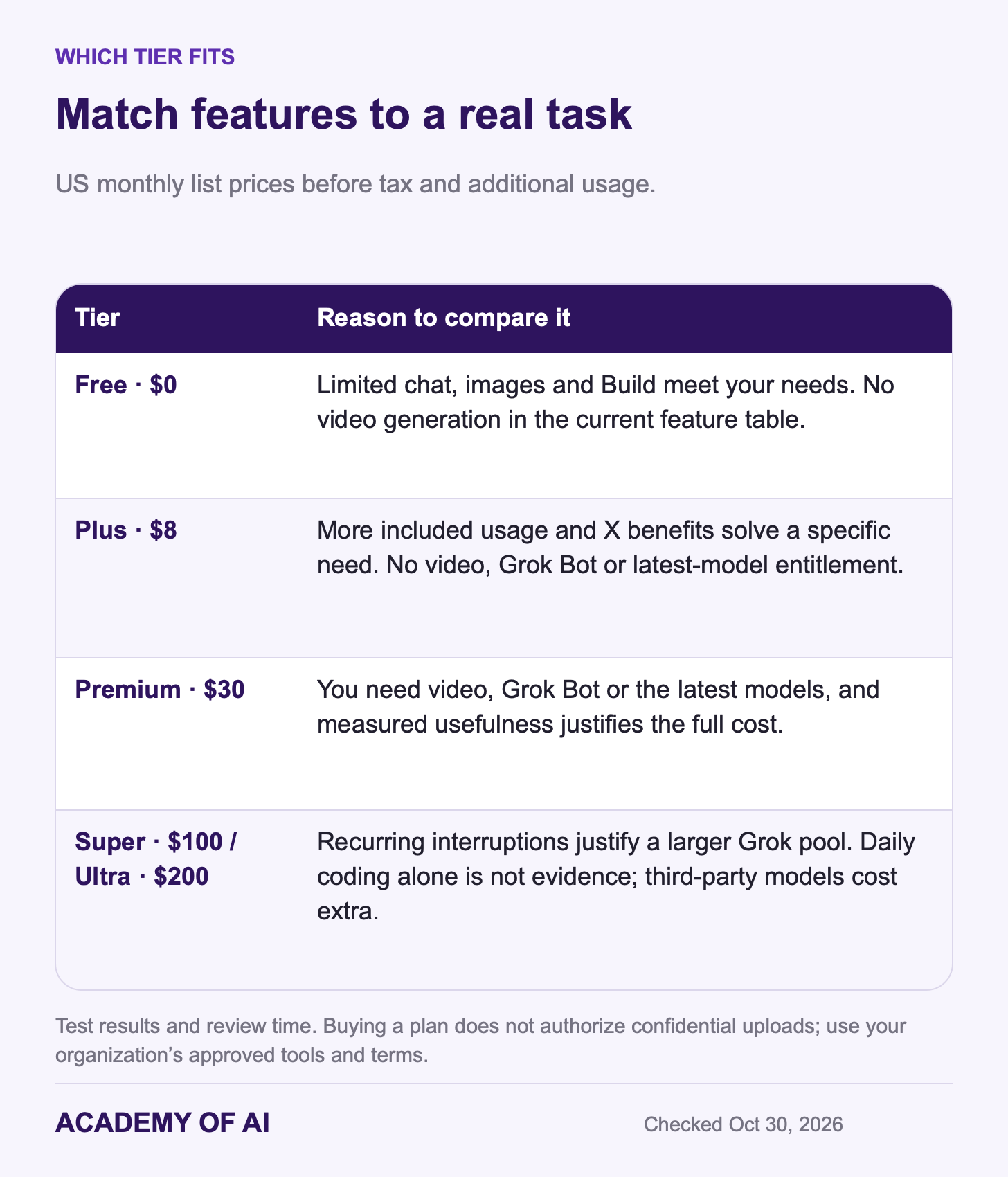
Start on Free if it handles your tasks and occasional limits do not disrupt important work. Test a representative task rather than guessing from how many days a week you open the app.
Consider Plus at $8 if its included Grok features and X benefits meet a specific need. Check Premium instead if the requirement is video generation, Grok Bot or the latest models. More allowance does not make missing features appear.
Premium can be worth $30 for one particularly useful capability or several combined benefits. There is no reliable “use two features” rule. Compare the useful results, correction time and bills actually replaced with the full monthly cost, including any third-party model usage.
Consider Super or Ultra only after recording recurring interruptions, the product causing them and the cost of a higher tier versus additional usage. Coding daily does not establish that you need a larger Grok allowance, especially if most of the work uses separately billed models.
And skip paying altogether if you need an assistant for confidential work files and your employer hasn’t approved Grok. Same if your daily work is writing and research where ChatGPT or Claude already fits. Our Grok vs ChatGPT comparison covers everyday tasks, and the ChatGPT Plus breakdown covers the $20 alternative.
For comparison shoppers: $30 is $10 more than ChatGPT Plus, which costs $20 a month in the U.S. The bundle is what’s meant to close that gap. If you’d never open Cursor or care about X perks, you’re paying for pieces you won’t use. Our roundup of AI assistants by task can help you figure out which assistant fits your workday.
Try your current access for a normal work week. Keep a short record of useful results, corrections, interrupted tasks and any feature you could not use. Upgrade only if the right tier solves a problem worth its total cost. Monthly billing is more flexible while testing, though usage charges can add to that month’s subscription.
To stop a new web-billed plan, follow Billing & invoices in the Grok dashboard. If you subscribed on X or Google Play, cancel through that channel. The pricing page says to cancel at least 24 hours before renewal. Canceling the bundle does not automatically cancel a separate Apple-billed Cursor subscription or undo combined accounts.
Grok AI Subscription Questions, Answered
Is Grok AI Free to Use?
Yes. Grok has a free plan on grok.com and in the mobile apps, with daily limits xAI doesn’t publish as numbers. xAI says Grok Build, for making simple apps from a description, has been on every plan since August 19, 2026.
How Much Does Super Grok Cost in 2026?
The standard legacy SuperGrok list price was $30 monthly; existing subscribers should check their own renewal record. For new buyers, Premium is $30 monthly or $300 annually before tax and extra usage, with the bundled Grok, Cursor and X benefits described above.
Does X Premium Include Grok?
Existing X Premium plans keep their current Grok access. For new buyers, every paid tier of The X Subscription includes both Grok and X Premium benefits, and Premium at $30 is the first tier with the latest Grok models.
Can You Still Buy SuperGrok Heavy?
Not as a new standalone plan. Existing Heavy subscribers keep it unless they switch. New buyers who want the most usage now pick Ultra at $200 a month, which has 50 times the Plus allowance.
Is the Grok Watermark Removable on Paid Plans?
No. The Grok FAQ says generated images and videos carry a watermark on every plan, with no setting to turn it off.
Keep reading on Academy of AI