



Start with the AI assistant that fits your main task and the software you already use. Compare Gemini for Gmail and Docs, Copilot for Outlook and Word, and ChatGPT or Claude for a mix of writing, research and file analysis. A specialist can help with meeting notes or calendar scheduling when your existing tools fall short. For work, confirm that the specific AI feature and account are approved before connecting them.
Prices and features below were checked against vendor pages on October 30, 2026. Prices are US dollars before applicable tax unless stated otherwise. Annual rates are monthly equivalents paid on an annual commitment, not month-to-month bills. Local pricing, promotions and app-store charges can differ. Check the renewal total as well as the first payment.
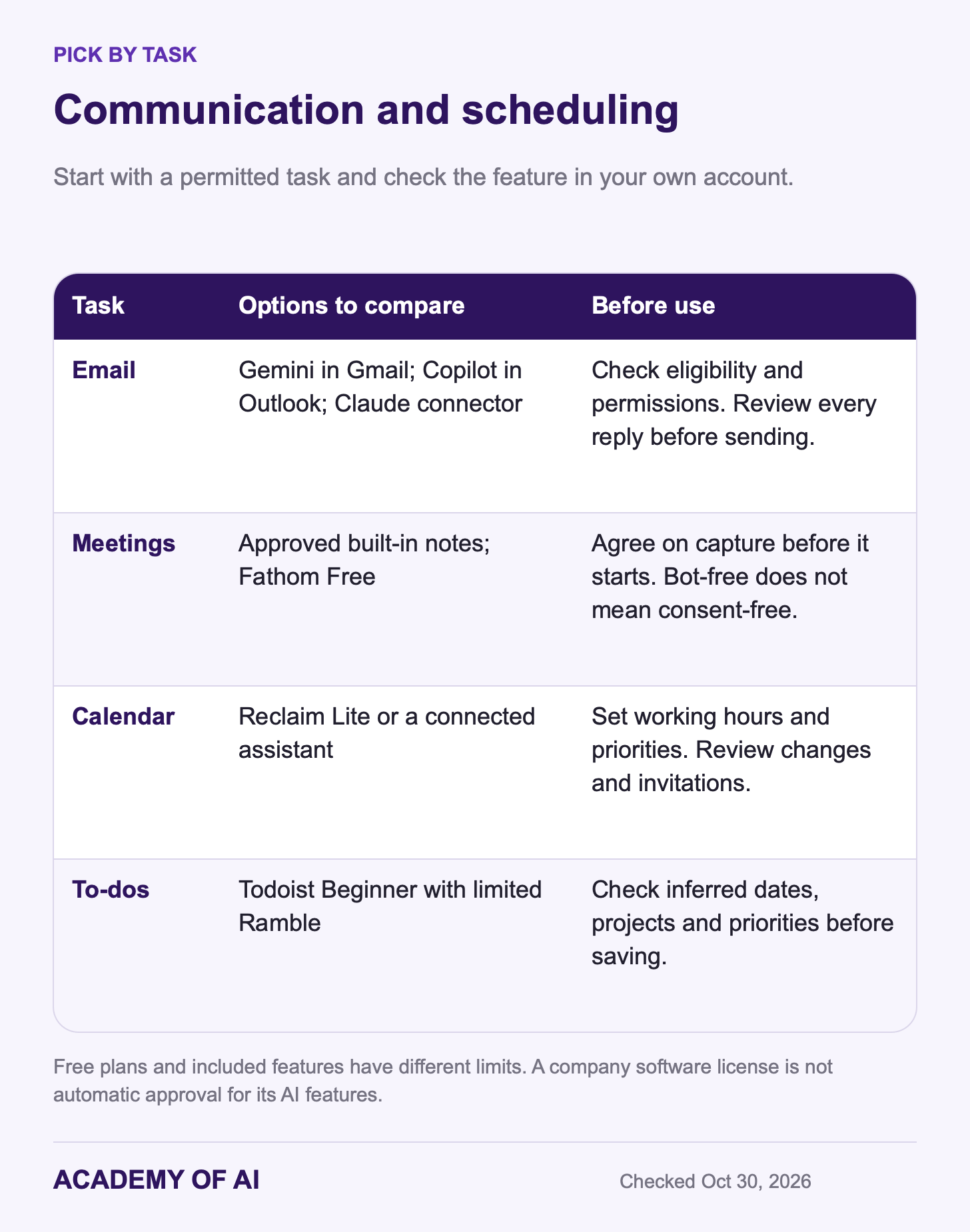
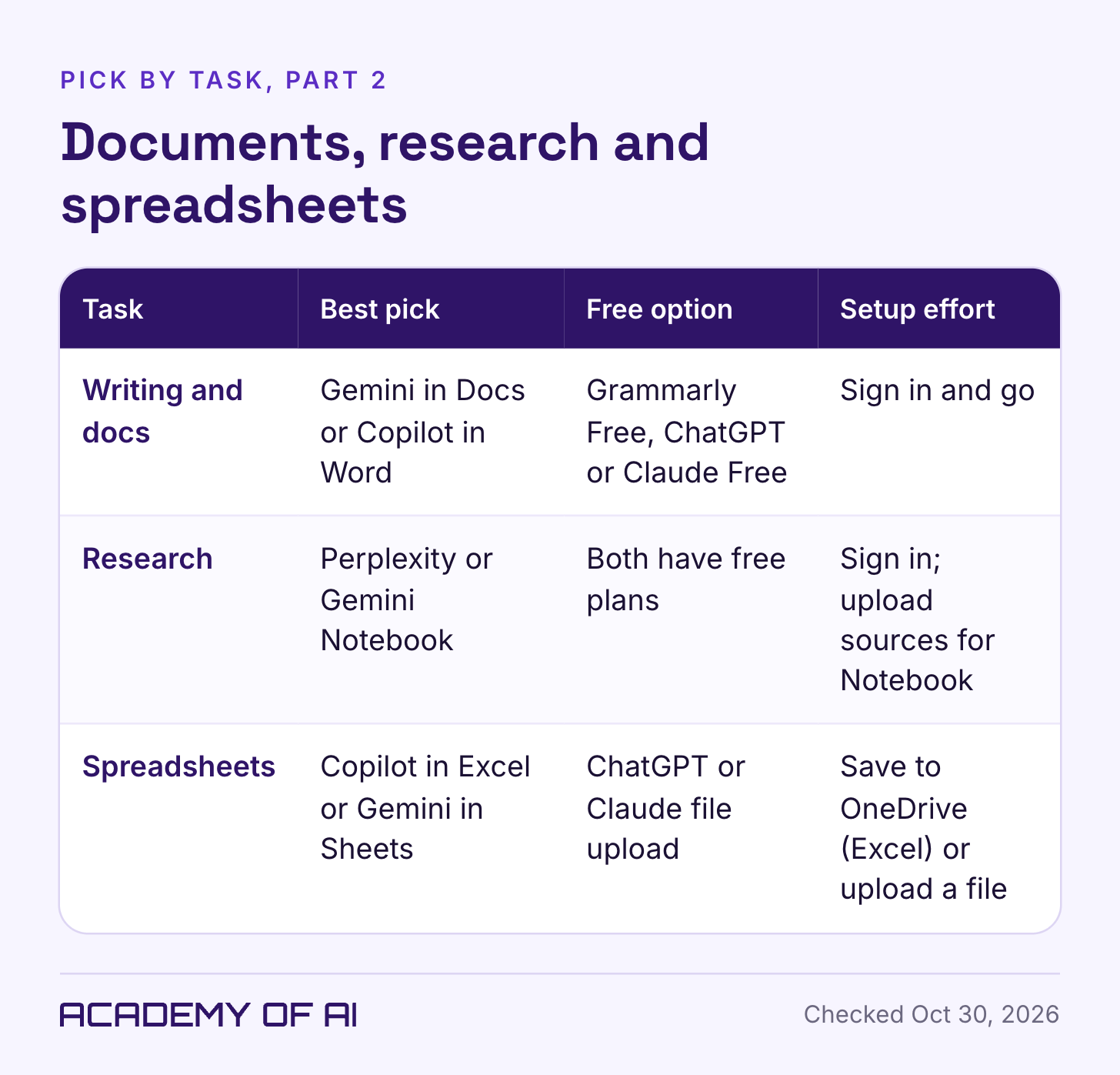
Use the task tables to find your pick fast. Then read the privacy section before you connect anything to a work inbox or let a bot into a client call.
How We Chose These AI Productivity Tools
This shortlist favors tools with a clear role in everyday office work. The selection criteria were:
A documented way for a nontechnical user to get started without code.
A useful role in email, meetings, scheduling, writing, research, spreadsheets or task capture.
Public pricing or a documented free tier.
Published data-handling guidance and account controls.
A public signup or trial route, with beta features identified where relevant.
This is a documentation-based buying guide, not a hands-on benchmark. We reviewed official pricing, help pages and announcements; we did not measure speed, accuracy or time saved, or complete a purchase for every tool. Availability can still depend on your country, account, device and administrator. The recommendations below are places to start a trial, not rankings of tested performance.
If you’re still sorting out which parts of your job suit AI at all, start with our guide to which tasks generative AI handles well. It’ll save you from buying a tool for a job AI does badly.
Best AI Tools for Productivity, Picked by Work Task
Choose one recurring task before adding another subscription. A tool that removes copying and reformatting can be useful, but connecting your whole inbox is not required to get value from AI. A small, non-sensitive sample is often enough for a first test.
For email, first check Gemini in Gmail or Copilot in Outlook if your plan includes it. Google lists Help me write for free personal Gmail accounts in the US. Claude’s Google Workspace connectors are available on all plans, including Free, but account availability and administrator permissions still matter. Review the requested access before connecting any inbox.
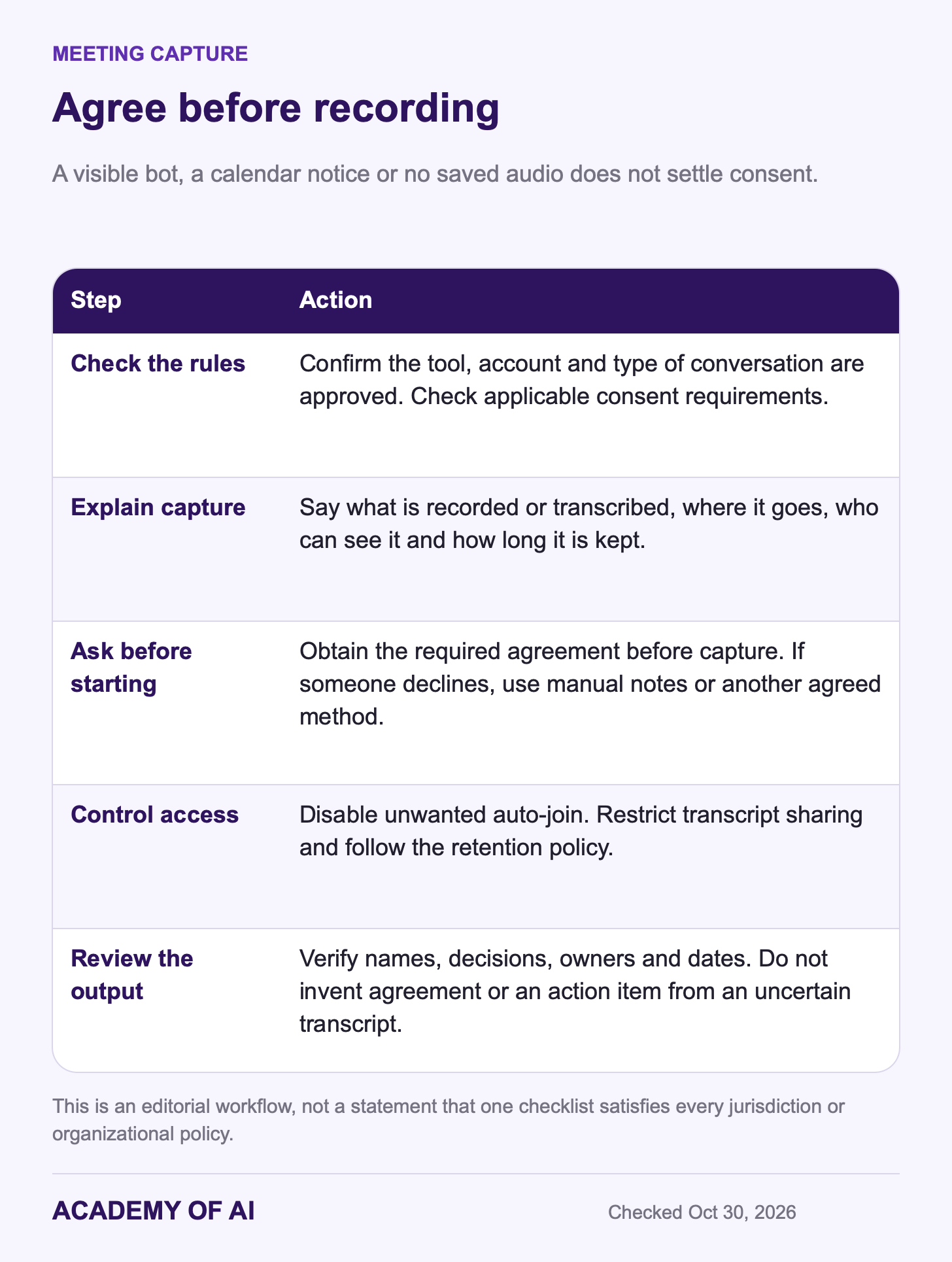
For meetings, check the AI features included with your Zoom, Meet or Teams license. Approval of the meeting platform does not automatically approve its AI notetaker. Fathom Free is another option for unlimited recordings and transcripts with basic AI summaries. Get the required participant consent before recording or transcribing, whether capture uses a visible bot or a desktop app.
Calendar tools need clear scheduling rules. Reclaim.ai’s free Lite plan supports Google and Outlook calendars, but you’ll need to connect your calendar and set working hours, focus time and task priorities and review the resulting schedule. To-do apps are simpler: Todoist’s free plan includes limited use of Ramble, which turns a spoken brain dump into tasks.
For writing, try the assistant in your document editor if it is available, or use ChatGPT or Claude to develop an outline. For research, compare Perplexity’s cited web answers with Gemini Notebook’s work on selected sources. For spreadsheets, compare Copilot in Excel or Gemini in Sheets with file analysis in ChatGPT or Claude. In every case, check important claims and calculations against the original material.
Five General AI Assistants for Productivity, Compared
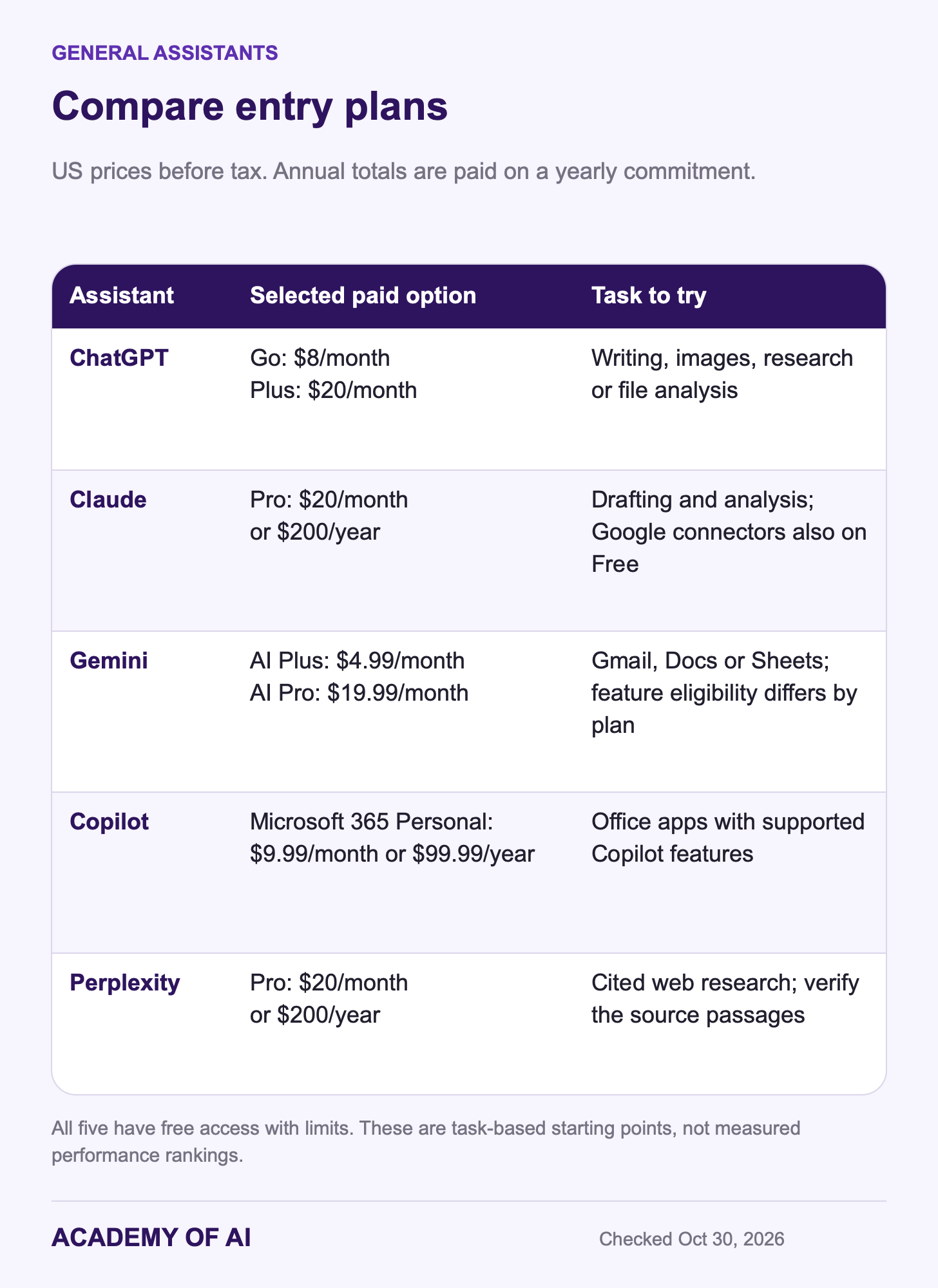
General assistants are the chat apps you open in a browser tab or on your phone. All five below can draft, summarize, answer questions and read files you upload. What separates them at work is what they connect to and what the free plan includes, plus how each one treats your data, which gets its own section further down.
ChatGPT: Writing, Images, Research and File Analysis
ChatGPT’s free plan includes limited image generation, research and file analysis. Go is $8 monthly in the US and raises some limits; Plus is $20 monthly and expands research and agent capabilities. Free and Go can include ads in supported markets, while Plus and Pro are ad-free. Pro has higher-capacity options starting at $100 monthly. Match the actual feature or limit you need before upgrading; personal subscriptions do not offer annual billing.
ChatGPT Business Standard costs $20 per user monthly on annual billing or $25 billed monthly, with a two-seat minimum. Higher-capacity seats cost more. Business and Enterprise content is not used for model training by default. Personal accounts use different data controls, covered below.
ChatGPT can also connect to Gmail, Google Calendar and Google Drive through its Google app. OpenAI’s data controls FAQ for that app says it doesn’t train its general models on data pulled directly from connected Google apps, but it may keep an indexed copy, scheduled for deletion within 30 days of disconnecting, subject to applicable exceptions. Feature and usage limits vary by tier, so compare the specific task you need. Pick ChatGPT if you want one assistant that covers writing, images, research and analysis, and read our take on whether ChatGPT Plus is worth it before upgrading.
Claude: Free Connectors for Your Inbox, Calendar and Drive
Anthropic documents Gmail, Calendar and Drive connectors on all plans. They can search and read messages, draft and send replies, create calendar events and work with files. Sending email and sharing, moving or trashing Drive files require approval by default; keep that review step for consequential actions. Team and Enterprise owners must enable the connectors before members authenticate.
Claude Pro is $20 monthly or $200 paid for a year, about $16.67 per month. It adds more usage, Research and Claude Code. Projects also exist on Free, so they are not by themselves a reason to pay. Max is $100 monthly; Ultra is $200. Team Standard is $25 per seat monthly or $20 on annual billing, starting at two seats, with commercial data terms.
Claude has both session and weekly limits on most plans. Ultra removes the five-hour limit for verified accounts, but weekly limits remain. Long files and tool-heavy work can consume allowance quickly. Our Claude usage-limit guide explains how to identify the constraint. Free is a useful starting point for testing the Google connectors with permitted data.
Gemini: An Option for Gmail, Docs and Sheets
Google’s free Gemini plan includes limited Deep Research and Gemini Notebook. Google AI Plus is $4.99 monthly in the US with 400 GB of storage and additional Gmail AI features. Pro is $19.99 monthly with 5 TB, higher AI limits and Gemini in Gmail, Docs and Sheets. Ultra starts at $99.99 monthly. Compare its specific extra capacity with your workload before treating it as an office necessity.
Google AI plans have country, age and language requirements, and individual features have their own restrictions. Google Workspace’s Business plans include the Gemini app and Gemini in Gmail; Docs features and AI note-taking in Meet begin at Business Standard. Personal Google AI subscriptions and managed Workspace licenses are different products.
The weak spot is on personal accounts. With Google’s Keep activity setting on, your Gemini chats can train Google’s models and some get read by human reviewers (more in the privacy section). Pick Gemini if your inbox and files already live at Google. Our breakdown of the Google AI Pro subscription covers what the $19.99 tier adds beyond storage.
Microsoft Copilot: Free App, Microsoft 365 Plans or Work License
Start by separating the free Copilot app from Microsoft 365 personal subscriptions. Personal is $9.99 monthly or $99.99 yearly and includes Copilot in supported desktop Office apps. Family is $12.99 monthly or $129.99 yearly; its AI benefits apply to the subscription owner, not everyone sharing the plan. Premium is $19.99 monthly or $199.99 yearly, with higher AI limits and advanced research and analysis features. Check the relevant app, device and language requirements.
At work, Copilot Chat is included with eligible Microsoft 365 subscriptions, while additional licenses and some agent usage can cost extra. The full enterprise Copilot license is listed at $30 per user monthly on annual billing, with an eligible base subscription also required. Copilot Business is $21 per user monthly on an annual plan; a first-year $18 rate is offered to existing eligible customers who subscribe by December 31, 2026. Confirm eligibility and the renewal rate. Business prompts are not used to train foundation models, but can still be logged and retained under organizational policies.
For Excel, Microsoft now supports Copilot with AutoSave on or off. Its file guidance lists supported workbooks in OneDrive or SharePoint. Do not rely on older instructions that make AutoSave mandatory. Copilot can directly change a workbook, so review the edits and keep a recoverable copy.
Perplexity: Web Answers With the Sources Attached
Perplexity is useful to compare when the task is finding a sourced web answer. Its products also include file and app creation, but this recommendation focuses on search. Perplexity lists Pro at $20 monthly or $200 yearly; $17 on an annual plan card is a rounded monthly equivalent. The free plan covers core search. Max is $200 monthly or $2,000 yearly on the web.
Citations make an answer easier to check; they do not prove it is accurate. Open the original source for any price, date, quotation or rule you plan to use. If an assistant you already have supplies good sourced answers for your task, you may not need a separate research subscription.
AI Email Help Inside Gmail and Outlook
An assistant in your mail app can reduce copying between windows. Google’s feature-specific Gmail table lists free personal-account Help me write and suggested replies in the US, and thread summaries more broadly. Paid Gmail features have their own country and language coverage; AI Inbox is US English. Workspace Business includes Gemini in Gmail. Microsoft 365 personal subscriptions include supported Outlook AI features, with owner-only AI benefits on Family.
Claude and ChatGPT also have Gmail connections. Check the requested permissions and the provider’s data rules before enabling one. OpenAI says synced Google data can be indexed, so disconnecting is different from merely closing a chat. Keep email actions in draft mode until you have checked recipients, names, numbers, dates and promises. A fluent reply can still commit you to something you never agreed to.
A good first job is triage. Try this in Claude with the Gmail connector switched on, or adapt it for Gemini in Gmail:
Search my Gmail for unread messages from the last two days. Sort them into: needs a reply today, needs a reply this week, and no reply needed. For each one that needs a reply today, give me a one-line summary and a draft reply under 80 words in a friendly, direct tone. Don't send anything.A few relevant writing samples can help an assistant match your voice. Our guide to getting AI to write emails in your voice shows how to set that up once and reuse it.
Meeting Note Takers: Otter, Fireflies, Fathom and Granola
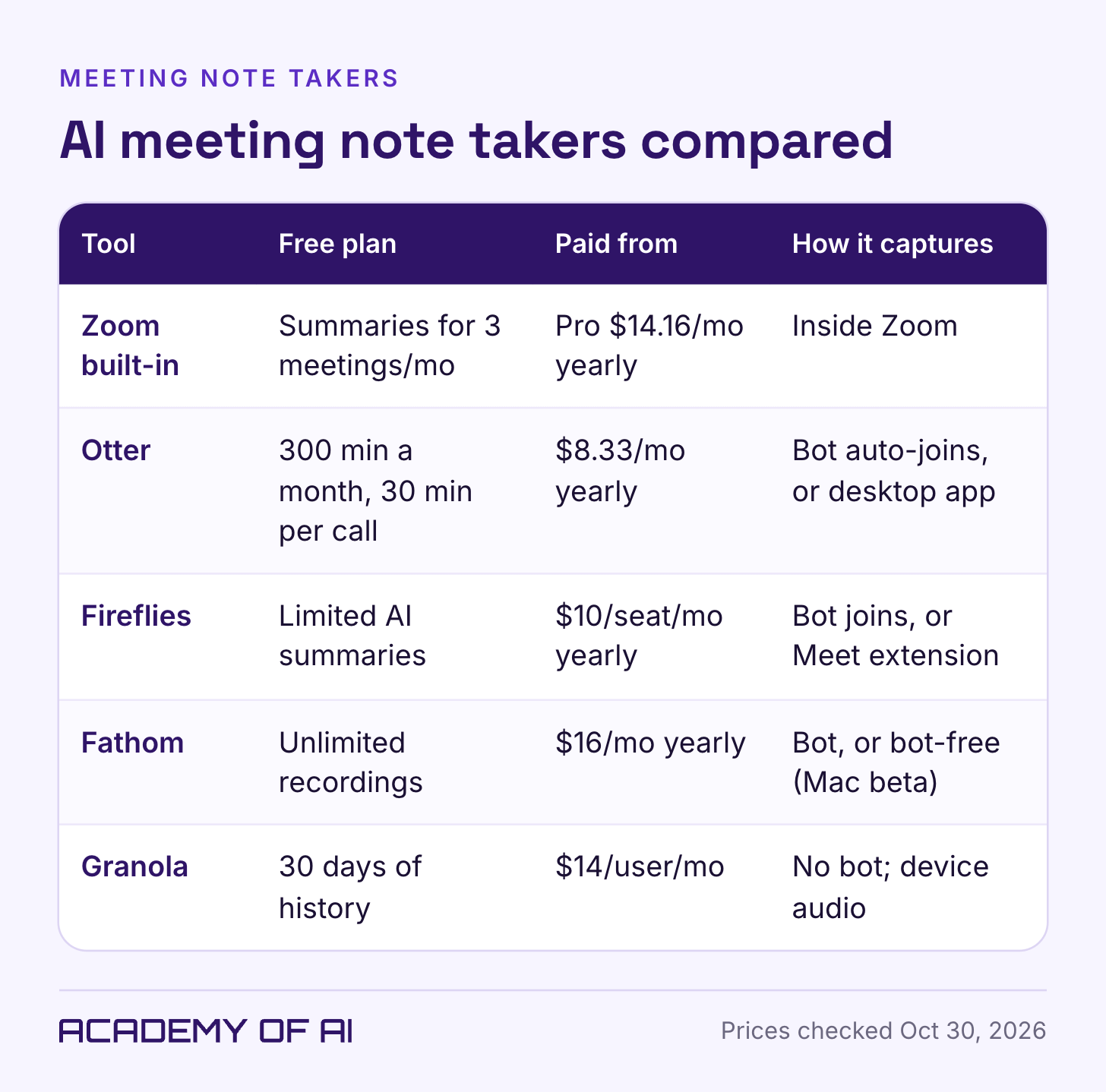
Zoom Basic includes meeting summaries for three hosted meetings monthly; Pro lists unlimited summaries at $16.99 monthly or $14.16 per month billed annually. Google Meet’s AI notes begin with Workspace Business Standard. Teams features depend on the assigned Copilot license and settings. Ask your administrator about the exact AI feature: a company’s existing meeting-platform subscription is not proof that recording, transcription or AI processing is approved.
If your licensed tools do not meet the need, compare these four specialists. Their free tiers offer different amounts of recording, stored history and AI analysis.
Otter Basic includes 300 monthly transcription minutes and a 30-minute conversation limit. Pro is $16.99 monthly or $8.33 per month billed annually, with 1,200 in-app recording minutes and up to 90 minutes per meeting. Business is $30 monthly or $19.99 on annual billing, with unlimited in-app meetings but separate imported-file limits and a four-hour meeting cap. Review auto-join settings before connecting a calendar.
Fireflies Free has limited AI summaries and 400 minutes of storage per team. Pro is $18 per seat monthly or $10 on annual billing; Business is $29 monthly or $19 annually. The product offers bot, extension and desktop capture options. Storage, transcription, AI credits and capture duration are separate limits, so do not read “unlimited” as covering every feature.
Fathom Free includes unlimited recording and transcription with basic summaries; advanced AI features have limits. Individual Premium is $20 monthly or $16 per month annually. Team starts at $19 monthly or $15 annually per user with two seats minimum. Bot-free capture is still labeled a Mac beta alongside the standard bot option.
Granola says users start capture manually and it does not join as a meeting bot. Desktop audio is transcribed in real time; mobile may temporarily cache audio for later transcription. It keeps transcripts and notes rather than permanent audio recordings, with cloud processing. Basic provides 30 days of meeting history; Business is $14 per user monthly. Granola says its own model training uses anonymized data unless you opt out; third-party model providers are not allowed to train on it. Enterprise training is off by default.
Compare the length of your meetings, the need to replay audio, the amount of history you need and the permitted capture method. A bot-free app can be less visible to participants, so agree on its use before starting. For turning a checked transcript into action items, see our meeting notes and follow-up email guide.
Recording Consent Rules for Any AI Notetaker
Recording and interception rules vary by jurisdiction and can depend on where participants are located and the nature of the conversation. Some US laws require all-party consent. The Reporters Committee’s recording guide is a starting point for state rules; consult your organization’s legal guidance for cross-border or sensitive calls. A transcript-only tool is not automatically exempt because it does not keep an audio file.
The Otter litigation has progressed beyond the original 2025 complaint. In an August 13, 2026 order in In re Otter.ai Privacy Litigation, a federal judge granted dismissal of some claims and allowed others to proceed. The plaintiffs allege recording and use of meeting data without consent. That ruling assessed whether claims could go forward; it did not establish that Otter was liable or that the allegations were true.
Before recording or transcribing, explain the tool, what it captures, who can see the output and how long it is kept. Ask everyone to agree before capture starts, and offer manual notes if someone declines. Put advance notice in the invitation, but do not treat that line or a visible bot as proof of consent. Disable unneeded automatic joining and follow the stricter applicable policy. Sensitive HR, medical, legal or performance discussions require an expressly approved process, not a casual personal-tool experiment.
Calendar Scheduling With Reclaim, Motion and Connected Assistants
Scheduling tools can keep moving tasks as your calendar changes. Their usefulness depends on your deadlines, working hours, priorities and rules about which events may move. Review their changes, especially before an event sends invitations or affects other people.
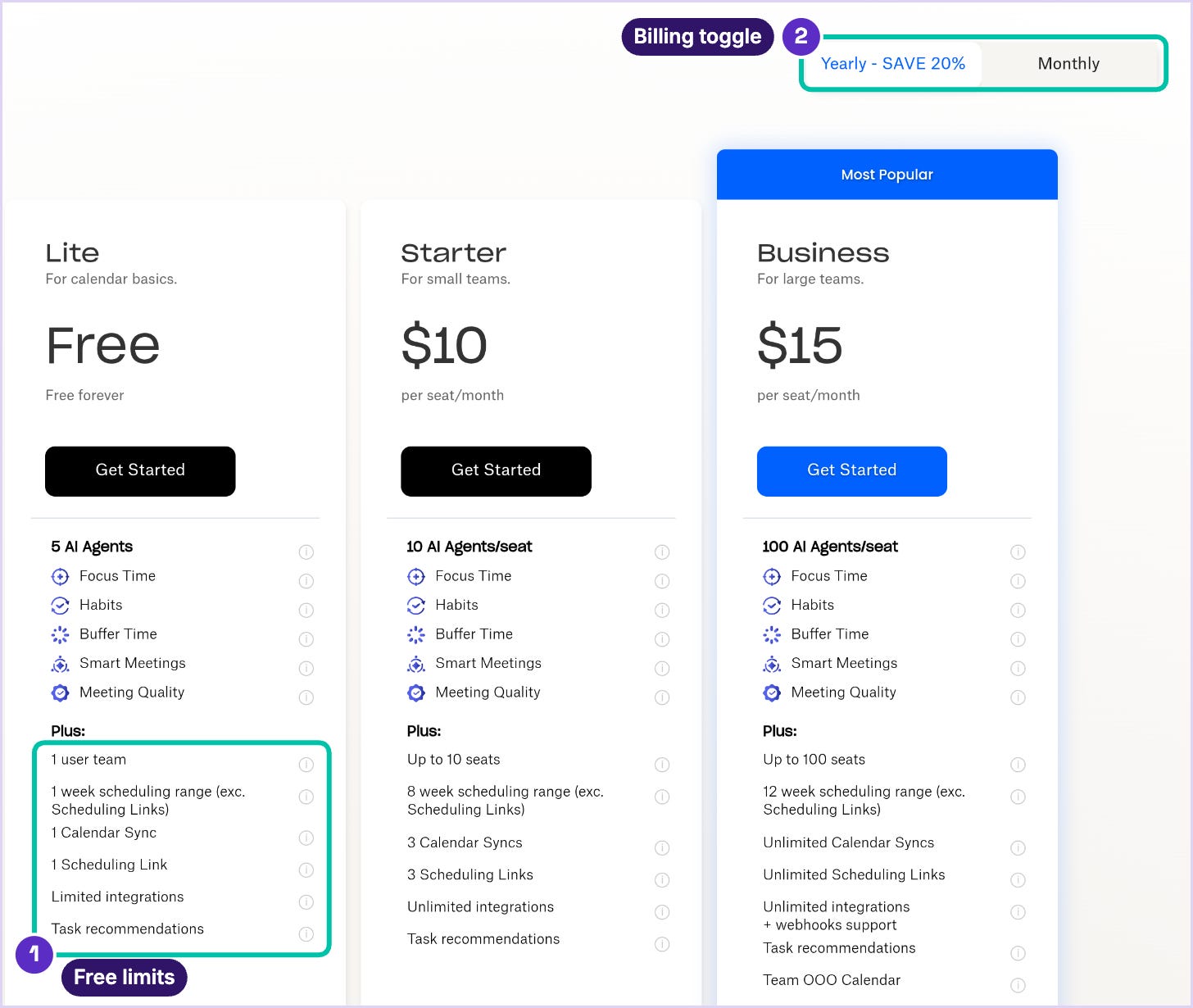
Reclaim.ai is an option for calendar protection. It works with Google and Outlook calendars on every plan. The free Lite plan covers one user, schedules one week ahead, includes one Calendar Sync and gives you one scheduling link, along with habits, focus time and buffer time. Starter costs $10 per seat a month billed yearly, or $12 monthly, and Business is $15 or $18. Setup means connecting your calendar and then defining working hours, focus blocks and task priorities, so plan on spending real time on that first pass.
Motion combines calendars, tasks and projects, with a free trial rather than a permanent free plan shown. Its billing toggle shows Pro AI at $29 per seat monthly or $19 per month annually; Business AI is $49 monthly or $29 annually. The plans include 7,500 and 15,000 AI credits respectively. The public page now offers active trial buttons; we did not create an account or test the trial. Compare Motion if you want to move planning into one app, and Reclaim if your main need is calendar protection.
If you only need help finding a time, a connected assistant may be enough. Claude’s Google Calendar connector can find mutual availability and create events, which covers the classic “find 30 minutes with these three people next week” request. Whatever you use, remember that blocks an AI tool adds to a shared work calendar may be visible to colleagues according to the calendar’s sharing permissions.
Writing and Document Tools: Grammarly, Notion AI, Built-Ins
For documents, an assistant inside the editor can reduce copying, but the text may still be processed in the cloud. Gemini in Docs is included with eligible Google AI Pro and Workspace plans. Copilot in Word comes with supported Microsoft 365 subscriptions. A chat assistant can also help build an outline or revise sections. Choose based on the workflow you need, and review the plan’s data rules rather than assuming the file never leaves the device.
Grammarly Free includes grammar and tone assistance plus 100 AI prompts monthly. Standalone Grammarly Pro is $30 per member monthly or $144 yearly, and adds more writing tools and 2,000 monthly prompts. Regional Grammarly Plus and Superhuman suite offers differ; compare the exact included product rather than just the plan name. Treat AI-writing detection as an estimate, not proof of authorship.
Notion Business is $24 per seat monthly or $20 per month annually. It includes Notion Agent, AI Meeting Notes and Enterprise Search, still labeled beta. Free and Plus have an AI trial. Business now lists 1,500 Standard and 500 Select credits per member monthly; additional AI usage can use separately purchased workspace credits. Meeting Notes is scheduled to begin consuming Standard credits on December 1, 2026. Enterprise’s zero-retention claim concerns LLM providers, not every copy of data in Notion and not automatic approval for sensitive records.
Sourced Research With Gemini Notebook and Deep Research
Choose web research for questions about current external facts, and a source-focused notebook for a defined set of documents. Tell the tool which sources are allowed, ask for citations and check them. “Source-grounded” describes a workflow, not a guarantee that every answer comes only from the right documents or is correct.
Google renamed NotebookLM to Gemini Notebook in July 2026. It remains a standalone product and also integrates with Gemini. A free tier is available, with higher limits on paid plans. Use it for questions across selected reports, manuals or transcripts; check your account for advanced analysis features rather than assuming a rollout announcement means access is available to everyone.
For broader web research, Gemini includes limited Deep Research on Free, ChatGPT offers limited free research and higher paid allowances, and Claude Research begins at Pro. Perplexity is another option for cited search. These tools can take longer than a simple chat response; none was speed-tested for this roundup.
Source-grounded tools work best with tight instructions. Try a prompt like this in Gemini Notebook once your documents are uploaded:
Using only the sources in this notebook, list every deadline, dollar amount and named owner mentioned. Cite the source and page or section for each item. If two sources disagree, flag the conflict instead of picking one.
Check every fact that could change the decision, especially numbers, dates, quotations and obligations. A citation can lead to a stale page or a passage that does not support the summary. For contracts or other consequential material, use the source and the appropriate professional review rather than relying on an AI digest.
Spreadsheet Help in Excel, Google Sheets and Chat Uploads
Spreadsheets give you concrete ways to check an answer: total spend by channel, duplicate invoice IDs or missing dates. Copilot in Excel supports eligible Microsoft 365 accounts and cloud workbooks in OneDrive or SharePoint; AutoSave is no longer mandatory. Gemini in Sheets is included with eligible Google AI Pro and Workspace plans. Keep a copy before allowing direct edits.
The free route is uploading a file to a chat assistant. Claude’s free plan includes file creation and code execution, and ChatGPT’s free plan includes data analysis at lower limits than its paid tiers. If you want ready-made wording, we’ve collected ChatGPT prompts for Excel and spreadsheets.
For the file-format details, our Claude XLSX guide includes a small synthetic workbook and checks for duplicates, missing values and formulas.
The usual failure is layout. Merged cells, blank header rows and totals tucked inside the data can throw off the analysis without any visible error. Make the assistant describe the file before analyzing it:
This spreadsheet lists monthly ad spend by channel. Before analyzing anything, describe each column and flag any blank, duplicated or oddly formatted rows. Then show total spend by channel for the last three months and the Excel formula I could use to check each total myself.Check the source rows, filters and at least one total independently with a formula or pivot table. Do not upload payroll, patient or client financial data unless the specific account and processing arrangement are approved for that information. Removing names alone may not make a file safe to share.
AI To-Do Lists: Todoist Ramble and Task Assist
Todoist Ramble turns spoken input into proposed tasks, dates, priorities and projects in 40 languages. Todoist says it does not share Ramble input with third parties or use it for model training, while usage data may be stored temporarily for debugging and improvement. Review the tasks before saving, especially inferred dates, time zones and project assignments.
The free Beginner plan includes limited Ramble sessions and Filter Assist. Pro costs $5 a month billed yearly ($60) or $7 monthly, and adds unlimited Ramble plus Task Assist and Email Assist. Business is $8 per user a month billed yearly, or $10 monthly. If your team already runs on Asana, ClickUp or Notion, check whether its approved features already meet the need before adding another app; those tools were not assessed here.
Data Privacy Settings Before You Connect Work Accounts
An assistant can help with a public document or a made-up example without accessing your inbox. If you connect accounts, review permission scope, action controls, retention, sharing and deletion as well as model training. Employer approval is necessary for work data, but it is not a blanket guarantee of safety.
Use the account and AI features your organization has approved. Google Workspace, Microsoft 365 Copilot, ChatGPT Business and Claude’s commercial plans document different protections from their consumer products. No-training commitments do not mean no storage, no administrator access or no connected third parties. Check the contract, settings and required data classification before linking a work inbox.
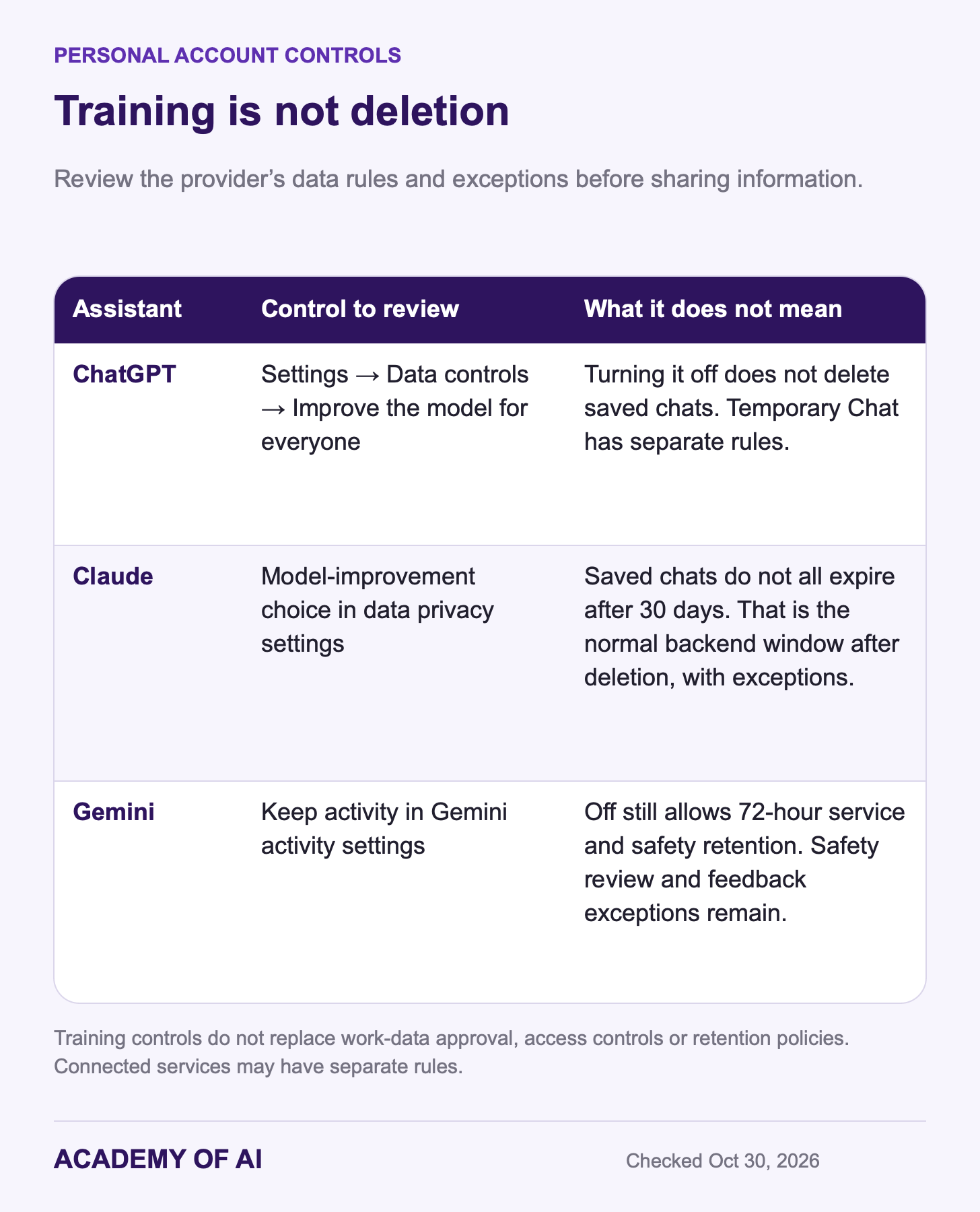
On personal ChatGPT accounts, review Settings → Data controls → Improve the model for everyone. Turning it off keeps new chats out of general model training; it does not delete saved history. Temporary Chat has separate retention and safety rules. Voluntarily submitted feedback and connected services can have additional data handling.
For personal Claude accounts, review the model-improvement choice in data privacy settings. Anthropic’s retention guide says saved chats remain until you delete them; deletion normally removes backend copies within 30 days, with legal and safety exceptions. Opted-in training data may be kept in de-identified form for up to five years. Turning training off does not make all saved chats expire in 30 days. See our Claude privacy explainer for the distinctions.
Gemini’s Keep activity setting governs how personal Gemini activity is stored and used. With it off, future chats are still retained for 72 hours for service and safety purposes, and human review can occur for safety. They are not used to train AI models unless you submit feedback. Previously reviewed data can have a different retention period. Gemini Notebook has separate privacy guidance; do not assume one Gemini toggle controls every Google product.
Which Assistant to Pay For First, by Software Setup
Check the assistant your employer already licenses before buying another tool. Confirm the AI feature is enabled, approved for the task and covered by the assigned plan. A familiar suite can still require an add-on license or usage payment. Use personal accounts for permitted personal work, not as a workaround for company restrictions.
For personal use, compare the feature you are missing. Gmail users may already have enough free drafting help; Google AI Plus and Pro add different capabilities. Microsoft 365 Personal can make sense if you also need the Office apps. ChatGPT Plus and Claude Pro both offer $20 monthly entry points, but their free tiers may already handle your task. Do not pay for a bundle because of benefits you will not use.
If meeting follow-up is the bottleneck, test an approved notetaker on an appropriate call with consent. Check whether the resulting summary captures decisions and leaves uncertain ownership or deadlines explicitly unassigned. Time saved in capture can disappear if the transcript needs extensive correction.
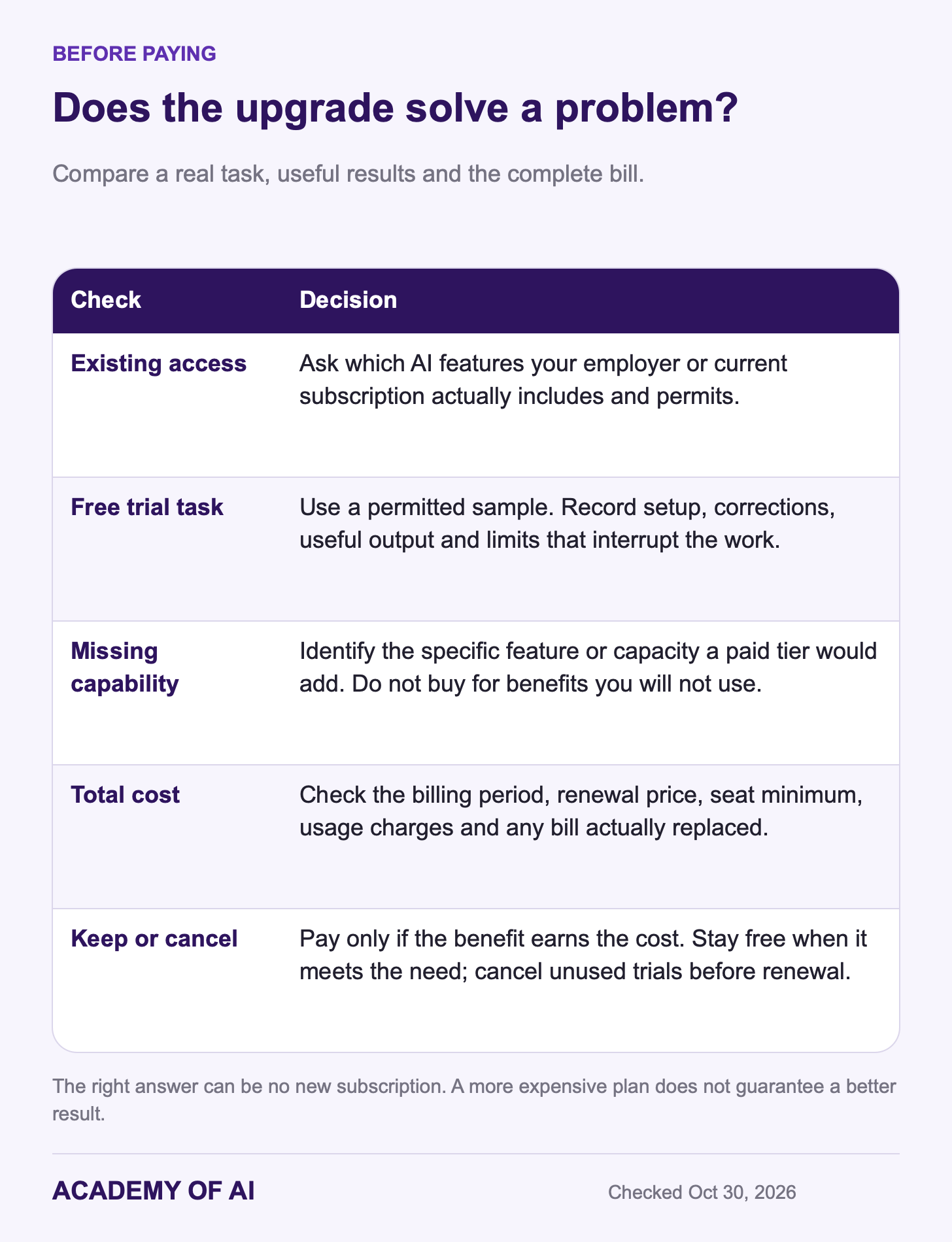
Write down the three tasks that took the most time last week. Test a matching free tier or trial on a permitted example, and track setup, review time, useful results and limits. Upgrade only when a paid capability solves a recurring problem worth the total fee. If the free plan works, staying on it is a valid result.
Quick Answers on Free Plans, Work Email and Note Takers
Which AI Assistant Should Most Office Workers Start With?
Compare the approved AI in the suite you already use, then ChatGPT or Claude if you need a general assistant. The best starting point is the account that handles a real task well under suitable data rules. Neither familiarity nor a paid license proves the feature is approved or accurate.
Which Free AI Plans Are Good Enough for Daily Work?
Free options worth testing include Fathom for basic meeting notes, Reclaim Lite for calendar protection, Todoist Beginner for limited voice-to-task capture, Grammarly’s 100 monthly AI prompts and Gemini Notebook for selected sources. General assistants also offer free tiers. Their limits differ; try your actual workload before assuming a free plan is enough.
Is It Safe to Connect AI to Work Email?
Use only a tool, account and permission scope your employer has approved for the data. Review retention, sharing and action permissions as well as model training. Business terms can provide stronger protections, but they do not eliminate mistakes or make every integration appropriate. Keep sending and other consequential actions subject to review.
Do I Need ChatGPT Plus If Work Pays for Copilot?
Not automatically. Test the licensed Copilot features on the task first. A separate personal ChatGPT plan may help with permitted personal projects or a capability you lack, but it should not be a workaround for work-account restrictions. Plus is $20 monthly with no annual billing; cancel according to its renewal deadline if it does not earn its cost.
Can an AI Note Taker Record Without Telling People?
Some apps capture device audio without a visible meeting bot. That does not remove consent or notice requirements. Explain the capture before it starts, obtain the required agreement and use an approved process. If someone declines, stop capture and use another approach; a quiet interface is not permission.
Keep reading on Academy of AI