



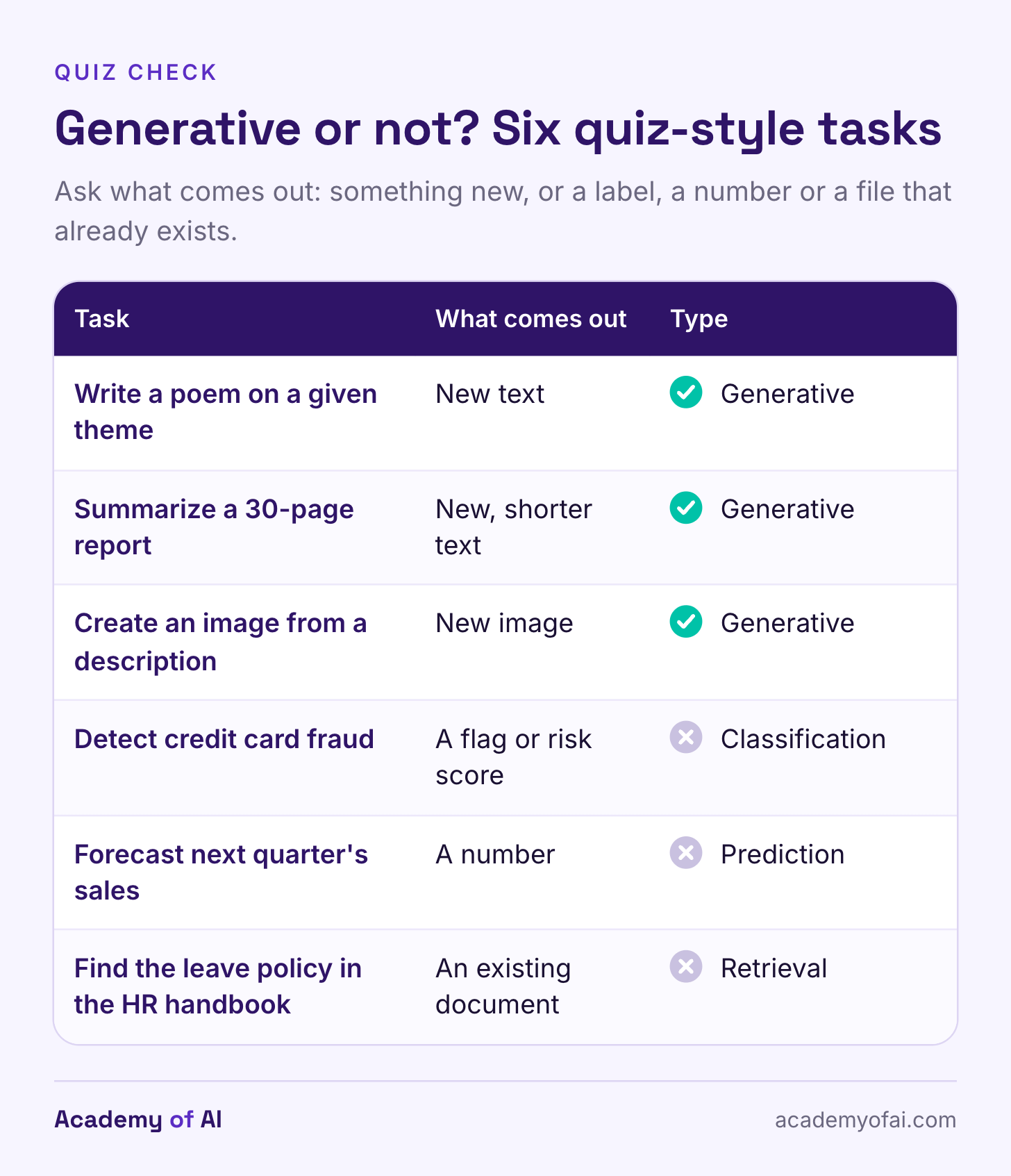
A generative AI task creates content: a draft, summary, image, translation or piece of code. If a quiz asks which task is a generative AI task, choose the option that creates something, such as writing a poem on a given theme. Classifying a transaction or counting words is a different kind of task.
For example, compare four options: writing a poem, labeling an article by topic, flagging possible credit card fraud and counting words. Writing the poem is generative. The others involve classification, detection and calculation. You can ask the same chatbot to attempt all four, but that does not make all four tasks generative.
At work, I care about a second question: is this a useful task to give AI? A draft email and an unreviewed hiring decision need very different rules. Below are 20 work examples, four checks I would apply before using a chatbot, and research on where the time savings hold up.
How Generative Tasks Differ From Classifying, Predicting and Searching
Chat tools such as ChatGPT, Claude, Gemini and Microsoft Copilot use large language models. These models generate text in small units called tokens, which can be words or parts of words. They learn patterns during training and use the conversation to produce a response. That process can create useful writing, but fluent text can still be false.
Classifying, predicting and retrieving have different goals. A classifier assigns a category, such as spam or not spam. A forecasting model estimates a future value. A search tool retrieves existing material. Generative models can assist with these jobs too. For the quiz, focus on what the task asks for, not which product performs it.
Summarizing counts as generative when the tool writes a new version of the source. Translation also generates text. A chatbot that searches the web and writes an answer combines retrieval with generation. Finding a reliable page does not guarantee that the answer represents it accurately.
Which Task Is a Generative AI Task? 20 Examples Rated
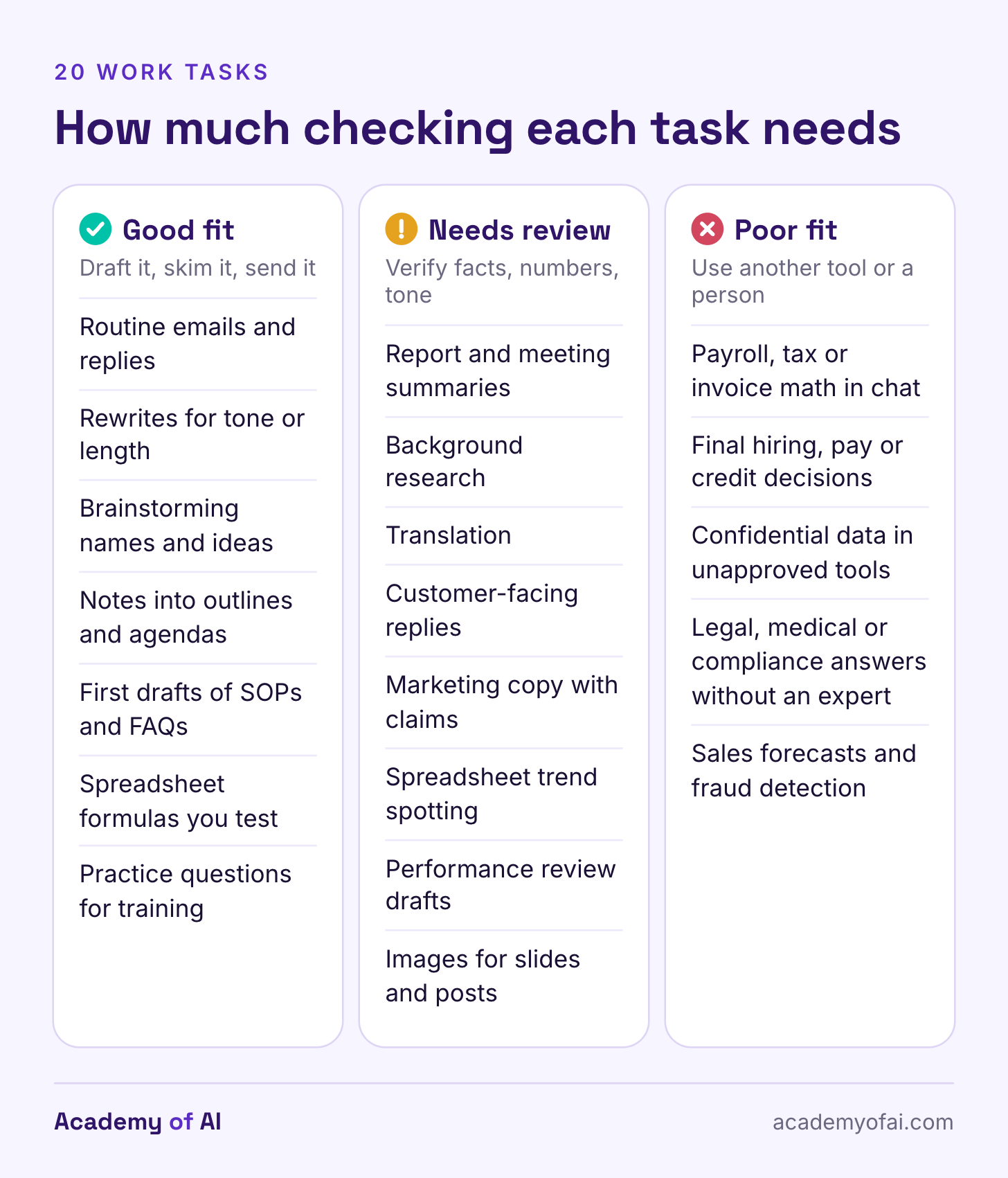
These ratings are an editorial guide, not a benchmark of every chatbot. Good fit means a draft or set of options you can check quickly. Needs review means facts, numbers, context or consequences need closer scrutiny. Poor fit means an unreviewed chatbot is the wrong tool, the data is not approved for it, or the task is not generative. Every category still requires judgment.
Good Fit: Drafts, Rewrites, Brainstorms and Formulas
Routine emails and replies. You supply the facts and check names, dates and promises before sending. A useful draft can save typing time. Our guide to getting AI to write emails that sound like you covers the prompts.
Rewriting for tone, length or reading level. The source gives you something to compare against. Check that the rewrite preserves facts and caveats.
Brainstorming names, headlines, workshop activities or subject lines. There’s no single right answer, and you’re picking from options rather than trusting one.
Turning rough notes into an outline, agenda or slide plan. You can see at a glance whether the structure matches what you meant.
First drafts of internal documents such as SOPs, FAQs and how-to guides. The draft gets you past the blank page, and the subject expert still owns accuracy.
Spreadsheet formulas and short scripts. Test them on examples with known answers, including blanks, zeros and unusual values, before applying them to a full dataset. These ChatGPT prompts for Excel and spreadsheets are a good starting set.
Practice questions, quizzes and role-play scenarios for training. Trainers and teachers get a pile of options to edit, and a bad question is easy to drop.
Needs Review: Summaries, Research and Customer Replies
Summaries of long reports or meeting transcripts. These were among the most common uses in the UK Department for Business and Trade’s Copilot pilot, but a summary can drop the one caveat that mattered or pin an action on the wrong person. Check names, numbers and decisions against the source. Our meeting-notes workflow shows how to keep missing details visible.
Background research. Chatbots with web search find sources fast, yet OpenAI’s help center warns that ChatGPT can make up quotes and citations. Open every source you plan to repeat.
Translation. Fine for understanding a colleague’s email. Risky for contracts, safety instructions or patient materials, where a fluent but wrong sentence does real damage. Have a fluent person review anything you publish.
Customer-facing replies. A draft is fine. Sending it unread isn’t, because the reply goes out under your company’s name and a wrong refund policy becomes your promise.
Marketing copy that makes claims. Product descriptions and social posts are generative by definition, but every statistic, award or “clinically tested” line needs a source you’ve checked.
Spotting trends in a spreadsheet. In the same evaluation, a small observed exercise found worse results with Copilot. Only three users and three non-users took that Excel task, so it is a caution, not a verdict on every spreadsheet tool. Ask the tool to show its formula or method, then check it.
Performance review drafts from your own notes. AI can turn bullet points into readable feedback, but it has no way to judge whether that feedback is fair. Read the draft as the employee will.
Images for slides or social posts. Check text, labels, visual details and usage rights before publishing. For portraits of colleagues or clients, get permission and agree on the intended use. Our AI image tool comparison covers the main options.
Poor Fit: Exact Figures, Confidential Files, Decisions About People
Exact calculations typed into a chat: payroll, invoices, tax, budgets. Use a spreadsheet formula, or a tool that shows its working so you can check every step.
Final decisions about hiring, firing, promotion, pay or credit. Resume-screening research has found strong name-based bias, and EU law treats hiring AI as high-risk. AI can draft the paperwork. A qualified person decides.
Pasting confidential client, patient or employee data into a tool your employer hasn’t approved. Depending on the plan and its settings, chats can be used for training or read by human reviewers.
Legal, medical or compliance answers you plan to act on without an expert. A convincing explanation can contain invented citations or omit a condition that changes the answer.
Sales forecasts and fraud detection. These are prediction and classification jobs. Let a statistical model or your finance system make the call, and use a chatbot to explain it.
Documented Limits: Hallucinations, Math Slips, Data Exposure and Bias
Start with hallucinations: plausible statements that are false. NIST calls this confabulation. OpenAI’s research explains how training and evaluation can reward guessing over admitting uncertainty. The problem reaches real work: Damien Charlotin’s database of legal decisions involving AI hallucinations documents invented citations and other unreliable material. A source that looks official still needs to be opened and checked.
Math needs a separate check. The International AI Safety Report 2026 describes uneven performance: systems can solve difficult problems and fail simpler ones. For a payroll or invoice calculation, ask for a formula or code you can inspect. Then verify the inputs, method and result. Running code helps with arithmetic; it does not guarantee the code uses the right rules.
Confidential data depends on the account, contract and settings. Google’s Gemini Apps privacy hub describes human review of some chats. On personal ChatGPT accounts, the Improve the model for everyone setting controls ordinary chat training. Claude has a Model Improvement setting. Turning training off does not mean nobody can access or retain the data. Business products from OpenAI and Anthropic exclude business inputs and outputs from training by default, with exceptions such as voluntary feedback. Use the tool and data your organization has approved. Our Claude privacy guide explains the settings.
Decisions about people need more than a polished explanation. In a peer-reviewed study, Kyra Wilson and Aylin Caliskan tested three language-model retrieval systems on resumes. Their results showed substantial race- and gender-associated name bias. This was a study of those systems, not a score for every current chatbot. The EU AI Act identifies specified recruitment and worker-management uses as high-risk. OpenAI’s October 2025 usage policy prohibits automated high-stakes decisions without human review. Keep an accountable, qualified person responsible for decisions about hiring, pay, care or credit.
What Would Be an Appropriate Task for Using Generative AI?
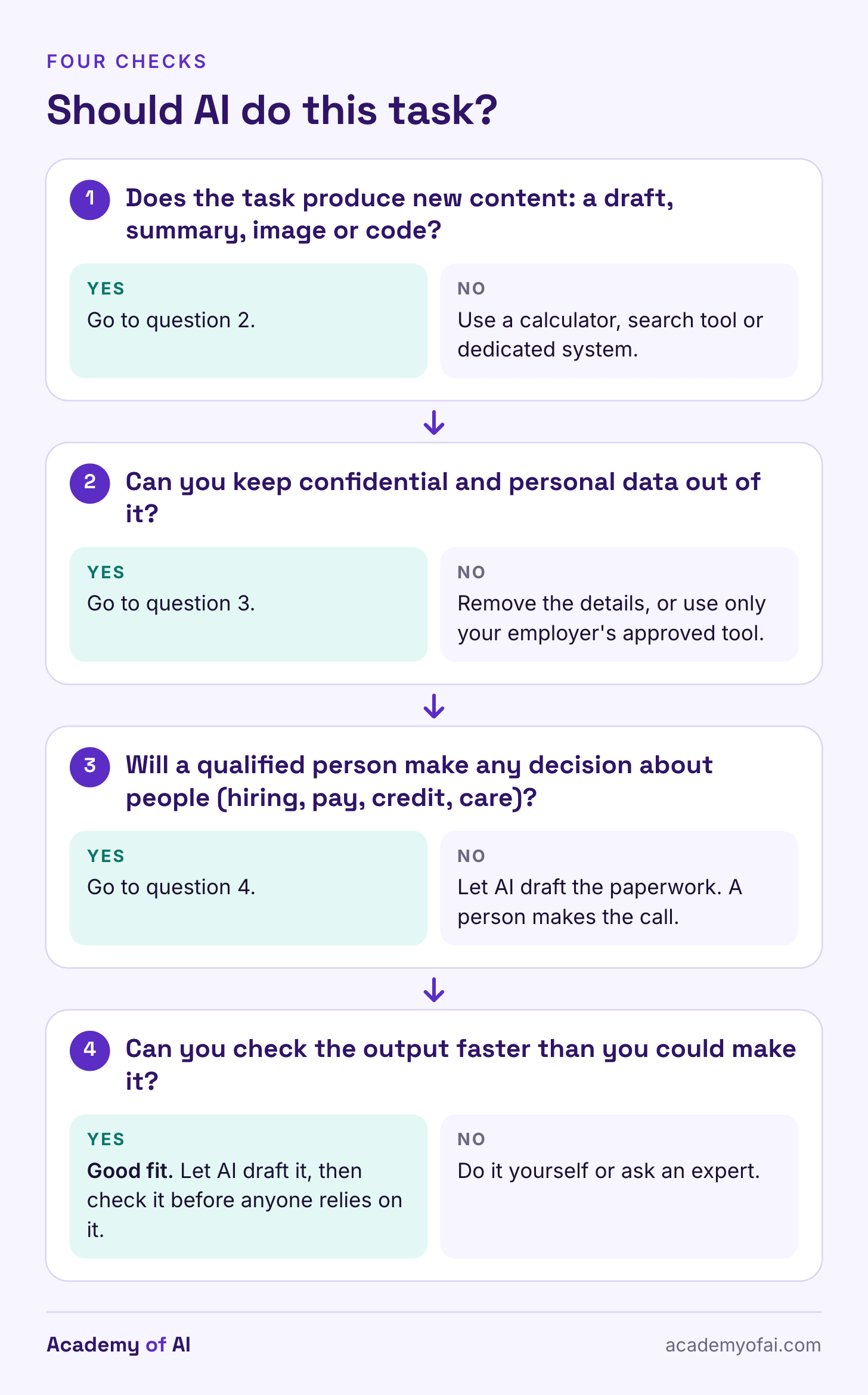
Use these four checks before choosing a general chatbot. If a task fails one, change the workflow or use another tool. Removing names alone may not make confidential material safe to upload.
Is the output new content, such as a draft, summary, image or code? If you need a label, a forecast or an existing file, consider a calculator, search tool or dedicated system first.
Does it keep confidential data out of tools your employer hasn’t approved?
Does it leave decisions about people (hiring, pay, care, credit) with a qualified person?
Can you check the result faster than you could have made it yourself? Include the time spent correcting mistakes. Otherwise, a fast draft can hide a slow review.
That fourth check has research behind it. In a field experiment with 758 Boston Consulting Group consultants, researchers including Fabrizio Dell’Acqua, Ethan Mollick and Karim Lakhani found that people using GPT-4 on tasks inside what they call the “jagged technological frontier” completed 12.2% more tasks, worked 25.1% faster and produced work rated more than 40% higher in quality. On a task chosen to sit outside that frontier, AI users were 19 percentage points less likely to reach the correct answer than consultants working without it. Nothing on the screen tells you which side of that line a task sits on, so the check has to come from you.
What UK Government Copilot Trials Found About Daily Time Savings
Some of the most detailed public evidence on everyday office work comes from British civil servants. The cross-government experiment run by the Government Digital Service gave Microsoft 365 Copilot licenses to 20,000 staff in 12 organizations from September 30 to December 31, 2024. Users reported saving 26 minutes a day on average, with drafting documents saving the most time. Those figures are self-reported, and the report says Copilot struggled with complex or data-heavy work.
The Department for Business and Trade ran a smaller pilot with 1,000 licenses from October to December 2024. Its diary study found stronger savings for written tasks and time costs for scheduling and image generation. The report did not establish that saved time improved productivity. It also collected limited evidence on that question, so this is not proof that productivity failed to improve.
The Department for Work and Pensions evaluation, published January 29, 2026, covered 3,549 central office staff from October 2024 to March 2025. Its model estimated users saved about 19 minutes a day across eight routine tasks compared with non-users. The analysis used self-reported survey data and was not a randomized trial. Differences between users and non-users may still affect the estimate.
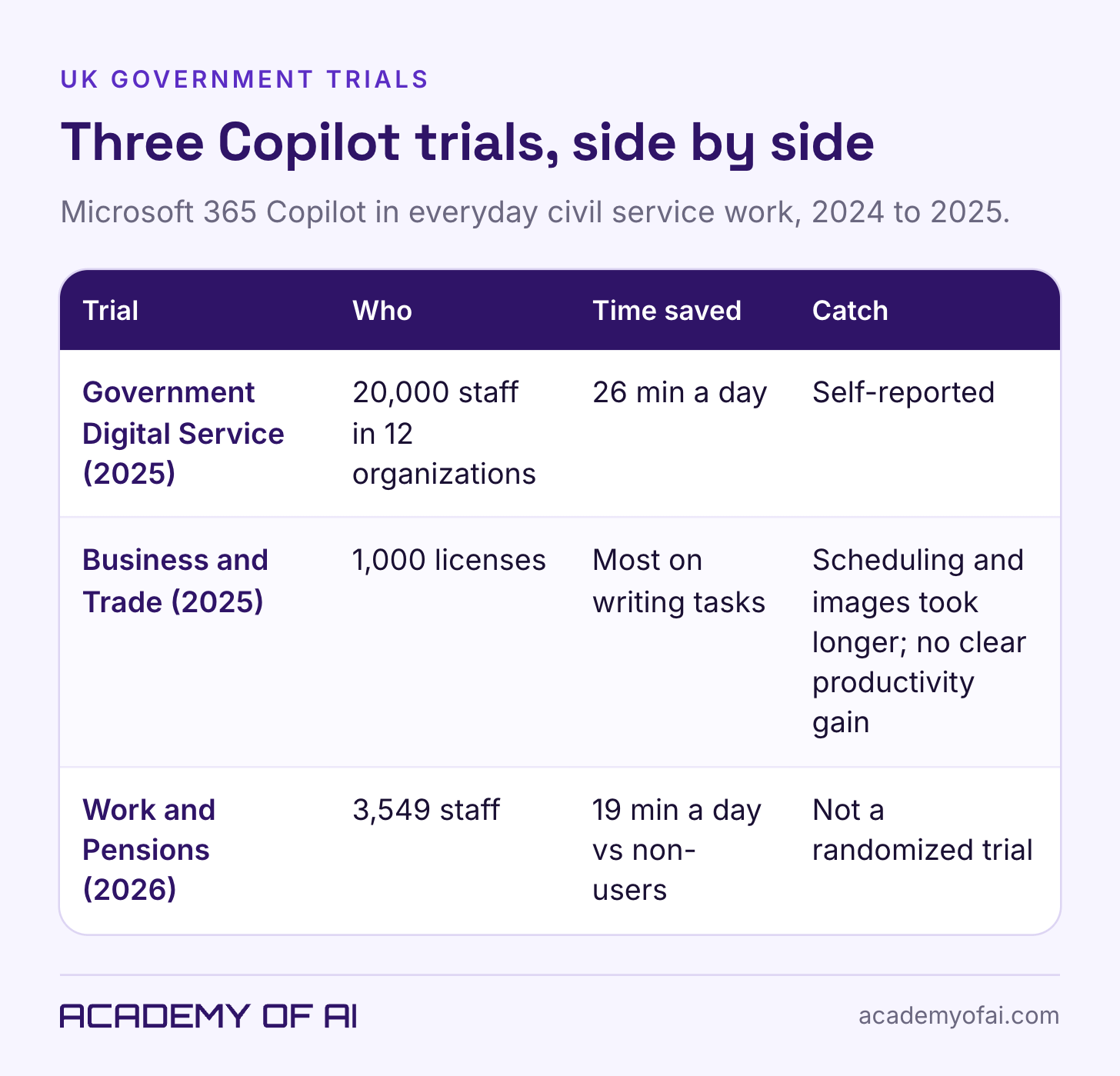
I would read these findings as a reason to test writing and summarizing first. They do not promise everyone 19 to 26 spare minutes a day. The trials used particular versions of Copilot in particular workplaces, and some tasks took longer. Our guide to AI assistants for productivity helps you choose a tool for the work you actually do.
Pick two tasks you do every week. Record the time spent doing each one yourself, then try AI on comparable work. Count prompting, corrections and final review. Keep the workflow if it saves time without reducing quality. Drop it if it does not.
Quiz and Workplace Questions About AI Tasks, Answered
Is Summarizing a Document a Generative AI Task?
Yes, when the tool writes the summary in its own new sentences, which chat assistants do. A tool that only highlights existing sentences (called extractive summarization) is closer to retrieval. Either way, check names, figures and decisions against the original when they matter.
Can a Generative AI Model Do Classification Tasks?
Yes. A chatbot can label an email as urgent or routine, classify feedback or assign a topic to an article. Those are classification tasks performed by a generative model. The task category describes the goal; the model category describes how the system works.
Can AI Really Streamline My Daily Tasks?
Sometimes. UK government evaluations reported or modeled average savings of 19 and 26 minutes a day, using different methods. Writing and summarizing were promising uses, but some other tasks took longer. Treat those figures as research findings, then measure your own work, including corrections.
Is a Free Chatbot Safe for Work Documents?
Check the specific account, settings and workplace rules. A paid subscription alone does not make confidential uploads appropriate, and turning training off does not eliminate retention or access. Use only material your organization permits in that tool. If you are unsure, practice with fictional or public information.
Keep reading on Academy of AI