



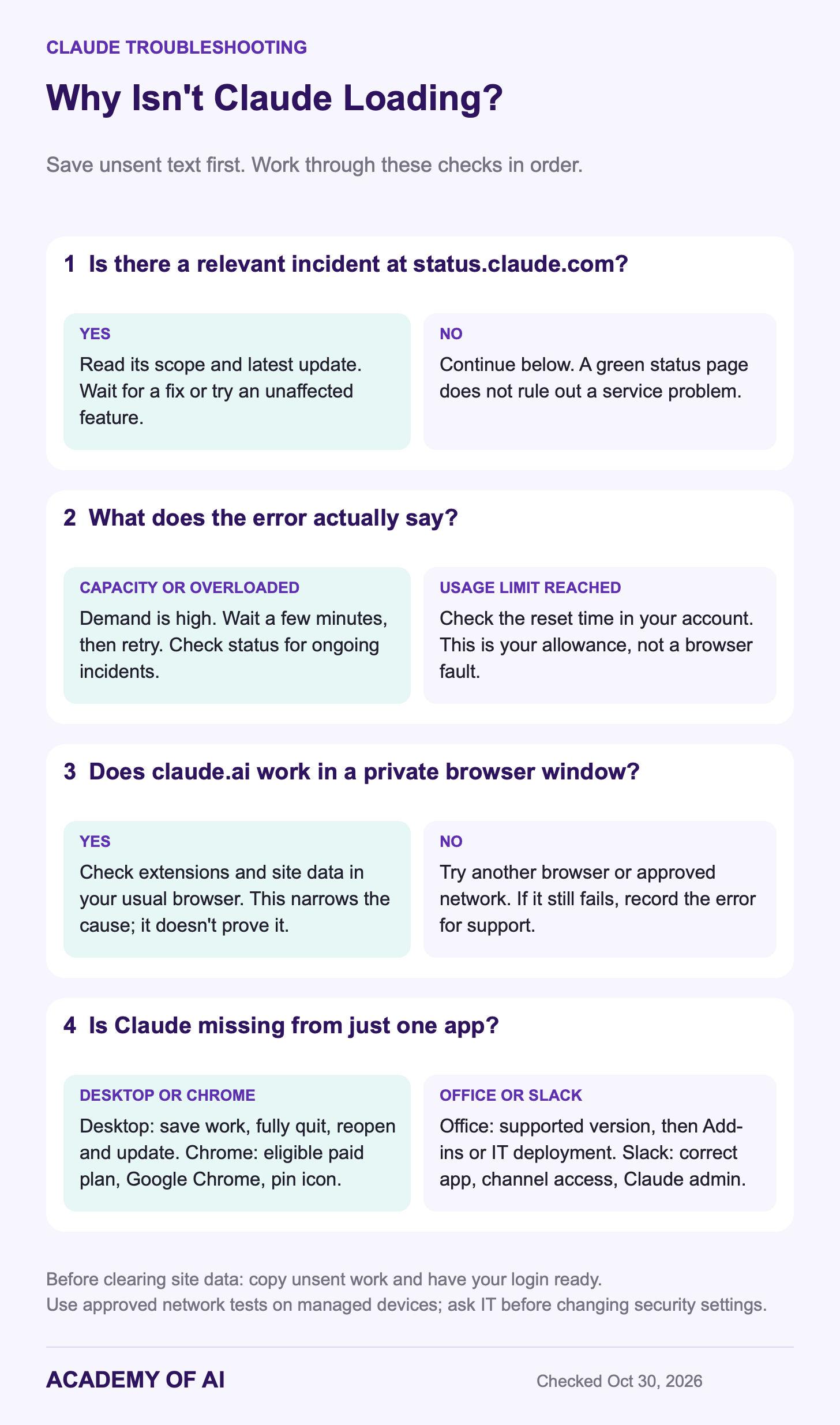
If Claude is not showing up or loading, first save any unsent text, then check status.claude.com. Look for an incident affecting the part you use. If there is no matching incident, try reloading and opening Claude in a private browser window. A green status page does not rule out every service problem.
The fix depends on where Claude is missing: the website, desktop app, Chrome extension, Office add-ins or Slack. Start with the status and error-message checks below, then go to your app’s section. Instructions were checked against Anthropic’s documentation on October 30, 2026.
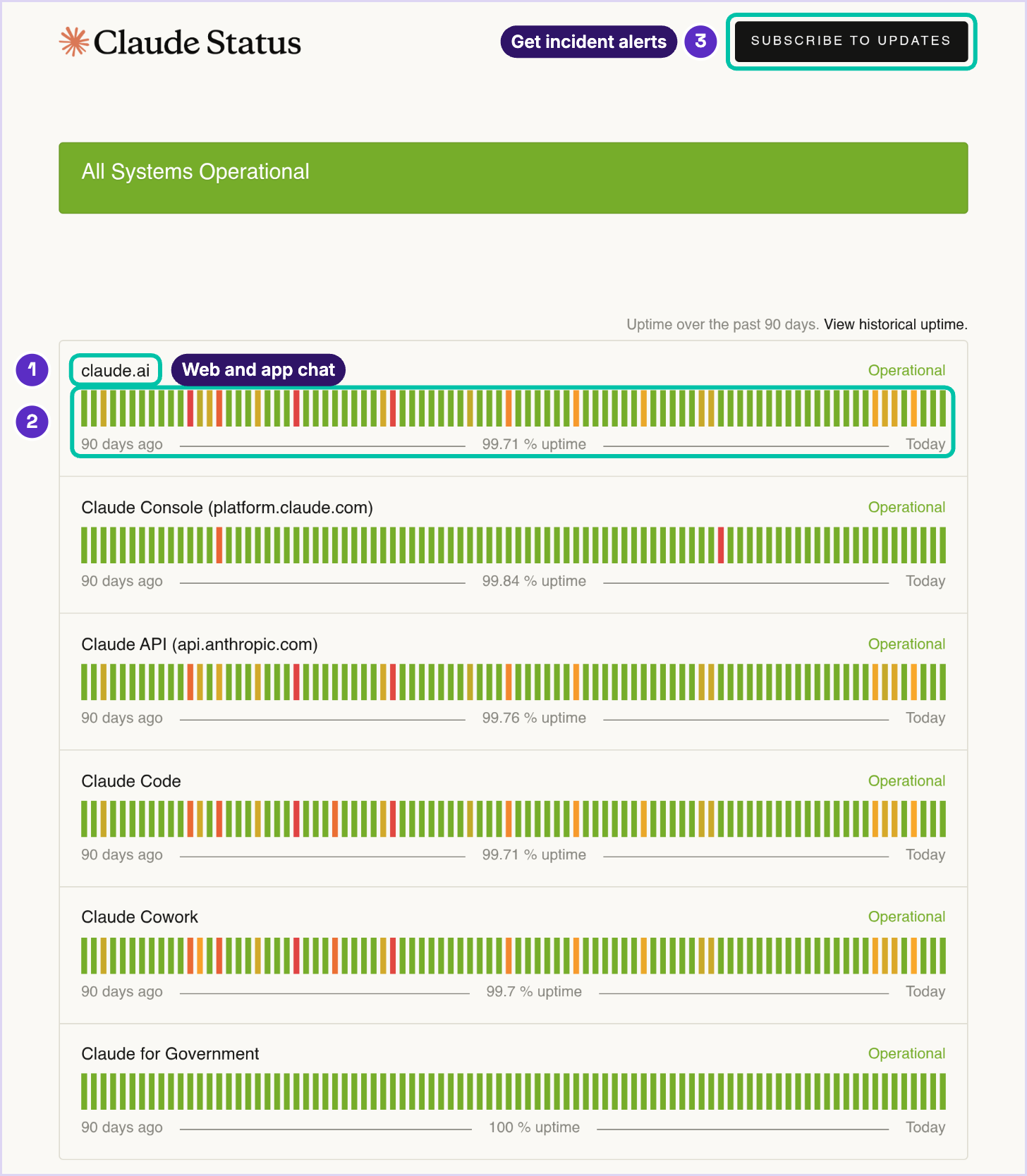
Is Claude Down? Check status.claude.com and Uptime
The Claude status page separates claude.ai, the Console, the API, Claude Code, Cowork and Claude for Government. Read the relevant component and any active incident’s latest update. The page also shows 90-day uptime and a link to older history.
Read the scope before changing anything. An incident could affect one model or a connector while the rest of Claude works. If an unaffected model is available on your plan, try it. If a connector is failing, you may be able to continue a task that does not need that connection.
Anthropic’s error-message guide says temporary capacity constraints on claude.ai are not reported as outages on the status page. Save the exact message you see; it helps separate service demand from a usage limit or a sign-in problem.
What “Claude Overloaded” and Capacity Errors Mean
A message about “capacity constraints” means Claude cannot handle the request at that moment because demand is high. Anthropic describes this as usually temporary. Wait a few minutes before retrying. Repeatedly refreshing or changing your account settings is unlikely to solve a capacity problem.
In an app built on the API, a 529 overloaded_error also indicates temporary overload. It is different from a 429 rate-limit error, which can concern request limits or certain spending caps. If you are using someone else’s app, report the exact error to its support team; you do not need to troubleshoot its code yourself.
A usage limit is different from an outage. Check the reset time shown in your account. Five-hour and weekly allowances depend on your plan; verified Ultra accounts do not have the five-hour limit. Our guide to stretching Claude usage covers ways to use less, and the Max and Ultra comparison explains the current plans. Upgrading is not a fix for an outage.
Why Is Claude Not Showing Up in Your Browser?
If the page is blank, keeps spinning or fails at sign-in, try one change at a time. Copy any unsent text somewhere safe before refreshing or signing out.
Reload, then try a new chat. A single stuck conversation may behave differently from the rest of the site.
Open a private or incognito window. If Claude works there, the difference may involve cookies, cached data or extensions. It does not prove an extension caused the failure; some extensions can also be allowed in private windows.
Check extensions and the network. Test one suspected browser extension at a time. For a personal VPN, Anthropic suggests testing without it if appropriate. On a managed device or company network, ask IT or use an approved alternative network before changing security settings.
Clear site data for claude.ai. Do this after saving unsent work and confirming you can sign back in. You do not need to erase every website’s cookies.
Try another browser or the desktop app. A working alternative helps you continue and narrows the investigation. It does not establish the cause on its own.
A message-length warning is a separate issue. It can come from a large new message or attachments as well as a long conversation. Reduce or split the input, remove unnecessary attachments, or start a new chat with a short summary. A new chat will not help if you paste the same oversized input into it.
Claude Desktop App Won’t Open or Load
Check the desktop installation requirements: macOS 13 or later, Windows 10 or later, or the Linux beta for Ubuntu 22.04 / Debian 12 and newer. Chat is available on Free. Code and Cowork in the app require Pro, Max, Ultra or an eligible Team or Enterprise account; Linux Cowork also has hardware and virtualization requirements.
If the browser works but the desktop app does not, save your work, fully quit the app and reopen it. Check for an update, then sign out and back in if needed. Reinstall from Claude’s official download page if those steps fail. On Linux, install package updates through the configured repository or get a current installer. Merely refreshing the package list with apt update does not install the new version.
Claude in Chrome Extension Hidden or Won’t Sign In
The Claude in Chrome extension requires a paid plan, including Pro, Max or Ultra, and Google Chrome on desktop. Anthropic does not support it on Edge, Brave or mobile browsers. On Team and Enterprise, organization settings also control access.
If the extension is installed but hidden, open Chrome’s puzzle-piece Extensions menu and pin Claude. If it is missing entirely, confirm that you installed the official extension in the Chrome profile you are using. Anthropic’s Chrome troubleshooting guide covers sign-in and connection errors.
Cannot sign in: confirm the account has an eligible plan and, for a work account, that your admin enabled access. Save work before clearing claude.ai site data or signing out.
The side panel changed: a new Cowork side panel is rolling out. A different layout is not necessarily a malfunction. The three-dot menu offers “Switch back to classic” where available.
A website will not open: check permission for that specific site. Some categories, including banking and investment sites, are blocked by default, and work administrators can impose additional restrictions. Ask your admin about a work block.
Desktop or Code will not connect: update and restart the extension and the app. For local-file actions through the new side panel, the desktop app needs to be open.
Claude Missing From Excel or PowerPoint
Check the current Claude for Excel or Claude for PowerPoint requirements. These add-ins need eligible account access and a supported Office version: the web apps, Microsoft 365 on Windows (build 16.0.13127.20296 or later), or Mac version 16.46 or later. Office 2016/2019 perpetual licenses and the iPad and Android apps are not supported.
Look under Home → Add-ins on Windows or Tools → Add-ins on Mac. If Claude has not been installed, use the official Claude for Microsoft 365 listing linked from Anthropic’s setup guide. At work, IT may need to deploy it. If your organization blocks the Office Store, ask IT to follow Anthropic’s manual deployment instructions rather than changing the organization’s settings yourself.
If Claude appears but stalls, try a smaller task or a smaller copy of the file. Anthropic’s Office performance guide flags rising risk with large workbooks and decks; roughly one million used cells or 100 slides are guidelines, not hard cutoffs. A timeout can end Claude’s wait while Office continues working. Wait for Office to respond, save, then retry a smaller step. Review any edits before relying on them, and be cautious with unfamiliar files that may contain hidden instructions. See our Claude spreadsheet guide for an analysis workflow.
Claude Not Responding in Slack
Slack troubleshooting depends on your organization’s setup. Claude Tag replaces the earlier Claude app in participating workspaces, using the same @Claude handle. If a channel reports that the legacy bot is retired, send the notice to your Claude admin. Team organizations with a single “Respond in channels” control do not have version settings to migrate.
Follow the Claude Tag troubleshooting checks: start typing @Claude and choose the app with an app badge. Confirm it belongs to the channel; where permitted, use /invite @Claude in the channel, not a thread. Send any disabled-channel or setup notice to your Claude admin, who may be different from your Slack admin.
If Claude reacted and seems to be working, use @Claude !status in the same thread before restarting. Restarting abandons the current work. Guest restrictions and Slack Connect settings can also keep Claude quiet; Slack Connect is off by default, rather than universally unsupported.
How to Reach Anthropic Support When Every Fix Fails
If the problem persists, open your account menu, choose Get help, then Send us a message. Start with Fin, Anthropic’s support bot. Human support access depends on your plan and organization role; work accounts may need an owner, admin or designated support contact. Replies are asynchronous through the messenger and email, not a phone or live-chat service.
If you cannot sign in, open the Help Center’s support messenger and select “I can’t login.” The support guide explains which account and subscription issues can be handled that way.
Include the app, plan, device and browser versions, exact error, time and time zone, and the steps you already tried. Redact private conversations, credentials and personal information from screenshots. Keep one support conversation per issue. Once Claude is working, our guide to using Claude covers everyday workflows.
Claude Outage and Chrome Extension Questions, Answered
Is Claude Down Right Now?
Use the live Claude status page for current incidents. This article and its screenshot are not live monitors. If no incident matches, check the error message and try the browser tests above; capacity constraints may not appear on the status page.
What Does “Claude Overloaded” Mean?
It indicates temporary high demand. An API app may show a 529 error; claude.ai may show a capacity message. Wait briefly, check status and retry. A message about your account’s usage allowance requires a different response: check its reset time.
Where Can I See Claude’s Uptime?
The status page displays 90-day uptime by component, with a historical-uptime link for older periods. The website and API can have different availability, so check the component you use.
Does Claude in Chrome Work on Edge or Brave?
No. Anthropic supports the extension only in Google Chrome on desktop. On another browser, use claude.ai in a tab or the desktop app instead.
Keep reading on Academy of AI